

Aries Logs Encounter (1.0.0)
Dependencies:
LibAddonMenu-2.0
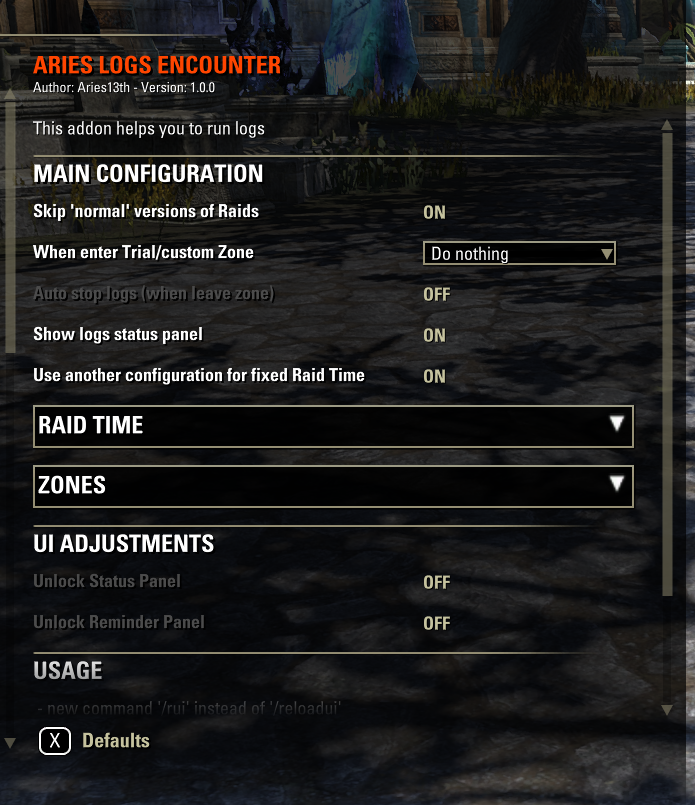
This addon helps you to run logs:
It has different options how to work with logs when you enter specific zone.
Do nothing (just disable addon for some reason)
Show reminder (addon shows big message with reminder to start logs. You can hide it if dont want to start logs)
Show dialog window that asks you if logs should be started
Auto-start logs
Additionally you can turn on Logs Status panel. It shows you if logs started or not (green or red light on image).
If you need – logs can be auto-stopped when you leave specific zones.
Zones:
By default addon works with trial zones (Night Market trial doesn’t count).
You can add all dungeon zones by clicking button in addon settings.
And you can add any other zone you need just by clicking “Add current zone” in addon settings.
For example: you can add pvp zones or your specific home where you parsing dummies.
Raid Time:
Addon allows you to define time of your regular raids.
And you can define unique addon settings for this raids.
For example: You can disable addon in non-regular raids and enable auto-starting of logs in your raid time.
Quality of life:
New addon keybindings:
To start/stop logs
To reload UI
New short commands:
‘/lg’ – to start/stop logs
‘/rui’ – to reload UI
‘/ale_skip’ – ignore current trial zone for next 2 hours and don’t show any reminders/dialogs.







