Stand Alone in Season Two’s Solo Dungeons
Preview the solo versions of Moon Hunter Keep and March of Sacrifices, coming soon with Season Two!


Preview the solo versions of Moon Hunter Keep and March of Sacrifices, coming soon with Season Two!
This is the first incremental patch for Update 51 in The Elder Scrolls Online.
A fan-favorite Chapter and dungeon DLC becomes free for all ESO players as part of the preparation for Season Two.
Haunt and harrow Tamriel’s monsters during the Witches Festival and you’ll earn spooky new and returning rewards!
Return to Skyrim, take on solo dungeons, and unlock new rewards during The Elder Scrolls Online’s Season Two.
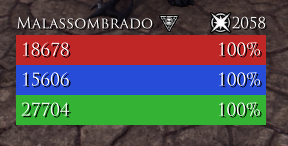
A simple player frame addon to show your health, magicka and stamina bars based on Bandits and Lui, but only the resource bar.Any ideas are welcome.Feel free to ask me anything ingame @nakamura182 PCNA
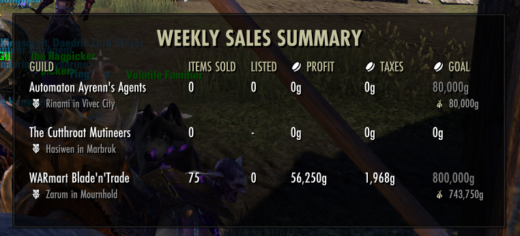
Muffin’s Market ManagerA group of tools for buying and selling at guild traders.* CalculatorRemembers your price per item and multiplies it by your stack size when you list an item for saleGuild Sales WindowA movable weekly sales summary for guilds with a trader. Automatically resizes to fit the guilds you choose to track.Shows guilds with traders and their locationTracks items sold, profit and taxes* Shows active listings so you know when you have room to list more* Calculates progress toward each guild’s sales goal and marks it when reached* Trader TooltipShows Tamriel Trade Centre and Master Merchant prices on item tooltips.* TTC Menu on guild store browser opens Search Online or Price History in your browser.* Material cost and market value when crafting or upgrading items* Good deal indicators* Vendor indicator with NPC location, price and a comparison to the listing pricegreen = good deal, red = cheaper at the NPC* Craft cost on tooltips* Purchased item indicators for items waiting in your mail or already in your backpack* * Share prices to chat* Optional feature or settingRequire * Tamriel Trade Centre or * Master MerchantAll features are built exclusively for Gamepad UI.Library dependenciesLibAddonMenu-2.0LibHistoire* LibMuffinsMarketManagerData is included in the download. Don’t disable it, it stores your listing prices.OptionalTamriel Trade CentreMaster Merchant
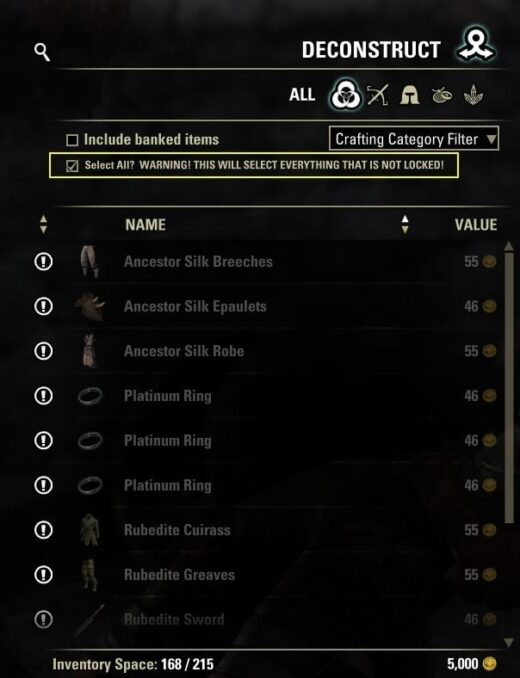
Supports ESO’s keyboard/mouse and controller interfaces at equipment deconstruction stations and universal deconstruction assistants.Keyboard:The existing warning checkbox remains above the item list. Tick it to select eligible unlocked backpack items; untick to clear the selection.Controller:Open the deconstruction screen, use the on-screen **Options** controller prompt, and highlight **Select All?**. The full warning appears in ESO’s tooltip panel. Toggle the checkbox using the controller, then close Options to apply it. Untick it in Options and close the menu to clear the selection.Misc Info:This uses ESO’s native controller checkbox and menu layout, so screen resolution and UI scaling are handled by the game rather than fixed screen coordinates. The controller option is only added to the active equipment or universal deconstruction panel, never other crafting menus. ESO’s current preferred interface determines which control is available. Changing interface mode resets the controller checkbox.The default is unticked, with no saved preference. Manual selection changes, item-category changes, station changes, and crafting reset it. Selection is limited to eligible backpack items accepted by the station; banked, equipped, and player-locked items are excluded. FCO ItemSaver deconstruction protection is respected when available. Other add-on filters/protections are not integrated. Universal crafting-category restrictions are respected. Unlocked valuable, researchable, set, and Armory items can be selected.ESO’s selection limits apply. Partial selection is reported in chat and leaves the checkbox unticked. Process the batch and tick again for the remaining items. The add-on only selects items; the player still initiates and confirms deconstruction.
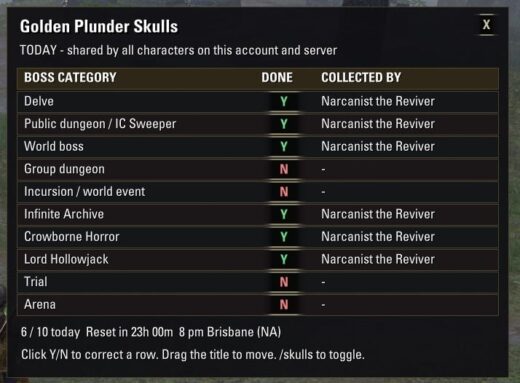
GOLDEN SKULL TRACKER v1.1.0INSTALL1. Exit ESO completely. If upgrading, overwrite the existing addon folder. Keep your SavedVariables file; existing checks and window position survive.2. Extract the GoldenSkullTracker folder from the ZIP into your AddOns folder: E:OneDriveDocumentsElder Scrolls OnlineliveAddOns3. Check that this exact file exists (no extra nested folder): …AddOnsGoldenSkullTrackerGoldenSkullTracker.txt4. Launch ESO and enable Golden Skull Tracker in the Add-Ons menu. If listed as out of date, enable Allow out of date add-ons, where offered. No dependencies are required.USEThe checklist appears on first install. Type /skulls (or /goldenskulls)in chat to show/hide it. X closes the window without stopping tracking.Drag the title area to move it. Its position and visibility are remembered.Y = a golden skull has been recorded today on this account/server.N = no golden skull has been recorded today on this account/server.Each row also shows the character that first collected the skull.All characters share the checklist; NA and EU have separate records.Automatically checks three reward paths: the boss loot window, the lootnotification, and newly added golden Dremora Plunder Skulls in your backpack.It accepts both plain item names and item links, with broader category-namematching (including Public Dungeon / Public & Sweeper variants). The two festival quest turn-ins are also detected bytheir English quest names, so their reward is recorded even if ESO does notsend a loot event. You do not need to open a skull container for it to count.Open the boss loot or loot its skull: a generic combat kill alone is notused as proof of a golden reward, since intermediate dungeon/arena bossesand repeat kills can otherwise falsely mark a daily category complete.The boss loot-window check can mark Y as soon as the golden reward is visible,even before taking it. Be sure to take your reward. If a boss dies withoutproviding a category-specific golden reward, this checklist does not mark Y.Regular purple skulls and other players’ loot do not count.Click a Y/N cell to correct it or add a completion from earlier today.An asterisk beside the character name means the entry was manually recorded.Click a Y again to clear that row. The click itself records the currentcharacter; you cannot retroactively infer which earlier character earned it.DAILY RESETThis is a DAILY reward checklist, not a one-time festival achievement list.It resets all rows automatically at the server’s daily reset, includingwhen you next log in after missing several days. The reset uses a fixed regional clock, independent of the login-rewardcountdown: NA 10:00 UTC = 8:00 pm Brisbane every day; EU 03:00 UTC.The display checks the day once per second even while hidden. After a logout,it checks again on the next login. The reset countdown is in the window.IMPORTANT LIMITSEnglish game client required for automatic name/quest detection in v1.0.N means not recorded, not proof you have never killed that boss.The addon cannot reconstruct rewards earned before installation, or whiledisabled, and intentionally does NOT scan old unopened skulls in your bags:they might have been earned on another day. Correct those rows manually.Automatic tracking confirms receipt/quest turn-in, not the boss kill alone.The checklist can be opened outside the festival; it only updates automaticallywhen matching rewards/quests are received. Manual corrections remain available.ESO normally saves addon data on logout or /reloadui. A forced process killcan lose changes since the last save.DIAGNOSTICS/skulls debug prints the version, last skull observed this session andthe detection source for completed rows. If a new gold skull is missed,copy that output along with the exact skull name.
A tiny addon that adds a keybind to switch Gamepad Mode between Automatic and On, without opening the settings menu.