

Character Homes (1)
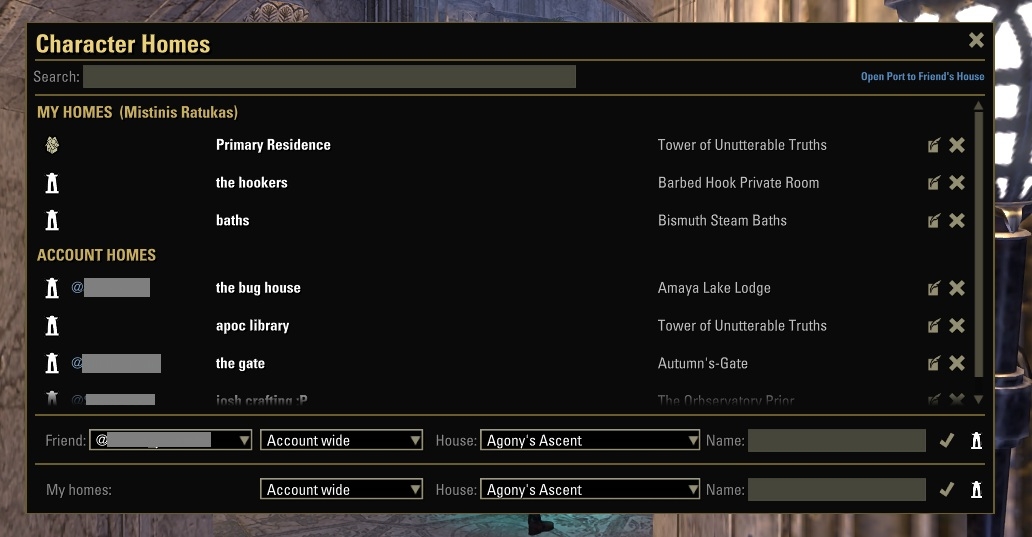
Manage and teleport to your homes across all characters and account-wide, with a built-in friend housing bar. No addon dependencies.
CharacterHomes lets you organize every home you care about in a single searchable dialog per character, account-wide, or a friend’s house you visit regularly. This was inspired by both Port To Friend’s House and Essential Housing Tools.
You can use the addon in two ways:
Open the Character Homes dialog with /homes to browse, add, edit, and teleport to any saved home
Use slash commands directly from the chat line
Features:
Save one primary home per character for instant /gohome teleport
Save unlimited named homes per character
Save homes account-wide, accessible from any character
Save a friend’s house to your list for one-click access at any time
Search entries by display label, official ESO house name, geographic zone, or owner @account
Friend housing bar select a friend and their house to teleport immediately or save to your list
Flyover tooltips on every button
Optional Port to Friend’s House quick-open link if that addon is installed
No library dependencies native ESO APIs and textures only
Slash commands supported:
/homes opens the Character Homes dialog
/setglobalhome
/setmyhome set current house as your character’s primary home
/setmyhome
/resethome clear your character’s primary home
/gohome teleport to your character’s primary home
/gohome search homes by label and teleport
/delhome remove an account-wide home (partial match supported)
/delmyhome remove a character home; use primary to remove primary
Note: /sethome and /home conflict with Essential Housing Tools. CharacterHomes uses /setglobalhome and /gohome to avoid collisions.
Compatibility:
Essential Housing Tools fully compatible (command conflicts resolved)
Port to Friend’s House optional integration







