

Ocular (1.0.1)
Change Log:
——————–
v1.0.1
– Added a local reference to the global table for faster access.
– SavedVariables are now saved per server (NA / EU / PTS) instead of overwriting each other.
v1.0.0
– First release.
Description:
——————–
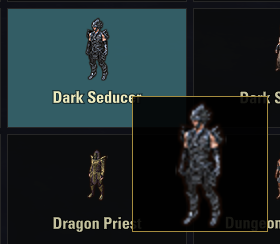
Ocular shows a big floating preview of whatever icon your mouse is hovering, so you don’t have to squint at the tiny cells in the Outfit Station, Collections, inventory and set browsers.
AI disclosure: Ocular’s coding was done largely with AI assistance. The concept, design and direction are the author’s, and every feature was tested and validated in-game. If you run into any issue, please let me know and I’ll fix it.
What it does
Turn it on inside a menu, hover a cell, and Ocular shows a large preview of that item/collectible/style icon next to your cursor. Perfect for outfit styles, costumes, gear and collectible sets where the cells are small and hard to read.
How to use
Bind two keys in Controls > Keybindings > Ocular:
Toggle magnifier (on/off)
Cycle magnifier size – switches between 96 / 128 / 192 px
Or use chat commands:
/ocular – toggle on/off
/ocular s | m | l – set size (96 / 128 / 192)
Your chosen size is saved between sessions.
Light and menu-only
Ocular only works inside menus. During normal gameplay it does nothing and nothing runs in the background – it switches itself off the instant you return to the game, and it only does any work when the cell under your cursor actually changes. So it stays very light.
Dependencies
None. Ocular is fully standalone.







