

Onix – Worldmap – Easy Navigation ( Zoom & Radar) (1.0)
0nix Worldmap – Easy Navigation & Player Radar
By Natosz
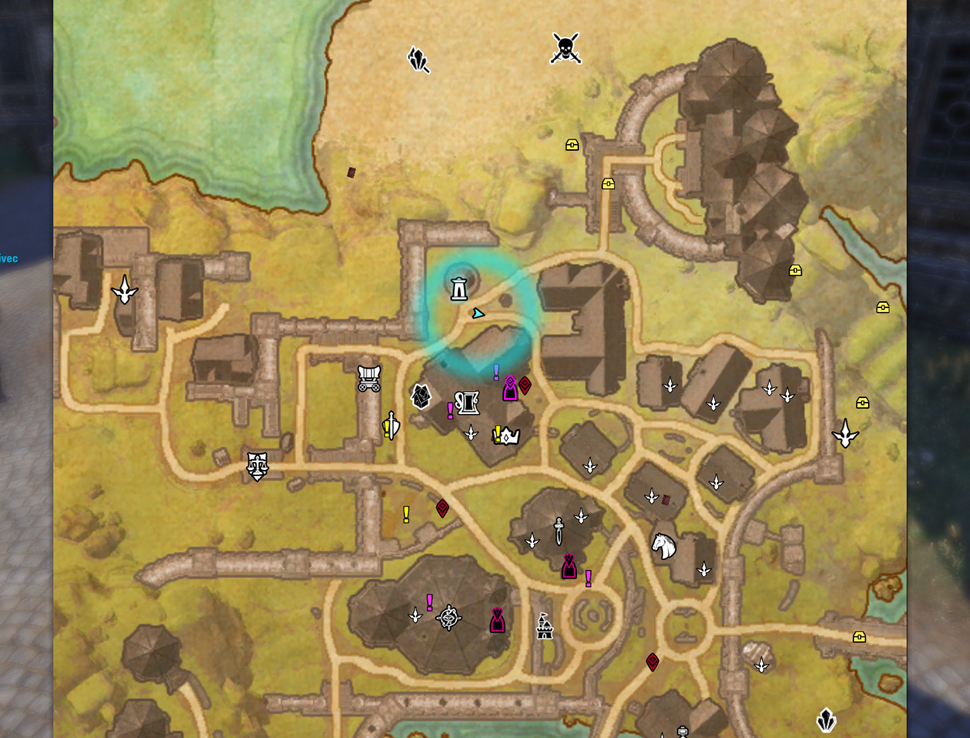
Enhances map navigation with extended zoom levels, automatic zone ascension/descension on mouse wheel scroll, and a customizable pulsing player position indicator.
https://i.imgur.com/RzuJacfl.gif
Overview
0nix Worldmap delivers full control over the Elder Scrolls Online world map. It completely replaces default zoom snapping with customizable initial zoom levels, adds intelligent subzone and parent map mouse navigation, and features an optimized player locator radar. Built from the ground up to ensure maximum client performance with zero background overhead.
—
Key Features
Instant Open Zoom Control: Overrides the default game memory zoom behavior. Set a fixed initial zoom percentage specifically for when you open the map via keybind (M), eliminating visual snapping and unwanted close-ups.
Extended Zoom Limits: Unlock up to 8x maximum zoom for detailed zone exploration.
Seamless Mouse-Wheel Navigation:
Ascend (Zoom Out): Automatically returns to parent map levels when zooming past your set threshold.
Descend (Zoom In): Automatically enters cities, subzones, or points of interest under your cursor.
Animated Player Radar Highlight:
Smooth breathing pulse animation centered on your exact coordinates.
Fully customizable Base Size, Opacity, Duration, Pulse Speed, and RGB Color tint.
Optional auto-trigger on mouse wheel zoom.
Camera auto-centering on your character upon map open.
Ultra-Lightweight & Clean Memory Architecture: Shuts down completely when the map is hidden, guaranteeing zero CPU cycles and no garbage collection lag spikes in combat.
—
Feedback & Suggestions
Your feedback drives future updates! If you run into any issues, have an idea for a new feature, or want to suggest navigation improvements, please feel free to leave a comment in the comment section below. All suggestions are welcome and greatly appreciated.
—
Chat Commands & Settings
/onix : Manually triggers the radar highlight on your map.
Access the complete configuration menu under Settings -> Addons -> 0nix Worldmap.
—
Requirements / Dependencies
LibAddonMenu-2.0







