

UniversalAssistant (1.0.0)
Required dependency: LibAddonMenu-2.0 (AddOnVersion 43 or newer).
Optional dependency: LibUndauntedPledges (required only for the Undaunted pledge feature).
AI disclosure: AI-assisted tools were used during development of Universal Assistant. The author has tested the addon in their own game setup.
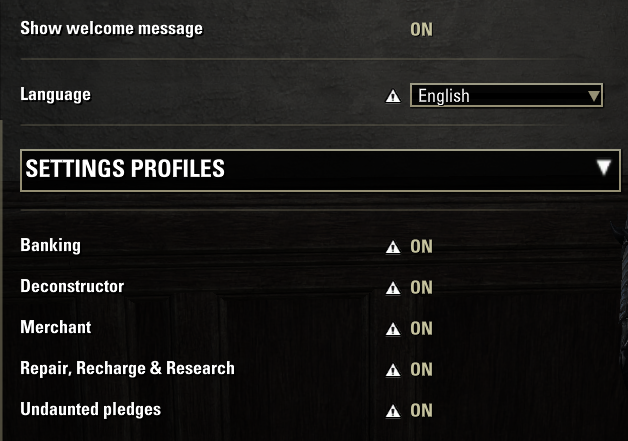
Universal Assistant is a collection of configurable tools for inventory management, crafting stations, and equipment maintenance. Each main module can be enabled separately. Banking, merchant, and crafting-station actions run only after the player opens the corresponding interface.
BANKING
Automatically deposit or withdraw gold, Alliance Points, Tel Var Stones, and Writ Vouchers while maintaining configurable amounts on the character.
Set individual deposit or withdrawal rules for crafting materials, including raw materials, refined materials, improvement materials, alchemy ingredients, runes, provisioning ingredients, scribing materials, style materials, trait materials, and furnishing materials.
Apply one action to all crafting-material categories, then adjust individual rules as needed.
Set separate rules for known and unknown motifs, recipes, furnishing plans, and style pages.
Configure master writs, unidentified survey reports, Intricate equipment, Undaunted Plunder, and filled Soul Gems.
Detect distinct potions, foods, and drinks in the character inventory and personal bank. Set separate minimum and maximum inventory amounts for each item variant; hover over a selection to see its full tooltip.
Maintain configurable inventory amounts for supported PvP consumables and siege weapons.
Optionally keep a chosen number of full 200-item resource stacks in the personal bank, or route full stacks to a selected guild bank or housing storage chest.
Optionally stack items in the personal bank and backpack.
Choose between no banking report, a detailed item-by-item report, or a total count in chat.
With the appropriate permissions, the addon can withdraw unlearned motifs, recipes, furnishing plans, and style pages from a guild bank. It does not automatically deposit these items into a guild bank.
MERCHANT
Automatically sell items according to configurable rules for weapons, armor, jewelry, glyphs, consumables, resources, materials, fishing items, and other supported items.
Configure filters such as item quality, traits, crafted items, and research considerations where available.
Optionally sell empty Soul Gems and Undaunted Plunder.
Junk management has two independent options: sell items marked as Junk, and remember specific item variants marked as Junk so future pickups are marked automatically.
Review remembered Junk rules in the settings and remove unwanted rules.
Automatically buy supported Soul Gems, Equipment Repair Kits, tri-restoration potions, and selected PvP supplies up to configured inventory targets when the currently opened merchant sells them.
Configure purchase currency priority where supported.
Configure sale and purchase chat messages separately, with a shared choice of summary or detailed reporting.
DECONSTRUCTION
Configure mass deconstruction of eligible weapons, armor, jewelry, and glyphs at the appropriate crafting station.
Use filters for quality, traits, crafted or reconstructed items, temporarily tradable items, and researchable traits where applicable.
Start mass deconstruction with the addons keybinding. Items are checked again before they are processed.
Optional chat messages report deconstruction results.
REPAIR, RECHARGE & RESEARCH
Automatically repair equipped items when their condition reaches a chosen threshold.
Automatically recharge equipped weapons when their enchantment charge reaches a chosen threshold.
Configure the use of standard or Crown repair kits and Soul Gems, combat behavior where the game permits it, low-resource warnings, and chat messages.
Configure automatic trait research for Blacksmithing, Clothing, Woodworking, and Jewelry Crafting at the appropriate crafting station. Choose research priorities and eligible items.
UNDAUNTED PLEDGES
Adds an optional checkbox above the queue status in the keyboard Dungeon Finder.
Uses accepted Undaunted pledge quests to select their available veteran dungeons.
The checkbox is unavailable when no matching dungeon can be selected.
The addon does not join the queue for you; press Join Queue yourself.
This feature requires LibUndauntedPledges.
SETTINGS
Use account-wide settings or separate settings profiles for each character.
New character profiles start with automation disabled.
Copy settings between character profiles with confirmation, or delete profiles belonging to other characters.
English and Ukrainian interface languages are included.
INSTALLATION
Extract the UniversalAssistant folder into:
Documents/Elder Scrolls Online/live/AddOns/
Install and enable LibAddonMenu-2.0. Install LibUndauntedPledges as well if you want the Undaunted pledge feature. Enable the desired modules in the Universal Assistant settings and review their rules before use.
Universal Assistant is free software. Its license is included in LICENSE.txt. This is an unofficial addon and is not affiliated with or endorsed by ZeniMax Online Studios.
Credits:
LibAddonMenu-2.0 Seerah, sirinsidiator, and contributors.
LibUndauntedPledges code65536.







