

CastHelper (1.1.0)
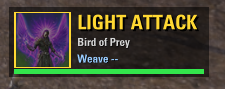
CastHelper – Rotation & Weave Helper
A small HUD window that tells you which skill to press next and when to light-attack weave. It also tracks your weave
percentage.
ESO does not let addons use abilities, so CastHelper never presses anything for you. It shows you what to press and when. You
still play the game.
Features
Next skill suggestion, in this order of priority:
Ultimate as soon as it is full (set Ignore on an ultimate you want to keep for emergencies)
DoTs and buffs that are about to expire, on both bars. A SWAP marker appears when the skill is on your back bar
Your spammable (filler) when nothing needs refreshing
Weave prompt: shows LIGHT ATTACK, WAIT, CAST or SWAP + CAST, with a color-coded icon frame
Global cooldown bar under the window
Weave tracker: live weave % during the fight, plus a summary in chat when combat ends (skills cast, weaved %, casts per second)
Per-skill settings that follow the skill to any slot or bar:
Auto: recast when its timer runs out
Spammable: use as the filler
Ignore: never suggest it
Duration override, for skills where the game reports a wrong duration
Companion skills (optional): a row of your companion’s skill icons, with the time left on each skill’s effect
Scribed (Grimoire) skills supported
Movable and lockable window. It is shown only on the HUD and can be set to appear only in combat
Languages: English and Russian. The addon follows your game client language automatically
Installation
Install LibAddonMenu-2.0.
Extract the CastHelper folder from the archive into
DocumentsElder Scrolls OnlineliveAddOns
The result should be AddOnsCastHelperCastHelper.txt
Enable CastHelper in the AddOns menu at character select.
Or just install it with Minion.
Usage
Type /ch or go to Settings > Addons > CastHelper.
Unlock the window, drag it where you want it, then lock it again.
Open the Front bar and Back bar sections and mark your spammable. Set Ignore on anything you don’t want suggested, such as defensive
skills, gap closers or a safety ultimate.
Companion options are in the Companion section.
Notes
Skill timers come from the durations the game reports. If a skill is refreshed too early or too late, use the duration override for that
skill or adjust the global “Refresh window”.
The game API does not expose per-skill cooldowns for companion skills, so the companion row shows how long each skill’s effect lasts
instead.
Timers reset when combat ends.
Requirements
LibAddonMenu-2.0 (r32 or newer)







