

ArabChat – Arabic Chat (1.2.2)
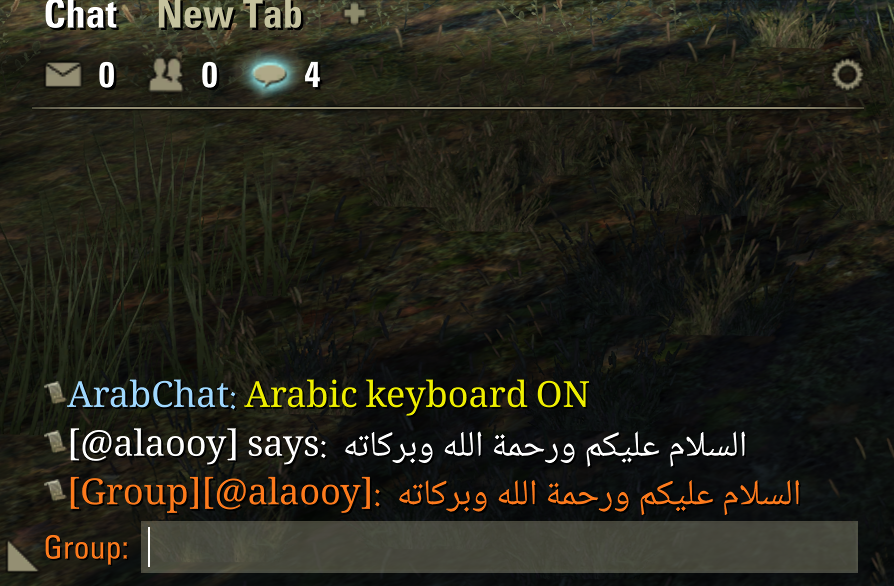
ArabChat lets you type and read Arabic in the ESO chat, even if your game is in English. It works on its own.
Features
Type Arabic with the standard Arabic 101 keyboard layout (Latin keys are converted).
Arabic messages show with joined letters and correct right-to-left order.
A small preview box shows how your message will look before you send it.
Built-in Arabic font (Noto Naskh Arabic), with font size setting.
Settings in Settings > Add-Ons > ArabChat.
How to use
Type /arabic on (or set a key: Controls > Keybindings > ArabChat).
Make sure Caps Lock is off, then type in the chat.
Type /arabic off to go back to English typing.
Notes
Optional: LibAddonMenu-2.0 (for the settings menu).
Works with or without the EsoAR translation addon.
The box while typing shows letters in typing order; after you press Enter the message shows correctly in chat.
Support: Discord https://discord.gg/mwSHxSzzU5
عرب شات: إضافة تسمح بالكتابة والقراءة بالعربية في شات اللعبة.
Font: Noto Naskh Arabic, Copyright 2022 The Noto Project Authors, SIL Open Font License 1.1 (OFL.txt included). This addon is not created by, affiliated with or sponsored by ZeniMax Media Inc.







