

ValuesBars (1.0.0)
Change Log:
——————–
1.0.0
– Initial release.
Description:
——————–
ValuesBars shows the numbers the default UI hides: the current value, the maximum and the percentage on your bars, plus the charge percentage of your Ultimate.
Features
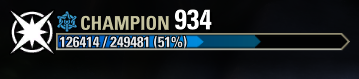
Value and percentage on health, magicka, stamina, target, boss and experience bars, for example 10,000 / 20,000 (50%).
Ultimate charge percentage on the Ultimate ability button (it can go above 100%).
Put the text inside, above or below the health, magicka and stamina bars, and adjust the spacing.
Choose the horizontal alignment on the magicka, stamina and experience bars.
Adjustable font size and four contrast styles for better readability.
Number format with or without a thousands divider (12,345 or 12345).
Live preview while you change settings.
English and Spanish, following your game client language.
Settings
Open Settings > Add-Ons > ValuesBars. The settings menu requires LibAddonMenu-2.0, which is optional: without it, ValuesBars works with its default settings.
Installation
Extract the ValuesBars folder into your DocumentsElder Scrolls OnlineliveAddOns folder.
Credits
ValuesBars was inspired by Azurah, which I used for a long time as my interface addon. It has not received updates since Update 44, and after the changes in Update 51 it started throwing errors. That is why I made ValuesBars: a small, focused addon that covers just this one feature, the values on the bars.
Thanks to @Barfot for his help with the English translations.







