

Dungeon Set Tracker (1.0.0)
Dungeon Set Tracker
AI disclosure: All code and the translations of this addon were written by an AI assistant (Claude by Anthropic). I am not a Lua developer: the idea, the feature requests and the in-game testing are mine, but I cannot review or verify the code myself. Please report bugs or performance problems in the comments.
Optional: LibAddonMenu-2.0 (r43 or newer) for the settings; without it the addon runs with its default settings.
Optional: LibSets: for two-part dungeons (I / II), shows only the monster set of the part you hover.
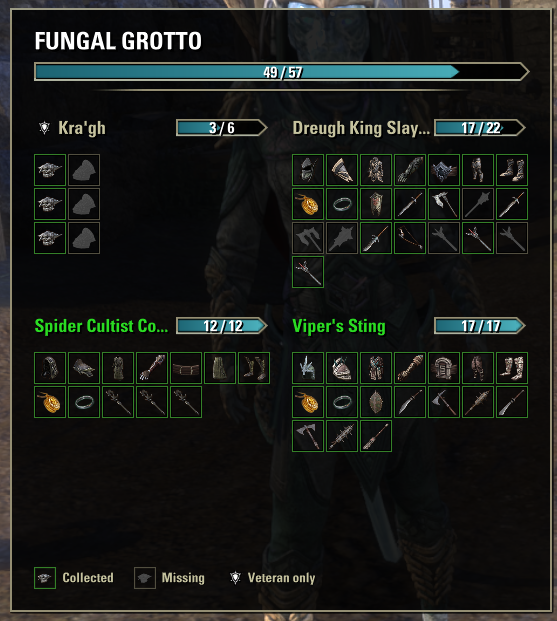
When you hover a dungeon in the Group & Activity Finder (“Specific Dungeons”), a chart shows every piece of every set of that dungeon, monster set included: in color with a green frame if you already have it in your Sets collection, as a dark silhouette if you don’t, just like the game’s own Sets collection.
The addon only reads the game’s set collection data and displays it. It does not loot, deconstruct, equip, trade or do anything else for you, and it does not change the game’s own dungeon preview.
Features
Set chart: the dungeon’s name and total progress, then per set its name, a progress bar and one icon per piece: one row each for light, medium and heavy armor, then jewelry, shield and weapons. The window always has the same size; names and icons never jump around.
On the normal version of a dungeon, monster sets are marked with the veteran icon: their pieces drop on veteran only.
Settings: position (left or right screen edge, or next to the dungeon preview), distance, vertical position, size, background opacity, “hide fully collected sets”, legend. Changing them shows a short preview.
Dungeon panel (off by default): inside a dungeon, a small movable HUD panel with that dungeon’s sets and progress bars.
Chat (off by default): a summary of the missing sets when you enter a dungeon, and a message with the item link for new pieces there.
Installation
Extract the DungeonSetTracker folder from the archive into DocumentsElder Scrolls OnlineliveAddOns
The result should be AddOnsDungeonSetTrackerDungeonSetTracker.txt
Recommended: install LibAddonMenu-2.0 and LibSets the same way.
Enable Dungeon Set Tracker in the AddOns menu at character select.
Or just install it with Minion.
Usage
Group & Activity Finder > Specific Dungeons: hover a dungeon
/dst or Settings > Addons > Dungeon Set Tracker: options
/dst panel: dungeon panel on or off
/dst total: your progress over all dungeons
Notes
Only the keyboard and mouse interface is supported (not the gamepad interface or consoles).
Dungeons are found through the game’s Sets collection and Dungeon Finder, so new dungeons work after a game update. If the chart does not appear for a dungeon, please tell me which one in the comments.
Settings are account-wide and saved per server (NA, EU, PTS).
The translations other than English were made with AI; corrections from native speakers are very welcome.
Credits
LibAddonMenu-2.0 by sirinsidiator, Seerah and contributors: settings menu.
LibSets by Baertram: where monster sets drop.
Baertram, for the addon release rules and best practices.







