

Simple Ultimate Tracker (1.0.0)
Note: This addon was made with the help of AI. All code was reviewed and tested in game by me.
Simple Ultimate Tracker
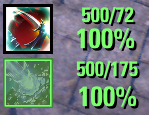
Shows your current and required ultimate right on your ultimate slot, plus the ultimate from your other bar, so you always know what you can cast after a bar swap.
Required: LibAddonMenu-2.0 (version 43 or newer)
Features
Ultimate values on the ultimate icon: current/required at the top, percentage and/or missing amount at the bottom
Opposite bar icon: your other bar’s ultimate with its own values. Position (above, below, left, right), size and border can be changed, it can highlight when castable, and shows the ability tooltip on hover
Colors: ready, not ready and an almost ready color (default at 90% of that ultimate’s cost)
Ultimate timer: shows how long your ultimate lasts, keeps counting after a bar swap, with an optional countdown glow on the icon
Ultimate gain (optional): gain per second (+2.4/s) or time until ready (8s, counting down, with its own almost ready and ready colors). Both are estimates based on your last 10 seconds
Show only in combat option for the texts
Ready alert: sound and/or flash when your ultimate becomes ready
Everything is movable: unlock and drag the texts, timers and even the ultimate skill itself, or use the X/Y sliders
The action bar is shown while the settings are open, so you see every change live
Account-wide or per-character settings
Works on its own, and alongside Fancy Action Bar+Commands
/sut – open the settings
/sut on / /sut off – turn the tracker on or off
/sut unlock / /sut lock – move the texts and the ultimate skill
/sut help – list the commandsGood to know
The game only reports the exact cost for the bar you are on. The addon remembers each ultimate’s cost once it has been on your active bar, so swap to each bar once after installing for exact values on the opposite icon
Another addon’s ultimate number can be hidden in Misc > Hide other ultimate number valuesCredits
The ultimate effect IDs used for the timer come from Fancy Action Bar+ by Anthonysc, DakJaniels and nogetrandom (based on the original Fancy Action Bar by andy.s), used with their permission. Thank you!
Feedback and bug reports are welcome in the comments.







