

ReconGearIcon (1.0)
AI disclosure: The code of this addon was written by an AI assistant (Claude). The author has tested the addon in-game.
Depency: LibAddonMenu-2.0Tested on: PC
ReconGearIcon
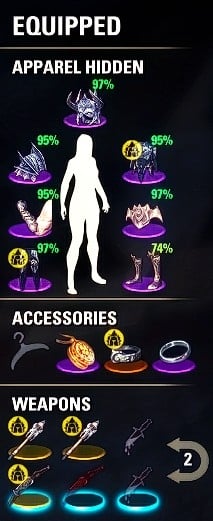
Shows the game’s Reconstructed icon on reconstructed items in the character window’s equipment panel – so you can see at a glance which of your equipped items are reconstructed.
The inventory already shows this information in its trait column, but the equipment panel does not. Optionally the icon can also be shown on the item icons in your inventory, bank and house storage, replacing the game’s own icon there so everything looks the same.
Features
Marks reconstructed items in all equipment slots: armor, jewelry and both weapon bars.
Optional: the same icon on the item icons in the inventory, bank and house storage. The game’s own Reconstructed icon is hidden on those rows, so it is not shown twice.
Lightweight: no timers or polling, icons are only created when needed.
Settings
Open Settings > Addons > ReconGearIcon, or type /recongearicon in chat. Settings are saved account-wide.
This addon has not been tested with gamepad or console. Please let me know if it works.
PS. Sorry Baertram, here’s another AI slop for you to check out. I have no idea how this was created but it seems to work 😀 I hope Dolby has given you a medal for all your hard work.
This Add-on is not created by, affiliated with or sponsored by ZeniMax Media Inc. or its affiliates. The Elder Scrolls and related logos are registered trademarks or trademarks of ZeniMax Media Inc. in the United States and/or other countries. All rights reserved.







