
Arclight Taunt Modern Tank HUD (1.0.0)
AI DISCLOSURE: Arclight Taunt was developed with AI-assisted Lua programming under the direction of tareN. Its core features and interface have been extensively tested in live ESO gameplay, including DLC dungeons, alongside automated regression tests. The add-on is actively maintained; some Scribing configurations remain unverified.
https://i.ibb.co/zTsWYrbr/Arclight-Taunt-Mystisches-HUD-Banner.png
Modern Multi-Target Taunt Tracking for ESO Tanks
Arclight Taunt brings multiple active taunt timers together in one compact, purpose-built HUD. No hunting through buff icons. No guessing which tracked enemy needs your attention next. Just clear names, readable countdowns, and smart visual warnings that help you stay one step ahead.
BUILT FOR THE MOMENTS THAT MATTER
01 | EVERY SECOND COUNTS
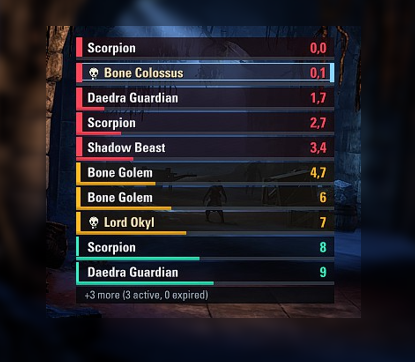
Track multiple enemies at once, even when several share the same name. Remaining taunt time is immediately readable through a signature three-stage color system:
TURQUOISE plenty of time left.
YELLOW your taunt is approaching expiration (7 seconds by default).
RED time to react (4 seconds by default).
The list can prioritize the soonest-expiring taunts, and the timer switches to tenths of a second as expiration approaches. Expired entries briefly display 0,0 before disappearing, so you can still spot what just ran out.
02 | BOSS WARNINGS YOU ACTUALLY NOTICE
Recognized bosses receive an icon and distinctive gold name highlighting. More importantly, Arclight can warn you before a boss taunt expires:
EARLY WARNING a dedicated turquoise banner appears 2.5 seconds before expiration by default. Enabled out of the box.
EXPIRATION ALERT a separate red banner when a tracked boss taunt expires.
OPTIONAL SOUNDS native ESO alert sounds if you want an audio cue; off by default.
These alerts are designed to remain easy to notice without taking over your entire interface.
03 | A HUD THAT FITS YOUR PLAYSTYLE
Arclight’s own clean, modern visual style is only the beginning. Make the tracker yours:
Compact Signal progress bars, or an optional full-row countdown fill.
Bright current-target highlighting to find your focus at a glance.
One or two columns, adjustable size, width, opacity and position.
Custom fonts, textures and background options through LibMediaProvider.
Configurable timer thresholds, sorting, boss indicators and warning behavior.
Convenient preview and drag mode configure everything under ESC > Settings > Add-ons > Arclight Taunt.
04 | FOCUSED ON TANKING, NOT UI CLUTTER
Designed and repeatedly tested in actual ESO dungeon combat, Arclight focuses on one job: making active taunt durations easy to understand under pressure. Optional experimental diagnostics for taunt immunity and stacks stay disabled by default. English is the primary interface language, with a complete German translation and English fallback for other languages.
QUICK START
Required libraries (install separately):
LibAddonMenu-2.0 r43 or newer
LibMediaProvider
Install the libraries, extract the ArclightTaunt folder to Documents/Elder Scrolls Online/live/AddOns/, then open the add-on settings in ESO. When upgrading, replace only the add-on folder; keep your SavedVariables.
Recommended defaults: 125% HUD size, one column, ten visible entries, time-based sorting, narrow Signal bars, 7s/4s color thresholds and a 2.5s boss early warning. All customizable.
GOOD TO KNOW
Arclight displays the duration of recognized taunt effects, not a direct measurement of enemy aggro. It currently tracks effect IDs 38254 and 38541; other abilities, especially some Scribing configurations, have not all been independently verified. Boss identification based on enemy difficulty is intentionally broader in some modes and can occasionally mark strong non-boss enemies. Immunity and stack indicators are experimental and optional.
FEEDBACK & SUPPORT
Found a missing taunt, unusual boss or visual issue? Leave a comment with your ESO language, the skill/morph involved, what happened and (if available) a screenshot or Lua error. Your feedback helps make Arclight better. Created and maintained by tareN.
Credits: Created and maintained by tareN. LibAddonMenu-2.0 and LibMediaProvider are external libraries installed separately. Promotional banner artwork was AI-generated. Not affiliated with ZeniMax Online Studios.