
InventoryPulse (1.0.0)
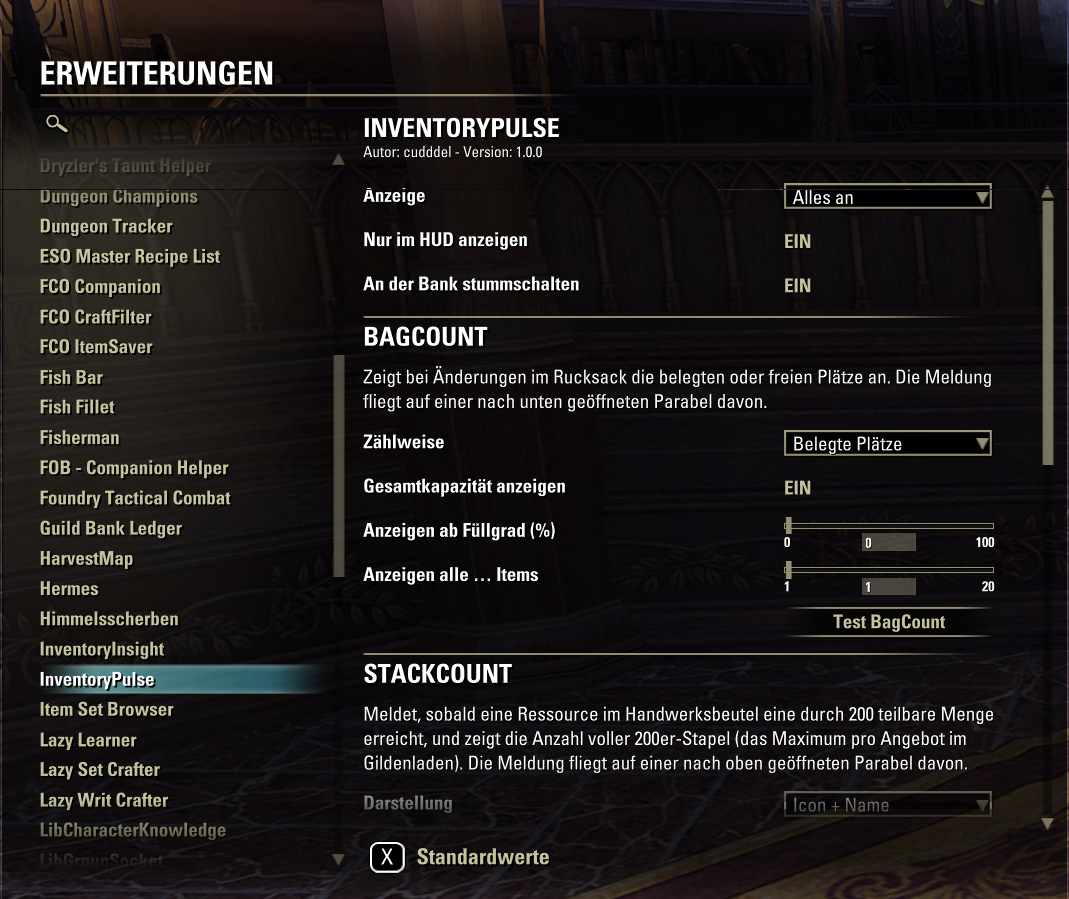
InventoryPulse
Deutsche Beschreibung weiter unten.
InventoryPulse shows short messages in the middle of your screen that fade in and then fly away in an arc. It has two parts:
BagCount
Whenever the number of items in your backpack changes, you see how many slots are used (or free), e.g. 161/215.
The color changes when only 15 or 5 slots are left, and you get “Inventory full!” when nothing is left.
Show it only from a certain fill level (e.g. 80 %).
Show it only every few items (e.g. at 150, 160, 170 …).
StackCount (requires ESO Plus)
Whenever a material in your craft bag reaches 200, 400, 600 … you see its icon and name and how many full 200 stacks you have, e.g. Rubedite Ingot: 7200. Handy if you sell full stacks in a guild store.
Customizable
Turn BagCount and StackCount on or off separately
Font, size, outline/shadow, opacity and colors
How long the message stays in the middle, and how wide, high, fast and far it flies
Let the message shrink while flying away looks like it flies into the distance
BagCount: let the font grow with the fill level, so you can see how full your bag is at a glance
StackCount: play a sound (ping, bell, fanfare …) when a new 200 stack is complete
Show only in the normal game view (not in menus) on by default
Stay quiet while a bank or guild bank is open on by default
Settings
Settings > Add-ons > InventoryPulse (needs LibAddonMenu-2.0), or type /ipulse help in chat to see all commands and their current values. Everything can also be set via chat, so LibAddonMenu is optional.
Optional libraries
LibAddonMenu-2.0 settings menu
LibMediaProvider more fonts
Languages
English, German. Translations are welcome just send a copy of lang/en.lua with your translations.
Development notes
This addon was developed with the assistance of AI tools. All generated content was reviewed and adapted before publication.
License
MIT
______________________________________________________________________
InventoryPulse (Deutsch)
InventoryPulse zeigt kurze Meldungen in der Bildschirmmitte, die langsam erscheinen und dann im Bogen davonfliegen. Es besteht aus zwei Teilen:
BagCount
Sobald sich die Anzahl der Gegenstnde im Rucksack ndert, siehst du, wie viele Pltze belegt (oder frei) sind, z. B. 161/215.
Die Farbe ndert sich, wenn nur noch 15 oder 5 Pltze frei sind, und bei vollem Rucksack erscheint Inventar voll!.
Meldung erst ab einem bestimmten Fllgrad (z. B. 80 %).
Meldung nur alle paar Gegenstnde (z. B. bei 150, 160, 170 ).
StackCount (bentigt ESO Plus)
Sobald eine Ressource im Handwerksbeutel 200, 400, 600 erreicht, siehst du Icon und Name und wie viele volle 200er-Stapel du hast, z. B. Rubedit-Barren: 7200. Praktisch, wenn du im Gildenladen volle Stapel verkaufst.
Einstellbar
BagCount und StackCount getrennt ein- und ausschalten
Schriftart, Gre, Umriss/Schatten, Deckkraft und Farben
Wie lange die Meldung in der Mitte steht und wie weit, hoch, schnell und lang sie fliegt
Meldung wird beim Wegfliegen kleiner als wrde sie in die Ferne fliegen
BagCount: Schrift wchst mit dem Fllgrad, so ist auf einen Blick erkennbar, wie voll der Rucksack ist
StackCount: Ton (Ping, Glocke, Fanfare ), sobald ein neuer 200er-Stapel voll ist
Nur in der normalen Spielansicht anzeigen (nicht in Mens) standardmig an
Stumm, solange eine Bank oder Gildenbank geffnet ist standardmig an
Einstellungen
Einstellungen > Erweiterungen > InventoryPulse (bentigt LibAddonMenu-2.0) oder im Chat /ipulse help zeigt alle Befehle und die aktuellen Werte. Alles lsst sich auch per Chat einstellen, LibAddonMenu ist also optional.
Optionale Bibliotheken
LibAddonMenu-2.0 Einstellungsmen
LibMediaProvider weitere Schriftarten
Sprachen
Englisch, Deutsch. bersetzungen sind willkommen einfach eine Kopie von lang/en.lua mit den bersetzten Texten schicken.
Hinweis zur Entwicklung
Dieses Addon wurde mit Untersttzung von KI-Werkzeugen entwickelt. Alle generierten Inhalte wurden vor der Verffentlichung geprft und angepasst.
Lizenz
MIT