
Alchemy Favorite Potions (1.0.0)
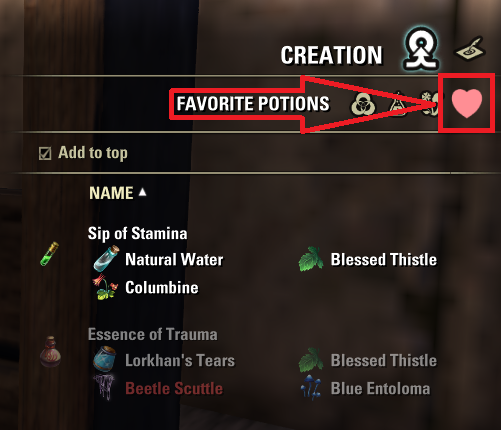
Alchemy Favorite Potions lets you save your favorite potion and poison recipes and brew them again with one click, right from the default alchemy station.
Features
A heart tab in the alchemy station (Creation) with the list of your favorite potions: the potion name and icon, and the solvent and reagents of each recipe.
Save the current combination (solvent plus two or three reagents) with a button in the bottom bar, next to “Craft”. The same button removes it if it is already a favorite.
Only combinations whose result you already know can be saved. The order of the reagents does not matter.
Click a favorite to place its solvent and reagents in the slots. Ingredients are taken from your backpack, craft bag and bank.
Favorites you cannot make right now are dimmed, and the missing ingredient is marked in red. A tooltip tells you why: missing ingredients, third reagent slot not unlocked, or alchemy rank too low for the solvent.
Right-click a favorite to remove it from the list.
Choose whether new favorites are added at the top or at the bottom of the list. The checkbox also reorders the ones you already have.
Favorites are saved per server (NA, EU and PTS are kept separate), shared by all the characters of your account.
English and Spanish, following your game client language. Other languages show the English texts.
Assigning a key
The add-on does not assign any key by default. The “Add to favorites” button works with the mouse, and if you want a key for it, go to Settings > Controls > Keybindings > General > Alchemy Favorite Potions.
Compatibility
Tested alongside Potion Maker (with LibAlchemyStation) and Bandits Alchemy Helper: no conflicts found.
Installation
Extract the AlchemyFavoritePotions folder into your DocumentsElder Scrolls OnlineliveAddOns folder.
AI disclosure
This add-on was developed with the assistance of AI (Claude, by Anthropic). The code, the translations and the documentation were drafted with it, and the author reviewed and tested everything in-game.