
Group Builds (1)
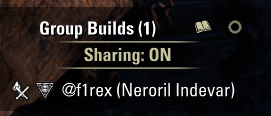
This AddOn lets group members see each other’s character builds in real time. Builds are rendered in SuperStar’s own window, so there is nothing new to learn. It also keeps a personal library of builds you want to look at later.
AddOn allows you to:
See your group members’ builds live, in a window sorted by role (tank, healer, DPS) with role and class icons
Click a member to open their build in SuperStar
Right-click a member to open a context menu with the option to save their build to your library
Toggle sharing of your own build per group (off by default, or always-on via settings)
Save any build opened in SuperStar – your own, a group member’s, or one from chat – straight from SuperStar’s window
Keep a searchable library of saved builds
Fulltext search, role and class filters, and sorting in the library
Share a saved build to chat
Privacy:
Saved builds store no character or account name – the name is whatever you type yourself (empty by default). There is an optional button to insert the owner’s name if you want it, but nothing is attached automatically
Keybinds (set in Controls > Keybindings > Group Builds):
Toggle Group Builds – the group member window
Toggle Saved Builds – the library
Dependencies:
SuperStar – Seasonal Update
LibGroupBroadcast
LibAddonMenu-2.0
Cautions:
Group members on different SuperStar versions may run into build compatibility issues
Scribed skill scripts are shown only when SuperStar has them cached from a chat share in the current session (a SuperStar limitation); the core build (gear, skills, CP, mundus, food) always shows
Note: This AddOn was written with the help of AI.
Purpose:
In a group you often want a quick look at what someone is running – their skills, sets or champion points – without asking them to link it or alt-tab to a site. Group Builds shows everyone’s build live in SuperStar’s familiar window, and lets you save the ones worth keeping for later.