
Pocket Critters (3.0.3)
Pocket Critters
A tiny animated companion who lives on your screen, reacts to your adventures, and plays fetch.
Pick a little critter, put them anywhere on your screen, and they’ll keep you company: wagging when you loot, hiding their eyes from bosses, napping when you go AFK, and doing happy zoomies when you level up.
Meet the critters
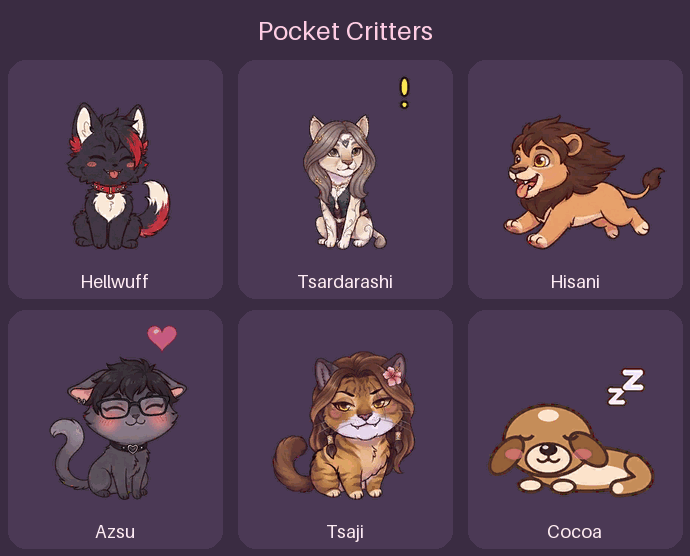
Hellwuff – a cheeky little hellhound with red streaks and a studded collar
Tsardarashi – a regal Khajiit with a thorn circlet, golden leaves in her hair and vine tattoos
Hisani – a cute lion cub with a big shaggy mane
Azsu – a black cat with glasses and a heart choker
Tsaji – a smug Khajiit with braids and a hibiscus flower
Cocoa – a sweet brown pup
What they do
Wag when you loot something
Alert (ears up!) when you enter combat
Hide their eyes when a boss is nearby
Zoomies when you level up, earn a champion point or get an achievement
Flop sadly when you die, and perk up when you’re revived
Nap if you stand still for a while, and wake up when you move
Pats! Click your critter for a happy squish and a floating heart. Every pat is counted.
Fetch!
Quick throw: right-click your critter and they’ll chase the ball and bring it back.
Fetch mode: press Start fetch (or the keybind, or /critter fetch), then left-click anywhere on the screen to throw the ball exactly there. Your critter runs to it, grabs it, and carries it home in their mouth.
Stop with the Stop fetch button on the banner, or right-click empty space. The banner can be dragged out of your way.
Fetch switches itself off in combat, near bosses, or if you die, so it never gets in the way of a fight.
Settings
Type /critter to open the settings window:
Pick your critter
Scale from 50% to 300% (critters switch to high-resolution art when scaled up, so they stay sharp)
Choose how long before they nap
Show or hide your critter, lock their position, and turn loot-wagging on or off
Come back! resets your critter (and the fetch banner) to the default spot
Try out every mood with one click
Keybinds
Set these in Controls > Keybindings > Pocket Critters:
Open Pocket Critters settings
Pat my critter
Start / stop fetch mode
Chat commands
/critter – open or close the settings window
/critter help – list all commands
/critter skin – hellwuff, tsardarashi, hisani, azsu, tsaji or cocoa
/critter scale <50-300> – size in percent
/critter fetch – start or stop fetch mode
/critter nap – how long before your critter naps
/critter lock, /critter unlock, /critter hide, /critter show, /critter reset
/critter test – idle, wag, zoomies, pat, sleep, hide, sad, alert
Good to know
No library dependencies – just install and play.
Your critter only shows on the normal game screen, and hides itself in menus, the map and inventory.
Keyboard / mouse interface only for now (gamepad mode is not supported).
Installation
Install with Minion, or manually: unzip the download and place the PocketCritters folder in
DocumentsElder Scrolls OnlineliveAddOns
Enjoy your new little friend! <3