
RPQuest – Build your own quests for role-playing (1.0.1)
RPQuest Custom Roleplay Quests for ESO
Create, play, complete, and share custom Roleplay quests directly inside The Elder Scrolls Online’s native UI 100% zero-dependency (no external libraries required).
Key Features
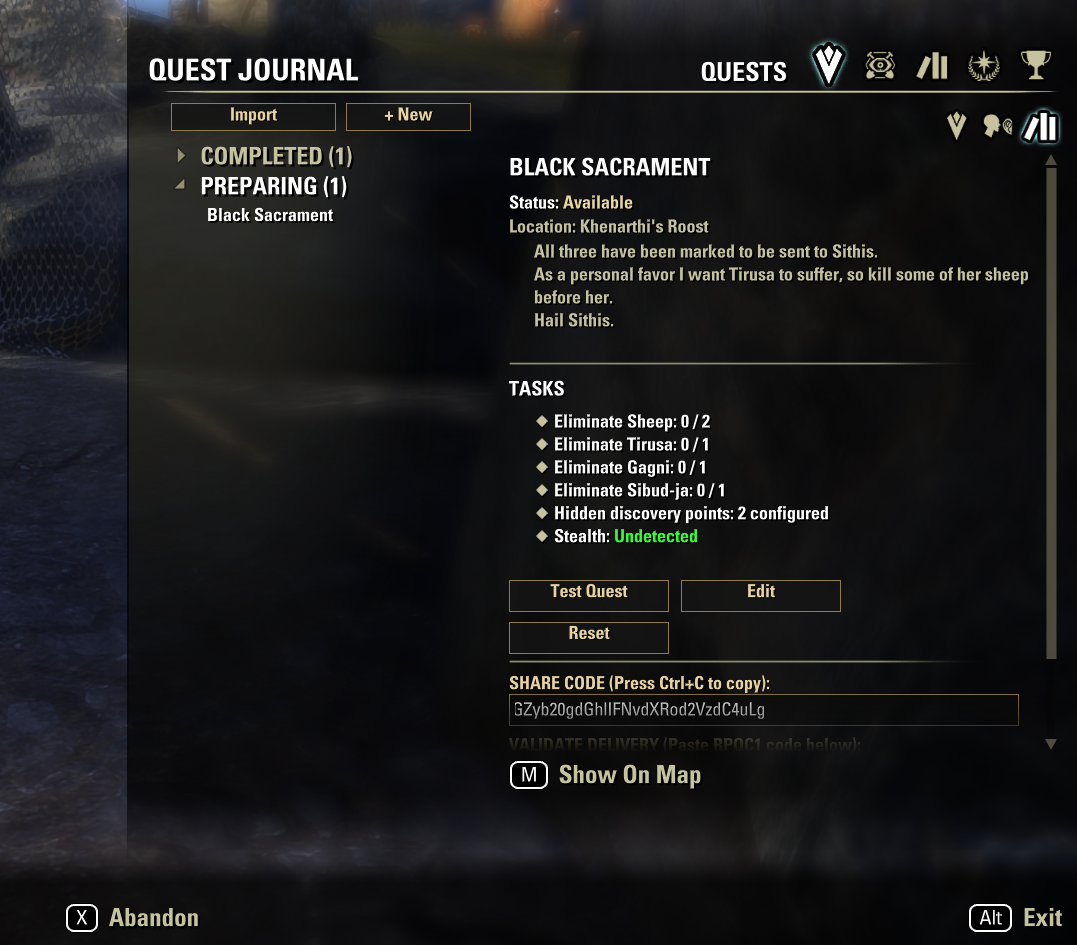
Native Quest Journal Integration (J): Adds a dedicated RPQuest tab inside the standard Quest Journal with separate Preparing (authored) and Received (playable) quest lists.
Reticle NPC Target Capture: Aim at any living NPC and press your keybind to register kill objectives automatically. Repeated captures of the same NPC stack (e.g. Sheep: 0/2); different named NPCs are tracked individually.
Hidden Discovery Points: Press your keybind at any location to capture exploration coordinates with configurable trigger radii (Small, Medium, Large) without cluttering the map with spoilers.
Optional Stealth / Undetected Condition: Require players to complete objectives without being detected in combat.
World Map Search Area (M): Displays an approximate search circle on the World Map so the target stays inside the area without revealing its exact center. Automatically clears upon completion.
Native Alerts & Sounds: Tracks combat kills and exploration proximity, triggering native center-screen quest announcements and official quest sounds.
Code Sharing & Completion Proof (RPQ1 / RPQC1):
Export any prepared quest as a share code (RPQ1:…) for other players to import.
Completed quests generate a delivery validation code (RPQC1:…) so players can prove completion back to the Quest Master.
Zero Dependencies & Bilingual: No libraries required. Auto-detects English (en) and Spanish (es) clients.
Quick Start
Set your Keybinds: Go to Settings → Controls → RPQuest and assign keys for Capture Target under Reticle and Capture Discovery Point.
Create a Quest (Quest Master): Open the Quest Journal (J) → RPQuest tab, click + New, set Title, Description/Lore, Search Area size, and optional Stealth requirement. Aim at NPCs or stand at discovery spots and press your keybinds to add objectives.
Share with Players: Copy the generated RPQ1:… share code and send it to your players. They paste it into the Import button.
Play & Validate: Activate the quest, use Show On Map (M) to see the search area, complete the objectives, and send the RPQC1:… delivery code back to the Quest Master to validate completion.
Source Code & Bug Reports
GitHub Repository (JerbilX/RPQuests) Licensed under GNU GPLv3.