Target Frame Line (1.2.0)
Change Log:
——————–
1.2.0
first release on ESOUI
Description:
——————–
AI disclosure: Target Frame Line is developed with the help of AI (Claude by Anthropic). Every change is tested in game before release.
Requires: LibAddonMenu-2.0
Target Frame Line
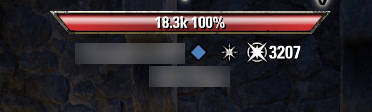
Rebuilds the line above the health bar of the targeted player (the one under the compass when you look at someone).
The game shows:
name
With Target Frame Line:
name level
The name is whatever the game uses as the primary name (@userid or character name, Settings → Interface); the caption under the bar is unchanged.
Level is champion points for champion characters, the character level otherwise. In veterancy zones it is still champion points, not the veterancy rank.
The target marker (the symbol a group member can put over someone’s head) is removed from this frame by default, for players and NPCs alike. Turned off, it stays in front of the name for players and where the game puts it for everyone else.
NPCs, monsters and objects are otherwise left as the game shows them.
Settings
Settings → Addons → Target Frame Line (account-wide)
Hide target marker in the target frame (on by default). Where markers show in the world is up to the game: Settings → Nameplates → Target Markers (over heads), Settings → Interface → Compass Target Markers.
Champion icon before champion points (on by default).
Overland difficulty icon after the name (off by default).
Class and rank icon size, in % of the text height (115 by default).
Credits
Inspired by AddedInfo…