

Meridias Block Pooky (2.4)
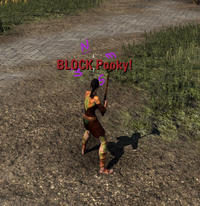
BlockPooky is an Elder Scrolls Online addon that provides critical combat awareness for PvP scenarios. Originally inspired by rumors about ballgroup BLOCK warning addons, it has evolved into a comprehensive tool that helps players react to incoming threats and optimize their defensive gameplay.
Installation
Download and install the required dependencies:
LibChatMessage
LibAddonMenu-2.0
LibMapPing
LibGPSFeatures
Features:
🛡️ Block Warnings
Visual Alerts: Large, customizable UI frame with BLOCK Pooky! message
Audio Notifications: Configurable sound alerts (Duel Start sound)
Center Screen Announcements (CSA): BA-style messages for critical awareness
Chat Integration: Optional chat warnings with addon tags
Group Messaging: Cross-addon compatibility with Agony Warning
🎯 Smart Detection
Ability Recognition: Detects incoming pull abilities (Dark Convergence, Rush of Agony, chains, etc.)
Group Awareness: Ignores abilities from group members and companions
Custom Triggers: Add your own ability IDs for personalized detection
Language Support: Works across different ESO client languages
📊 Combat Awareness
Block Detection: Shows when you’re actively blocking (solves Am I Blocking? uncertainty)
CC Immunity Tracking: Visual bar showing immunity duration from dodge rolls/potions/skills
Negate Warnings: Alerts when standing in enemy Negate Magic fields
Ready Hints: Notifications when DC/ROA abilities are off cooldown
⚡ Performance Tools
Vigor Timing: Optimal recasting reminders (8s intervals for group play)
Custom Cooldown Bars: Track any ability or effect with personalized bars
Mount Notifications: Reminds you when it’s possible to mount in Cyrodiil
🎨 Customization & Combat Visuals
Movable UI: Drag and position all elements anywhere on screen
Color Themes: Customize colors for all UI components
Font Sizing: Adjustable font sizes for visibility
Duration Controls: Configure how long messages stay visible
Combat Visuals: Adjust maximum AOE brightness, outline thickness, and target outline intensity from the settings menu
RGB AOE Cycling: Enable color cycling for AOE indicators (with speed and turbo controls)
For detailed informations, images and clips visit the documentation-Wiki:
https://wiki.claudiapps.de/wiki:blockpooky







