

ACI-AddOn Conflict Inspector (0.2.0)
v0.2.0 First public release (2026-04-10)
One slash command tells you what’s wrong with your ESO addon environment.
한국어 설명은 페이지 하단에 있습니다.
If you have 50+ addons installed, you’ve probably seen the “out-of-date” warnings, watched your SavedVariables file grow past 10 MB, and wondered which addon is actually slowing things down. ACI answers all of those in one place no guessing, no manual file inspection.
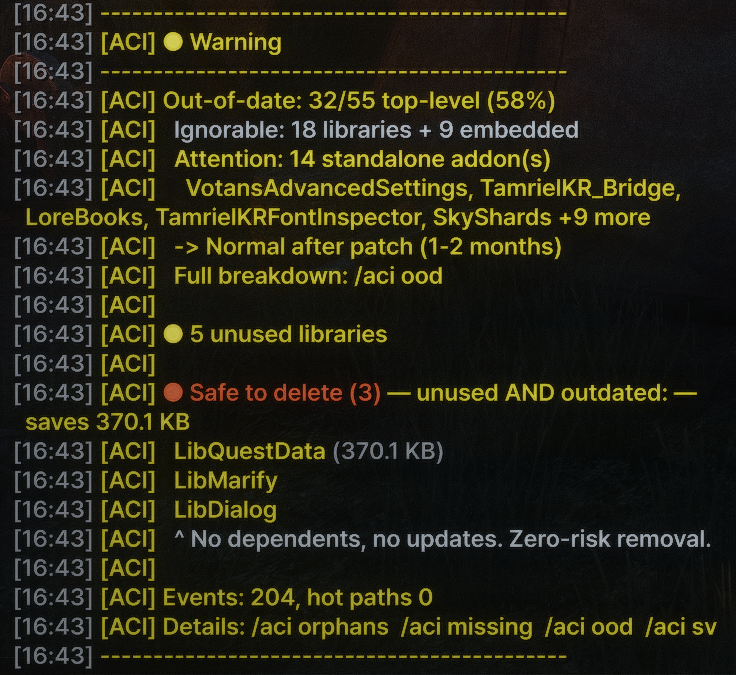
/aci health gives you a traffic-light diagnosis in a single screen:
⚠ This is an early release (v0.2.0 beta). Core analysis is stable and tested on a 55-addon environment, but ACI is brand new and there are corners it hasn’t seen yet. If you hit something weird wrong numbers, missing addons, a command that doesn’t make sense please report it. Feedback from real-world setups is how this addon gets better.
Out-of-date addons that actually need attention separated from abandoned libraries that still work fine
Unused libraries you can safely delete, with the disk space you’ll recover
SavedVariables conflicts, bloat, and waste
Missing dependencies with typo-hint matching
Event hot paths and the addons contributing to them
What it answers
“Which of my 55 addons is actually out-of-date?”
On my own 55-addon setup, ESO’s addon menu reports 32 out-of-date warnings (58%). ACI splits them into three buckets: 14 standalone addons that actually need updating, 18 libraries whose authors stopped bumping the API version but still work fine, and 9 embedded sub-addons bundled inside bigger addons (not your problem). 32 scary warnings, 14 that actually matter.
“Why is my SavedVariables file twice as big as last month?”
Disk usage ranking with , , and tags shows you which addons are eating space and whether anything still uses them. The tag marks SV files from addons that are both unused and out-of-date prime deletion candidates.
“Which addons contribute to performance hot spots?”
Event hot path analysis flags addons registered for many high-traffic events. The annotation tells you how many of the top hot events a given addon touches a fast way to spot multi-hot-path offenders.
“What can I delete without breaking anything?”
Safe-to-delete recommendations combine unused, out-of-date, and dependency-free into one list with exact MB savings.
“My addon says it’s missing a dependency but I have it installed.”
ACI’s missing dependency detection runs 3-tier hint matching: case-mismatch (LibAddonMenu vs libaddonmenu), version-suffix strip (LibStub-1.0 vs LibStub), and Levenshtein distance for typos. Tells you what the addon is actually looking for vs what you have.
All commands
Start here:
/aci environment summary
/aci health traffic-light diagnosis + safe-to-delete
Detailed views:
/aci sv SavedVariables conflicts + disk usage with value/waste tags
/aci hot event hot paths with cross-hot annotations
/aci ood out-of-date breakdown (standalone / library / embedded)
/aci orphans unused libraries + de-facto libraries
/aci missing missing dependencies + typo hints
/aci deps X forward + reverse dependencies for addon X
/aci init init time estimation (top 10)
/aci help full command list
Requirements
No required dependencies
No conflicts with other addons ACI is a passive observer, it does not hook into other addons’ code
Tested on API 101049 (Live) and 101050 (PTS)
Installation
Extract ZZZ_AddOnInspector into your AddOns folder, enable it in the in-game addon menu, reload, and type /aci health.
The ZZZ_ prefix ensures ACI loads last so it can observe every other addon’s registrations.
Feedback & bug reports
ACI is in active development and every report helps. If you run into:
An addon that ACI misclassifies (e.g. a standalone tagged as a library, or vice versa)
A SavedVariables conflict that isn’t a real conflict (false positive)
A missing dependency that ACI doesn’t catch, or a wrong typo hint
Numbers that don’t match what you see in the in-game addon menu
Any command that crashes or prints garbage
…please open an issue on GitHub or leave a comment on this ESOUI page with your /aci output. The more weird environments ACI sees, the smarter it gets.
github URL: https://github.com/baeghyeon-hub/eso-addon-conflict-inspector
License
Source-available on GitHub. Personal, private, non-commercial use and local modifications allowed. Re-uploading, repackaging, or distributing modified versions requires prior written permission see LICENSE for full terms.
Languages
English by default. Korean strings load automatically when https://github.com/baeghyeon-hub/ESO-TamrielKR is installed no extra setup required.
한국어 설명 (Korean)
슬래시 명령어 한 줄로 내 ESO 애드온 환경의 문제점을 진단합니다.
애드온이 50개를 넘어가면 누구나 한 번쯤 겪습니다. “구버전” 경고가 한가득이고, SavedVariables 파일은 어느새 10 MB를 넘었고, 어떤 애드온이 진짜로 게임을 무겁게 만드는지 짐작도 안 가는 상황. ACI는 이걸 한 자리에서 답해줍니다. 추측도, 파일을 직접 열어보는 작업도 필요 없습니다.
/aci health 한 번이면 신호등 형태로 환경 상태를 한 화면에 보여줍니다.
⚠ 초기 릴리즈입니다 (v0.2.0 베타). 핵심 분석 기능은 안정적이고 55개 애드온 환경에서 검증을 마쳤지만, ACI는 이제 막 공개된 상태라 아직 못 본 환경이 많습니다. 숫자가 이상하거나, 빠진 애드온이 있거나, 명령어 출력이 말이 안 되는 부분이 보이면 꼭 알려주세요. 실제 사용자 환경의 피드백이 이 애드온을 키웁니다.
진짜로 업데이트가 필요한 구버전 애드온 그냥 업데이트가 멈췄을 뿐 멀쩡히 작동하는 라이브러리와 분리해서 보여줍니다
안전하게 지울 수 있는 미사용 라이브러리, 회수 가능한 디스크 용량까지 같이
SavedVariables 충돌, 비대화, 낭비 진단
누락된 의존성과 오타 힌트
이벤트 핫패스와 거기에 기여하는 애드온
어떤 질문에 답해줄까?
“내 55개 애드온 중 진짜로 업데이트가 필요한 건 몇 개야?”
제 환경(애드온 55개) 기준으로 ESO 애드온 메뉴는 32개를 구버전(58%)으로 표시합니다. ACI는 이걸 세 묶음으로 나눕니다 진짜 업데이트가 필요한 독립 애드온 14개, 작성자가 API 버전을 더 이상 안 올릴 뿐 정상 작동하는 라이브러리 18개, 그리고 큰 애드온 안에 번들로 들어 있어서 신경 쓸 필요 없는 내장 하위 애드온 9개. 무서워 보이는 32개 경고 중 실제로 손볼 건 14개뿐입니다.
“내 SavedVariables 파일이 왜 지난달의 두 배가 됐지?”
디스크 사용량 순위에 , , 태그를 붙여서, 어떤 애드온이 용량을 잡아먹는지, 그게 아직 누가 쓰고는 있는지 한눈에 보여줍니다. 태그는 미사용이면서 동시에 구버전인 애드온의 SV 파일 1순위 삭제 후보입니다.
“어떤 애드온이 성능 저하의 원인이지?”
이벤트 핫패스 분석으로 트래픽이 많은 이벤트에 등록된 애드온을 잡아냅니다. 과부하 표시는 그 애드온이 상위 핫 이벤트 중 몇 개에 동시에 걸려 있는지를 알려줘서, 여러 핫패스를 한꺼번에 차지하는 문제 애드온을 빠르게 골라낼 수 있습니다.
“뭘 지워도 안전한지 모르겠어.”
미사용구버전의존성 없음을 한 줄로 묶어서, 정확한 회수 용량(MB)과 함께 안전 삭제 후보를 추천합니다.
“애드온이 의존성이 없다고 하는데, 분명히 깔려 있어요.”
누락 의존성 감지는 3단계 힌트 매칭을 돌립니다 대소문자 불일치(LibAddonMenu vs libaddonmenu), 버전 접미사 차이(LibStub-1.0 vs LibStub), 그리고 오타 잡는 Levenshtein 거리. 그 애드온이 실제로 뭘 찾고 있고, 내가 가진 건 뭔지 대조해서 보여줍니다.
전체 명령어
여기서 시작:
/aci 환경 요약
/aci health 신호등 진단 + 안전 삭제 추천
상세 보기:
/aci sv SavedVariables 충돌 + 디스크 사용량(가치/낭비 태그)
/aci hot 이벤트 핫패스 + 핫이벤트 동시 점유 표시
/aci ood 구버전 분류 (독립 / 라이브러리 / 내장)
/aci orphans 미사용 라이브러리 + 사실상 라이브러리
/aci missing 누락된 의존성 + 오타 힌트
/aci deps X 애드온 X의 정방향/역방향 의존성
/aci init 초기화 시간 추정 (상위 10개)
/aci help 전체 명령어 안내
요구사항
필수 의존성 없음
다른 애드온과 충돌 없음 ACI는 패시브 옵저버라 다른 애드온 코드에 후킹하지 않습니다
API 101049 (라이브) 및 101050 (PTS) 에서 검증
설치
ZZZ_AddOnInspector 폴더를 AddOns 폴더에 풀어 넣고, 인게임 애드온 메뉴에서 활성화한 다음, 리로드 후 /aci health를 입력하세요.
폴더명의 ZZZ_ 접두사는 ACI가 다른 모든 애드온의 등록을 관찰할 수 있도록 가장 마지막에 로드되게 하기 위함입니다.
피드백 & 버그 제보
ACI는 활발히 개발 중이고, 모든 제보가 도움이 됩니다. 다음과 같은 경우는 꼭 알려주세요:
ACI가 잘못 분류한 애드온 (독립 애드온이 라이브러리로 잡혔거나 그 반대)
실제 충돌이 아닌 SavedVariables 충돌 오탐
ACI가 못 잡은 누락 의존성, 또는 잘못된 오타 힌트
인게임 애드온 메뉴에서 보이는 숫자와 ACI 출력 숫자가 어긋날 때
명령어가 크래시를 내거나 깨진 출력을 낼 때
GitHub 이슈로 올리거나, 이 ESOUI 페이지에 /aci 출력과 함께 댓글을 남겨주세요. 다양한 환경을 볼수록 ACI는 더 똑똑해집니다.
GitHub URL: ](https://github.com/baeghyeon-hub/eso-addon-conflict-inspector%5B/URL%5D)
라이선스
GitHub에서 소스 공개. 개인적비공개비상업적 사용과 로컬 수정은 허용됩니다. 재업로드, 재배포, 수정본 배포는 사전 서면 동의가 필요합니다 자세한 조건은 LICENSE 파일을 참조하세요.
언어
기본 언어는 영어입니다. TamrielKR이 설치되어 있으면 한국어 문자열이 자동으로 로드됩니다 별도 설정 불필요.







