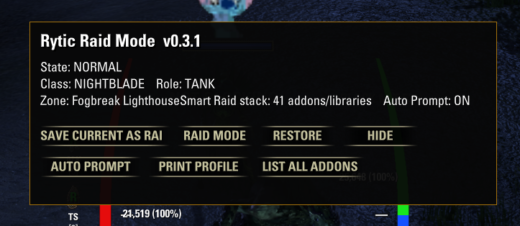
Rytic’s Raid Manager (RRM)A customizable, instance-aware addon manager built to keep your everyday ESO conveniences while giving you a cleaner, purpose-built addon environment when it’s time for trials and instanced combat.Why I Built RRMWhile developing and performance-testing my Rytic Tank and Raid Tools, I started paying closer attention to what was actually running in the background during trials.One thing stood out: my normal ESO setup included a lot of addons, libraries, and dependencies that were useful during everyday gameplay but simply weren’t needed once I entered a trial.I didn’t need another complicated performance tool. I needed a simple addon manager. I seen significant performance boost from disabling non needed addons and dependencies upwards of 100 ms ping improvement and 20 fps, this will depend on your pc set up ovbiously but well worth the reload when in a hard encounter. That’s where Rytic’s Raid Manager came from.The idea is straightforward:Keep your daily conveniences during normal gameplay. When it’s time to raid, load what you actually need.Instance-Aware Addon ManagementRRM helps manage your active addon configuration when entering supported instanced content.Instead of permanently giving up your crafting, trading, inventory, map, convenience, and other everyday addons just to maintain a cleaner trial setup, RRM lets you switch to a focused combat configuration.When you’re finished with the instance, restore your normal gameplay setup.Fight:Keep your important raid, role, class, mastery, and helper tools while unnecessary addons stay out of the way.Smart Class, Role & Instance AwarenessRRM isn’t designed to blindly disable everything.Its Smart Profile system can select appropriate tools based on: Your class Your current role The instance you’ve entered Relevant mastery trackers Role-specific helpers Important/core addons Required dependenciesCustomizable to Your SetupRRM takes dependencies into account when examining and building your addon environment.The objective is a purpose-built combat configuration, not simply the smallest possible addon list.Addon Inventory & Orphan Dependency ReportOne of the features that grew out of developing RRM was a better way to understand exactly what was sitting in my AddOns folder.Addon collections change over time. Addons get installed, replaced, abandoned, updated, and removedbut their old libraries and dependencies don’t always disappear with them.After enough time, an AddOns folder can accumulate dependencies that may no longer be required by anything you’ve actually got installed. Or orphans that the parent out grew or no longer was needed. Use:/rrm addonsThe report can show: Installed addons and libraries Current ON/OFF state Declared dependencies Which addons use each dependency Smart Raid Stack status Possible orphan count POSSIBLE ORPHAN warningsThis makes it much easier to identify old libraries that may have been left behind after uninstalling addons.RRM reports potential orphans. It does not automatically delete them. Always review a reported dependency before manually removing it from your AddOns folder.Quick StartConfigure your addons the way you want them for trials or other instanced combat.Type:/rrm saveThis saves your current addon configuration as your Raid Profile.When you’re ready for instanced combat, use:/rrm raidRRM applies your saved Raid Profile.Run your content using your focused combat addon setup.When you’re finished, use:/rrm restoreRRM restores your normal addon configuration.Slash Commands/rrm showShows the RRM interface./rrm hideHides the RRM interface./rrm saveSaves your current addon configuration as your Raid Profile./rrm raidApplies your saved Raid Profile and switches your addon environment into Raid Mode./rrm restoreRestores your normal addon configuration after you’re finished with Raid Mode./rrm profileBuilds and displays RRM’s Smart Profile so you can see the addons selected for your current combat setup./rrm addonsRuns RRM’s addon inventory and dependency report, including detection of potential orphan libraries./rrm auto onEnables automatic instance prompting./rrm auto offDisables automatic instance prompting.Designed for Trials Useful Beyond ThemRRM grew directly out of trial performance testing while I was developing Rytic’s other tank and raid tools.Its instance-aware approach can be useful for trials, dungeons, arenas, and other instanced combat.The addon inventory, dependency mapping, Smart Profile, saved configurations, and orphan reporting also make RRM useful as a general maintenance tool for players with larger ESO addon collections.Performance PhilosophyEvery PC, addon collection, UI configuration, and trial environment is different.RRM does not promise a specific FPS increase.That’s what RRM is designed to do.Feedback & Bug ReportsSuggestions, compatibility reports, and bug reports are welcome.When reporting an issue, please include your RRM version, character class, role, instance/trial, the addon that was enabled or disabled incorrectly, and any ESO UI error message you received.Rytic’s Raid ManagerKeep the conveniences.Drop the unnecessary load.Clean up the leftovers.Get into the trial.AI DisclosureAI tools were used during the development of Rytic’s Raid Manager to assist with coding, debugging, documentation, and development workflow.The addon concept, feature design, testing, performance testing, configuration decisions, and final implementation decisions were directed and reviewed by the author.AI-generated or AI-assisted code was tested in-game and modified as needed during development.