Best BG3 Rogue Build Ranking for 2026 (Patch 8)
Every BG3 Rogue subclass ranked for Patch 8: Swashbuckler, Thief, Assassin, and Arcane Trickster builds, with the best multiclass build.


Every BG3 Rogue subclass ranked for Patch 8: Swashbuckler, Thief, Assassin, and Arcane Trickster builds, with the best multiclass build.
Discover the spellcasting hybrid Rogue build that does more than unlock chests and traps; it will control enemies and provide your party with burst damage in melee.
If you love sneaking, stealth, and ranged combat, then you will love the Thief subclass on the Rogue class. Built as a multiclass Longbow sniper, using Fast Hands extra bonus action for utility and combat performance, the Rogue shines both while exploring and at range.
Discover the ultimate in alpha strike and critical burst damage with our Assassin Rogue build, designed to eliminate all enemies before they take a turn.
The ultimate in burst damage, the Swashbuckler turns the Rogue into a guaranteed Sneak Attack damage with the easiest chance of landing critical hits.
Change Log:——————–3.0.0a – Archive parameters modified for compatibility with Windows ExplorerDescription:——————–Base addon page: AzurahAboutThis is an updated version of Azurah – Interface Enhanced, released primarily to fix compatibility errors with recent ESO API versions. It preserves the original addon’s core functionality while improving stability. No new features are planned.Core FeaturesUnlock UI elements move and scale interface windows anywhere on screen.Attribute transparency set a minimum transparency level or make attribute bars always visible.Fixed attribute size food no longer increases the size of health, magicka, and stamina bars.Text overlays display values for your own attributes and your target’s attributes.Ultimate meter overlay showing your current Ultimate level.Target color indication health bar, name, and level of your target are colored based on relation or difficulty.Class and alliance icons show class and alliance icons next to player target names.Experience bar customization overlay for the XP bar and option to keep it always visible.Inventory notifications display bag changes and warnings when your inventory is nearly full.Werewolf timer countdown for remaining werewolf transformation time.Account-wide settings apply the same settings across all characters.Slash commands /azurah unlock and /azurah lock to unlock or lock the UI.Changes in This UpdateCompatibility fixes resolved errors caused by recent ESO API changes.Stability improvements fixed known bugs in existing modules to improve overall reliability.Support StatusImportant: Support for this addon is limited. Updates are unlikely to be released frequently and will generally be limited to critical compatibility fixes. Long-term development is not planned.Recommended AlternativesFor continued support and future updates, please consider switching to the following addons:Improved…
enjoy!
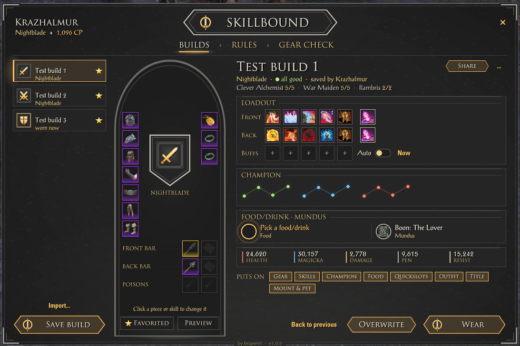
https://i.postimg.cc/7Z1kgDpg/skillbound-logo-clear-2x.pngSkillboundSave it. Wear it. Switch in one click.Build presets | Gear, skills, food and more | Auto switching | Gear checkOptional: LibAddonMenu-2.0 (for the settings page)I play a lot of different content on the same character, and every switch meant the same routine: swap the gear piece by piece, drag the skills onto both bars, fix my champion stars, eat the right food, and then find out in the first pull that I forgot a ring. So I made Skillbound. You save what you’re wearing as a build, and later you put the whole thing back on with one click. It finds the pieces in your bag, tells you when one is in the bank or on another character, and can even switch builds for you when you enter a trial or face a certain boss.Who it’s forAnyone with more than one setup: a trial build and an overland build, a PvP build, a tank set for when the group needs one. New players get a simple start (just “Save build” and “Wear”), and if you like to fine-tune, everything else is one right-click or one tab away.BuildsSave build: saves what you’re wearing right now. Give it a name, a picture, a note, and pick what it holds: gear, skills on both bars, champion stars, food or drink, quickslots, outfit, title, mount and pet, and your companionWear: puts it all on with one click. It asks first (you can turn that off), and an optional “what will change” list shows every change before anything happensWaits for the right moment: if you’re in combat, it finishes when the fight is overFinds your gear: the exact piece first, otherwise a copy of the same set and kind. It tells you when a piece is in the bank or on another characterBack to previous: changed your mind? One click puts back what you wore beforeEdit it in the window: click a gear slot or a skill to pick another one, click the name to rename itPreview on your character: see the build’s look on your character and spin it aroundCompare two builds side by side (sets, bars, stats), and learn a build’s skills: it buys the skills and morphs you’re missing (it asks first and lists the points)Layers: a build that only changes a few things, like just your champion stars or one barThe Skillbound buttonA small button with up to 10 favorite builds. Click one to wear it. Hover a favorite to see its notesFold it to 5 slots with the arrow at its endQuick wheel: hold a key and pick a build with your mouseKeybinds for each favorite, the window, the wheel, back to previous and more (Controls > Skillbound)Rules: switch builds by themselves”When I enter a trial, wear my trial build”. Also for group dungeons, Cyrodiil and Imperial City, battlegrounds, one zone, back out in the world, or a certain boss by namePlan a trial or dungeon: one build for the trash and one for each boss. Bosses are added by themselves the first time you meet them thereAsk first per rule, and a “Rules on” switch to pause them allThe most specific rule wins: a boss before a zone, a zone before the rest of the worldGear checkShows the condition of your gear, your weapon charge, repair kits and soul gems at a glanceRepair and Recharge buttons, or let it happen on its own below a level you chooseFor every build: ready, in the bank, on another character, or missingAt the bank: a Skillbound panel next to the bank takes a build’s gear out for you, and puts spare pieces awayA small mark on build gear in your bag and bank, so you don’t sell or deconstruct it by accidentFood, buffs and dungeonsFood and drinks per build: pick one, and it eats it for you in trials and dungeons when the buff runs out. It never eats over another food buff that’s still runningReady check: a small card when you enter a dungeon or trial shows your food, potions, poisons, repair, charge and mundus at a glancePrebuff: puts your buff skills on the bar for a moment so you can cast them, then puts your bar backShare your buildsLink in chat: post a build in chat, and anyone with Skillbound can click it to import itShare code: a short code to copy and paste, for Discord or a guideImport from the Armory: turn your game Armory builds into Skillbound buildsHow to open itClick the logo on the Skillbound button, or type /sb (or /skillbound). Right-click the button for more options. Click the title plate at the top of the window for the settings. A short welcome tour shows you around the first time (/sb tour shows it again). /sb help lists all commands, and /sb reset puts every window back in its place.Good to knowAddons can’t cast skills for you. Prebuff only puts the skills on your bar, you still press them.Nothing changes during combat. A build you pick in a fight goes on as soon as it’s over.”On another character” is known for characters you logged in with since installing Skillbound.After installing or updating, restart the game once: new images only load on a full start, /reloadui isn’t enough.Made for the keyboard UI. Gamepad mode isn’t supported yet.Your builds and settings are shared by all your characters.Available in English, German and French.RequirementsLibAddonMenu-2.0 (optional) for the settings pageInstallationMinion (easiest): search for Skillbound, click Install, done. Minion keeps it up to date too.Manual: open the .zip and drag the Skillbound folder into DocumentsElder Scrolls OnlineliveAddOns. Then start the game and make sure Skillbound is ticked under Add-Ons.CreditsA lot of the inspiration came from the build addons I used for years. Wizard’s Wardrobe by ownedbynico, ghostbane, JN Slevin and STUDLETON gave me the idea of trial plans with a build per boss, and AlphaGear 2 by mesota (and the original AlphaGear by AlphaLemming) showed how handy a build bar with one-click buttons is. Thanks to all of you. The settings page is built with LibAddonMenu by sirinsidiator.This was my personal addon, but I decided to share it too, made with the help of AI most of it is done by myself, I test every feature in game and keep the addon updated myself.Found a bug, or a piece of gear it doesn’t find? Leave a comment (the line /sb errors prints helps me a lot) and I’ll take a look. The addon keeps improving with each patch. 2026 brianmit. Free for personal use. Please don’t re-upload or share modified versions without asking me first.
ENGLISH=======AI DISCLOSURE————-Alchemiewerk was materially developed with OpenAI ChatGPT. The assistant Atlas generated and revised the Lua code, technical structure, release texts and parts of the procedural artwork workflow used by the addon. Concept direction and in-game testing were provided by Torfason. The final package is published by Torfason. No third-party addon code or art assets are bundled with Alchemiewerk.ABOUT—–Alchemiewerk is an alchemy recipe addon for The Elder Scrolls Online. It learns ingredient combinations from potions and poisons you actually craft and stores the resulting recipe together with its solvent and reagents.Known combinations can then be selected from Alchemiewerk and inserted directly into ESO’s original alchemy interface. Alchemiewerk only prepares the solvent and reagents; ESO remains responsible for the preview, quantity and final crafting action.FEATURES——–Learning Recipe Book- Learns solvent + reagent combinations from successfully crafted potions and poisons.- Uses the result actually produced by ESO as the stored recipe entry.- Existing learned combinations are updated automatically when crafted again.- Tracks how often each learned combination has been crafted.Recipe Overview- Categories for All, Potions and Poisons.- Continuous scrollable recipe list with scrollbar and mouse-wheel support.- Displays Result, Minimum Level, Ingredients, Crafted count and Material status.- Groups identical results and lets you expand them to choose the exact ingredient combination.- Shows whether the required materials are currently available.Sorting- Sort recipes by Result, Minimum Level, Ingredients, Crafted count or Material status.- Clicking a column header changes sorting temporarily for the current window.- The configured default sorting is restored the next time Alchemiewerk is opened.Insert into ESO- Insert places the stored solvent and reagents into ESO’s original alchemy slots.- Alchemiewerk does not automatically craft the potion or poison.- ESO keeps control of the normal result preview, quantity and final crafting action.Tooltips- Learned recipe details appear beside the Alchemiewerk window.- ESO’s own alchemy result tooltip is positioned beside Alchemiewerk while the window is open.- The result tooltip shows whether the current ingredient combination is known or unknown to Alchemiewerk.- Known combinations also show their crafted count.Interface- Responsive ESO-style window with the Torfason Atlas blue frame.- Window can be moved with the left mouse button.- Pushpin locks or unlocks the window position.- Saved window position can be reset from the settings.- Custom Alchemiewerk book icon at alchemy stations.- Optional Alchemiewerk icon in ESO’s normal keyboard main menu.SETTINGS——–Alchemiewerk uses its own dependency-free ESO-style settings window.Open the settings through:- the blue gear in Alchemiewerk’s row in ESO’s Add-ons list- /alchemiewerksettings- /awsettings/alchemiewerk and /aw open or close the recipe window.Available settings:- Open Alchemiewerk automatically at alchemy stations- Hide Alchemiewerk after Insert- Show chat messages- Show the Alchemiewerk icon in ESO’s main menu- Default sort column- Default sort direction- Lock window position- Open / close the Alchemiewerk window- Reset window position- Restore settings to defaults without deleting learned recipesLANGUAGES———- English- GermanA German ESO client uses German. Other client languages use English as the fallback.CONTACT / FEEDBACK——————Feedback, bug reports and suggestions are welcome in the ESOUI comments.In-game contact: @TorfasonCREDITS——-Development and code: Atlas (OpenAI ChatGPT)Concept direction: TorfasonIn-game testing: TorfasonPackaging and publication: TorfasonArtwork concept and selection: Torfason AtlasDEUTSCH=======KI-HINWEIS———-Alchemiewerk wurde wesentlich mit OpenAI ChatGPT entwickelt. Der Assistent Atlas erzeugte und berarbeitete den Lua-Code, die technische Struktur, Verffentlichungstexte und Teile des prozeduralen Grafik-Workflows des Addons. Konzeptvorgaben und Tests im Spiel erfolgten durch Torfason. Das fertige Paket wird von Torfason verffentlicht. Es werden keine Code- oder Grafikdateien anderer Addons mit Alchemiewerk ausgeliefert.BER DAS ADDON————–Alchemiewerk ist ein Rezept-Addon fr die Alchemie in The Elder Scrolls Online. Es lernt Zutatenkombinationen aus Trnken und Giften, die du tatschlich herstellst, und speichert das entstandene Rezept zusammen mit seinem Lsungsmittel und seinen Reagenzien.Bekannte Kombinationen knnen anschlieend in Alchemiewerk ausgewhlt und direkt in ESOs originale Alchemieoberflche eingesetzt werden. Alchemiewerk bereitet ausschlielich Lsungsmittel und Reagenzien vor; Vorschau, Menge und endgltige Herstellung bleiben bei ESO.FUNKTIONEN———-Lernendes Rezeptbuch- Lernt Kombinationen aus Lsungsmittel + Reagenzien aus erfolgreich hergestellten Trnken und Giften.- Verwendet das tatschlich von ESO hergestellte Ergebnis als gespeicherten Rezepteintrag.- Bereits bekannte Kombinationen werden bei erneuter Herstellung automatisch aktualisiert.- Merkt sich, wie oft jede gelernte Kombination hergestellt wurde.Rezeptbersicht- Kategorien fr Alle, Trnke und Gifte.- Durchgehende scrollbare Rezeptliste mit Bildlaufleiste und Mausrad-Untersttzung.- Zeigt Ergebnis, Mindeststufe, Zutaten, Hergestellt und Materialstatus.- Fasst gleiche Ergebnisse zusammen und lsst sie zum Auswhlen der genauen Zutatenkombination aufklappen.- Zeigt an, ob die bentigten Materialien aktuell vorhanden sind.Sortierung- Sortierung nach Ergebnis, Mindeststufe, Zutaten, Hergestellt oder Materialstatus.- Ein Klick auf eine Spaltenberschrift ndert die Sortierung nur vorbergehend fr das aktuell geffnete Fenster.- Beim nchsten ffnen wird wieder die in den Einstellungen festgelegte Standardsortierung verwendet.In ESO einsetzen- Einsetzen bertrgt das gespeicherte Lsungsmittel und die gespeicherten Reagenzien in ESOs originale Alchemiepltze.- Alchemiewerk stellt den Trank oder das Gift nicht automatisch her.- ESO behlt die normale Ergebnisvorschau, Menge und den endgltigen Herstellvorgang vollstndig bei.Tooltips- Details gelernter Rezepte erscheinen neben dem Alchemiewerk-Fenster.- ESOs eigener Ergebnis-Tooltip der Alchemie wird bei geffnetem Alchemiewerk passend daneben positioniert.- Der Ergebnis-Tooltip zeigt an, ob die aktuelle Zutatenkombination Alchemiewerk bekannt oder unbekannt ist.- Bei bekannten Kombinationen wird zustzlich der Herstellungszhler angezeigt.Oberflche- Responsives ESO-nahes Fenster mit dem blauen Torfason Atlas Rahmen.- Das Fenster lsst sich mit der linken Maustaste verschieben.- Eine Stecknadel fixiert beziehungsweise lst die Fensterposition.- Die gespeicherte Fensterposition kann in den Einstellungen zurckgesetzt werden.- Eigenes Alchemiewerk-Buchsymbol an Alchemiestationen.- Optionales Alchemiewerk-Symbol im normalen ESO-Tastatur-Hauptmen.EINSTELLUNGEN————-Alchemiewerk verwendet ein eigenes abhngigkeitfreies Einstellungsfenster im ESO-Stil.Die Einstellungen erreichst du ber:- das blaue Zahnrad in Alchemiewerks Zeile in ESOs Add-on-Liste- /alchemiewerksettings- /awsettings/alchemiewerk und /aw ffnen oder schlieen das Rezeptfenster.Verfgbare Einstellungen:- Alchemiewerk an Alchemiestationen automatisch ffnen- Alchemiewerk nach Einsetzen ausblenden- Chatmeldungen anzeigen- Alchemiewerk-Symbol im ESO-Hauptmen anzeigen- Standardsortierspalte- Standardsortierrichtung- Fensterposition fixieren- Alchemiewerk-Fenster ffnen / schlieen- Fensterposition zurcksetzen- Einstellungen auf Standardwerte zurcksetzen, ohne gelernte Rezepte zu lschenSPRACHEN——— Deutsch- EnglischBei einem deutschen ESO-Client wird Deutsch verwendet. Andere Clientsprachen verwenden Englisch als Fallback.KONTAKT / RCKMELDUNG———————-Feedback, Fehlermeldungen und Vorschlge sind in den ESOUI-Kommentaren willkommen.Ingame-Kontakt: @TorfasonCREDITS——-Entwicklung und Code: Atlas (OpenAI ChatGPT)Konzeptvorgaben: TorfasonTests im Spiel: TorfasonPaketierung und Verffentlichung: TorfasonGrafikkonzept und Auswahl: Torfason Atlas
Change Log:——————–Version 1.0.0 – 2026-10-03————————–ENGLISH- First stable release of Runenwerk.- Finalized the custom Runenwerk rune-book icon used at enchanting stations and in ESO’s optional main-menu entry.- Prepared the addon package for ESOUI with a clean runtime-only ZIP structure.- Set AddOnVersion to 100.- Uses the dependency-free custom settings window introduced during development.- Supports ESO Update 51 / API 101051 and the previous API 101050.- Existing learned recipes and SavedVariables remain compatible.DEUTSCH- Erste stabile Verffentlichung von Runenwerk.- Das finale eigene Runenwerk-Runenbuch-Symbol fr Verzauberungsstationen und den optionalen ESO-Hauptmeneintrag bernommen.- Das Addon-Paket mit sauberer ZIP-Struktur ausschlielich aus bentigten Runtime-Dateien fr ESOUI vorbereitet.- AddOnVersion auf 100 gesetzt.- Verwendet das whrend der Entwicklung eingefhrte eigene abhngigkeitfreie Einstellungsfenster.- Untersttzt ESO Update 51 / API 101051 sowie die vorherige API 101050.- Bereits gelernte Rezepte und SavedVariables bleiben kompatibel.Description:——————–ENGLISH=======AI DISCLOSURE————-Runenwerk was materially developed with OpenAI ChatGPT. The assistant Atlas generated and revised the Lua code, technical structure, release texts and parts of the procedural artwork workflow used by the addon. Concept direction and in-game testing were provided by Torfason. The final package is published by Torfason. No third-party addon code or art assets are bundled with Runenwerk.ABOUT—–Runenwerk is an enchanting recipe addon for The Elder Scrolls Online. It learns rune combinations from glyphs you actually craft and stores the resulting glyph together with its Potency, Essence and Aspect runes.Known combinations can then be selected from Runenwerk and inserted directly into ESO’s original enchanting interface. Runenwerk only prepares the three runes; ESO remains responsible for the preview, quantity and final crafting action.FEATURES——–Learning Recipe Book- Learns Potency + Essence + Aspect combinations from successfully crafted glyphs.- Uses the glyph actually produced by ESO as the stored result.- Existing learned combinations are updated automatically when crafted again.- Tracks how often each learned combination has been crafted.Recipe Overview- Categories for All, Weapons, Armor and Jewelry.- Continuous scrollable recipe list with scrollbar and mouse-wheel support.- Displays Glyph, Minimum Level, Runes, Crafted count and Material status.- Uses ESO’s glyph-specific minimum-level / Champion Point requirement.- Shows whether the required runes are currently available.Sorting- Sort recipes by Glyph, Minimum Level, Runes, Crafted count or Material status.- Clicking a column header changes sorting temporarily for the current window.- The configured default sorting is restored the next time Runenwerk is opened.Insert into ESO- Insert places the stored three-rune combination into ESO’s original enchanting slots.- Runenwerk does not automatically craft…