Author: JFFK

0

TheElderSporesOnline (2.16)

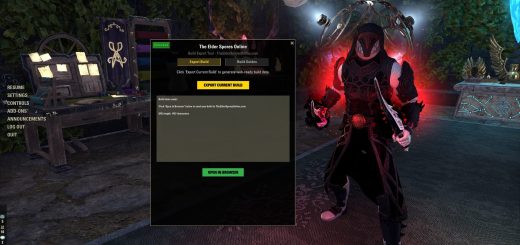
The Elder Spores Online – Build Sharing AddonCommunity Focused Build Sharing and Optimization HubAuthor: Reishi_SporesVersion: 2.1.6API Version: 101047Game Version: Update 46+What Does It Do?TheElderSporesOnline is the companion addon for The Elder Spores Online build planning website. It creates a two-way bridge between your game client and the site. Export your current build directly from ESO to thewebsite with one click no manual data entry. Import up to 3 build guides from the website into the gameto follow as interactive checklists while gearing up.Free to Use Features for All !!! SIMPLE EASY UICustom floating window / Discreet Placeholder button with easy lock & unlock positionsTwo tabs: Export Builds and Build GuidesDraggable, remembers positionClean minimal display that doesn’t obstruct gameplay EXPORT YOUR BUILDS FROM IN GAME → TheElderSporesOnline Community Sharing WebsiteOne-click build export captures your full character buildReads all equipped gear (sets, traits, enchantments, quality)Captures slotted skills on all bars (including morphs)Pulls Champion Point allocations and slotted starsReads race, class, attributes, Mundus stone, and consumablesGenerates a URL that opens directly in your browser with the build pre-loaded on the siteEncoded and compressed for efficient transferGear for every slot (set name, quality, traits & enchants)Skills for front bar and back bar + Werewolf Skills when neededChampion Points slotted & passive starsUsing This Addon:EXPORTING YOUR BUILD WITH EASEEquip the gear and skills you want to exportType /spores or click the placeholder button to open the addon windowClick “Export Current Build”Click “Open in Browser” your build loads directly on the websiteSave it, edit it, or share it with the communityIt’s that easy!!! =========================================== Added Convenience, Bonus Features for Site Subscribers Import Builds you Want to Follow from Website → Into the Game (Build Guides)Import up to 3 build guides from the website into the addonPaste exported build data from the site and create a persistent in-game guideGuides display as an interactive checklist with:Guides persist across sessions via SavedVariablesDropdown selector to switch between stored guidesDelete guides when no longer neededHow to Import a Build Guide to follow From the Website into the GameOn the website, browse and find a build you want to tryClick “Export for Addon Button” to generate the guide dataCopy the guide stringIn-game, open the addon with /sporesSwitch to the Build Guides tabPaste the data and click “Create Guide”Type /reloadui to activate the guide===========================================BASIC SLASH COMMAND”/spores” to Toggle the addon window About The Elder Spores OnlineA ESO build planning platform with a full build editor, community build sharing, and an anti-metaphilosophy that encourages creative builds. All data is 100% game-extracted and API-verified.Website: theeldersporesonline.comNOTESDoes not modify gameplay or provide any in-game advantageUses only ESO’s official public API functionsFully TOS compliant

0

KayzarUI (1.1)

KayzarUIA fully customizable Unit Frame replacement with style presets, movable bars, and extensive color/layout options. Designed for players who want complete control over their UI appearance. If the Groupframes dont work for you turn them off in the UI under Element Visibility and Download Alternative Group Frames or any Group Frames Addon of your Choice default ESO Group Frames work also links are belowAuthor: @haze068 Version: 1.0.0 Dependency: LibAddonMenu-2.0, FancyTitles FancyTitles: https://www.esoui.com/downloads/info4355-FancyTitles.htmlLibAddonMenu-2.0: https://www.esoui.com/downloads/info7-LibAddonMenu-2.0.htmlAlternative Group Frames: https://www.esoui.com/downloads/info3053-AlternativeGroupFrames.htmlCredits: https://www.esoui.com/forums/member.php?action=getinfo&userid=44027FeaturesUnit Frames- Custom Player, Target, Group Frames – Individually movable Health, Magicka, and Stamina bars (Independent Bars mode) – All positions saved and persistent through /reloadui – Target frame with 2-line display: Name (line 1) + Title (line 2) – Show All Elements mode for easy repositioning Style Presets- 28 style presets (16 standard + 12 fancy) Special presets highlighted in red in the dropdown: Neon Viper, Cyberpunk, Blood Moon, Arctic Ice, Inferno, Toxic Waste, Void, Sunset, Galaxy, Shadow Gold, Phantom White, Demon King Class-themed presets: Nightblade Red, Templar Gold, Warden Green, Sorcerer Blue, Necro Purple – Full custom color support: 10 individually adjustable colors (Accent, Name, Level, Bar Text, Health, Magicka, Stamina, Ultimate, Frame Background, Frame Border) Bar Textures- 24 bar textures (12 standard + 12 fancy) Standard: Smooth, Flat, Gloss, Gradient, Striped, Glass, Metal, Pixel, Charcoal, Neon, Marble, Minimal Special (red in dropdown): Electric, Plasma, Fire, Hex Grid, Circuit, Aurora, Hologram, Crystalline, Lava, Matrix, Carbon Fiber, Frost Layouts & Shapes- 9 layout modes: Stacked, Horizontal, Vertical, Minimal, Pyramid, Center Stack, Wide, Compact, Diamond – 8 bar shapes: Rectangle, Rounded, Thin, Thick, Slim, Extra Thick, Flat Line, Chunky UI Color Scheme- Apply a custom color to ESO’s default Crosshair Group Frame- Compact DPS-meter style bars with role color stripe – Name display modes: Character Name, UserID, UserID + Character – Customizable role colors (Tank, Healer, DD) – Row width, height, and spacing sliders Action Bar- Cooldown text overlay – Ultimate cost display – Active bar indicator (1/2) with adjustable width and height – Movable with saved position Additional Features- Independent Bars: Detach Health, Magicka, and Stamina into separate movable frames – Individual bar width and height sliders for each resource bar – Background and border toggles with opacity control – Fade out of combat with adjustable opacity – Hide frames in menus, during loot – Animated bar transitions – Text display modes: Value + Percent, Value Only, Percent Only, Current Only, None Support & Links- Donate button opens ingame mail to @haze068 – FancyTitles addon link (ESOUI) – /kayzar important – Shows important information and contact details Slash Commands- /kayzar or /kui – Open settings panel – /kayzar ui – Open settings panel – /kayzar lock – Toggle frame lock – /kayzar showall – Toggle Show All Elements (position mode) – /kayzar save – Confirm settings saved – /kayzar important – Show important information – /kayzar rl – Reload UI Languages- English, German, French, Spanish, Japanese, Russian, Chinese – UI Languages changes based on your Game Language Important InformationIf something is not working or you encounter bugs, please contact haze.3169 on Discord or leave a comment on ESOUI. If the Group Frame is not working properly, please disable it in the Addon settings UI > Element Visibility and use an alternative Group Frame addon instead. This addon can impact FPS. Try to keep your settings minimal if you are playing competitively or you have a low end PC. If u want to report anything and u need fast support i prefer if you Message me on Discord instead of Comments iam more active in there.

0

BossBoxTimer (0.1.0)

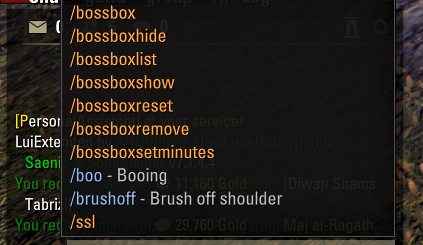
quick and easy boss box timer addon that you /bossbox : Adds a specific word to the tracking list (e.g., /bossbox parcel). /bossboxremove : Removes a word from the tracking list. /bossboxlist: Displays all current keywords you are tracking in the chat window. /bossboxreset: Performs a factory reset. This clears your entire tracking list, stops any active timer, and resets the display to “BossBox Ready”. /bossboxhide: Hides the timer /bossboxshow: Makes the timer window visible /bossbox debug: Toggles “Debug Mode” on or off. When on, every item you loot will be printed in your chat so you can verify the names the addon is “seeing”. /bossboxsetminutes : this is by default set to 5, but you can change it if you want to.if you are want stuff added to it you can let me know.

0

Best BG3 Sorcadin Build – Sorcerer Paladin Mutliclass Build

Welcome to the best Sorcadin Build for BG3 (Sorcerer Paladin Multiclass Build). This multiclass build excels in both spellcasting and melee combat. Paladin benefits from higher-level spell slots for more powerful smites, while Sorcerer adds Metamagic, offering versatile spellcasting when needed. Table of Contents: Sorcerer Paladin Build Overview Character Creation – Level 1 Starting Class […]
The post Best BG3 Sorcadin Build – Sorcerer Paladin Mutliclass Build appeared first on AlcastHQ.