Author: JFFK

0

Atlas (0.7.1)

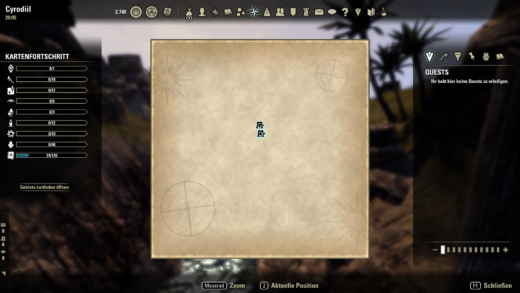
ENGLISH——-Atlas was materially developed with OpenAI ChatGPT. The assistant Atlas generated and revised the Lua code and the original procedural map-background assets. Concept direction, feature decisions and in-game testing were provided by the uploader. The uploader tested the addon iteratively in ESO and reported bugs/results back for correction.LibAddonMenu-2.0 r43 or newer is required. Please install/update it separately.LibGPS is optional and can improve parent-map position conversion.TrueExploration is optional and is only needed while importing legacy exploration data.Atlas turns ESO exploration into a real map-discovery experience. Unexplored areas are covered by a selectable map style and become visible as the character travels. It includes six original map backgrounds, soft discovery edges, simultaneous city/parent-zone exploration, an Atlas map archive, German/English UI, and a read-only importer for the user’s old TrueExploration exploration data.Languages- German and English- Automatic mode follows the ESO client language; manual German/English selection is also available.Credits- Development, Lua code and original procedural map-background assets: Atlas (OpenAI ChatGPT)- Concept direction, feature decisions and in-game testing: uploader- Inspiration and legacy-data compatibility: TrueExploration by Shinni. Atlas is independently implemented; no TrueExploration code or art assets are bundled.- Settings library: LibAddonMenu-2.0 by its maintainers/contributors (external dependency; not bundled)- Optional coordinate library: LibGPS by sirinsidiator and votan (external dependency; not bundled)DEUTSCH——-Atlas wurde wesentlich mit OpenAI ChatGPT entwickelt. Der Assistent Atlas erzeugte und berarbeitete den Lua-Code sowie die eigenen prozeduralen Kartenhintergrnde. Konzeptvorgaben, Funktionsentscheidungen und Tests im Spiel erfolgten durch den Uploader. Das Addon wurde wiederholt direkt in ESO getestet; Fehler und Testergebnisse wurden anschlieend zur Korrektur zurckgemeldet.LibAddonMenu-2.0 r43 oder neuer wird bentigt. Bitte separat installieren bzw. aktuell halten.LibGPS ist optional und kann die Positionsumrechnung auf bergeordnete Karten verbessern.TrueExploration ist optional und wird nur whrend des Imports alter Erkundungsdaten bentigt.Atlas macht die ESO-Karte zu einer echten Erkundungskarte. Unerforschte Bereiche werden von einem whlbaren Kartenstil verdeckt und beim Reisen nach und nach aufgedeckt. Enthalten sind sechs eigene Kartenhintergrnde, weiche Aufdeckrnder, gleichzeitige Stadt-/Gebietserkundung, ein Atlas-Kartenarchiv, deutsche/englische Oberflche und ein nur lesender Import der eigenen alten TrueExploration-Erkundungsdaten.Sprachen- Deutsch und Englisch- Automatik folgt der ESO-Clientsprache; Deutsch/Englisch knnen auch manuell gewhlt werden.Credits- Entwicklung, Lua-Code und eigene prozedurale Kartenhintergrnde: Atlas (OpenAI ChatGPT)- Konzeptvorgaben, Funktionsentscheidungen und Tests im Spiel: Uploader- Inspiration und Alt-Daten-Kompatibilitt: TrueExploration von Shinni. Atlas ist eigenstndig implementiert; es werden weder Code noch Grafiken von TrueExploration mitgeliefert.- Einstellungsbibliothek: LibAddonMenu-2.0 und deren Maintainer/Contributors (externe Abhngigkeit; nicht enthalten)- Optionale Koordinatenbibliothek: LibGPS von sirinsidiator und votan (externe Abhngigkeit; nicht enthalten)
0

Randwache (1.0.2)

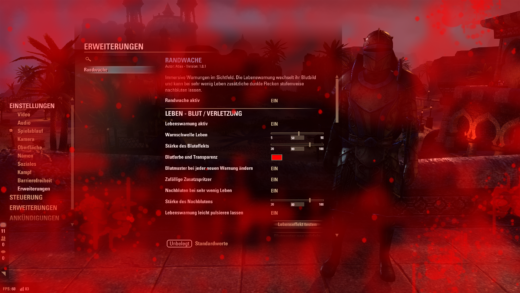
Change Log:——————–Version 1.0.2 ESOUI compliance update- Requires LibAddonMenu-2.0 >= r43.- SavedVariables are server-specific via GetWorldName().- Existing older settings are migrated once per server.- EVENT_POWER_UPDATE uses engine-level unit/power event filters.- Added AddOnVersion and explicit AI disclosure/credits.- Visual effects unchanged.Version 1.0.2 ESOUI-Konformittsupdate- Bentigt LibAddonMenu-2.0 >= r43.- SavedVariables werden mit GetWorldName() servergetrennt gespeichert.- ltere Einstellungen werden einmalig je Server bernommen.- EVENT_POWER_UPDATE nutzt Engine-Eventfilter fr Spieler/Ressourcentyp.- AddOnVersion und deutlicher KI-Hinweis/Credits ergnzt.- Visuelle Effekte unverndert.Description:——————–ENGLISH——-Randwache was materially developed with OpenAI ChatGPT. The assistant Atlas generated and revised code and the procedural overlay assets. Concept direction and in-game testing were provided by the uploader. No code or art assets from other ESO addons are bundled.REQUIRED DEPENDENCYLibAddonMenu-2.0 r43 or newer is required. Please install/update it separately.Randwache is an immersive screen warning addon for The Elder Scrolls Online. Instead of adding more bars or numbers, it makes low resources noticeable directly in your field of view. Health, Magicka and Stamina each have their own visual effect, and a separate cloak effect is used for death and revival.Health Blood and injuryAt low Health, randomized blood patterns and blurred injury effects appear on screen. At critically low Health, additional darker blood spots fade in progressively.Magicka SlimeAt low Magicka, semi-transparent organic slime grows around the screen edges. Randomized patterns, drops and patches keep the effect varied while leaving the center mostly visible.Stamina Exhaustion streaksAt low Stamina, irregular movement/exhaustion streaks appear from the edges. The lower Stamina gets, the denser and stronger the effect becomes.Death Death cloakAt zero Health, a torn black cloak closes in from the outside. A small central viewing slit remains. The cloak stays while the character has no Health, and after revival it recedes gradually so the temporary ghost-like state retains the visual transition. ESO revival controls remain usable.SettingsEach warning can be enabled separately. Thresholds, colors, opacity and effect strength are configurable, and every effect has a test function.LanguagesGerman and English. German is selected for a German ESO client; English is the fallback for other client languages.CreditsDevelopment and procedural overlay assets: Atlas (OpenAI ChatGPT)Concept direction and in-game testing:…

0

GrimUi (1.0)

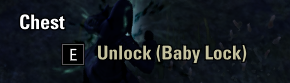
GrimUI is a lightweight collection of humorous UI tweaks for ESO, including custom chest difficulty names, Heavy Snacks, and custom boss names such as Lieutenant Dan and Angry Lizard Lady.

0

Sorcerer Mastery Tracker (1.0)

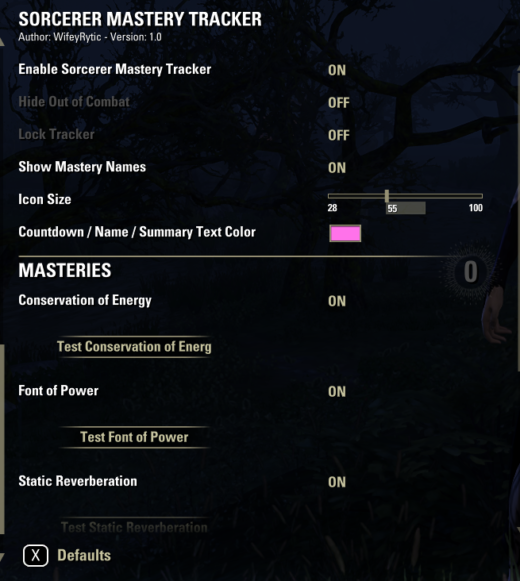
Sorcerer Mastery Tracker provides a clean, visual way to track the Sorcerer Class Masteries you currently have selected.Only your selected masteries are displayed, keeping the HUD clean and easy to read.Features: Selected masteries are detected automatically Inactive masteries display as gray icons Active masteries change to full color Timed masteries display their remaining duration directly on the icon Instant-proc masteries briefly light up when they activate Individual ON/OFF controls for each mastery Hide while out of combat option Adjustable icon size, text color, and position Lock/unlock positioning Automatically hides when ESO menus are open Settings and position are saved between sessionsSupported Sorcerer Masteries: Conservation of Energy Font of Power Static Reverberation Calculated Defense Sphere of InfluenceOptional Dependency:LibAddonMenu-2.0 is recommended for access to the settings menu. The tracker will continue to function without it.Created and tested by WifeyRytic.

0

NagaMapCompletion (7.1)

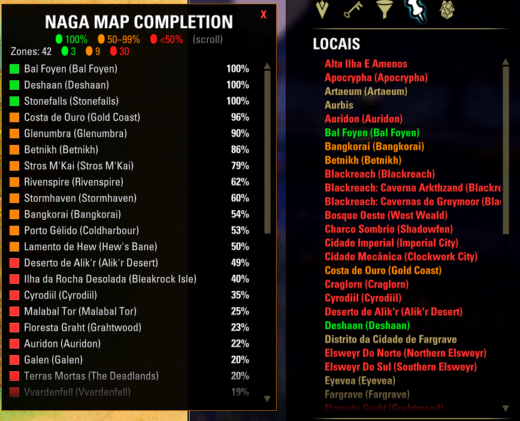
Ver o progresso (painel)No chat, digite: /nmcAbre a lista de todas as Zone Stories com:🟢 Verde = 100% completo🟠 Laranja = 50% a 99%🔴 Vermelho = menos de 50%Use a roda do mouse para rolar a lista.Digite /nmc de novo para fechar.Cores na lista de Locais do mapaAbra o mapa (M).V na aba Locais (cone de alfinete).Os nomes das zonas ficam coloridos pelo mesmo critrio (verde / laranja / vermelho).Zonas sem Zone Story (ex.: algumas caves, Aurbis) podem ficar na cor normal.Comandos/nmc Abre/fecha o painel/nmc refresh Atualiza o progresso na hora/nmc debug Mostra info tcnica no chat/nmc help Lista os comandosAtualizao automticaO addon atualiza sozinho quando voc:completa atividade de Zone Storytermina questganha achievement (skyshard, livro, etc.)descobre POI / wayshrineNo precisa ficar dando /nmc refresh o tempo todo.

0

Common Works UI (1.0)

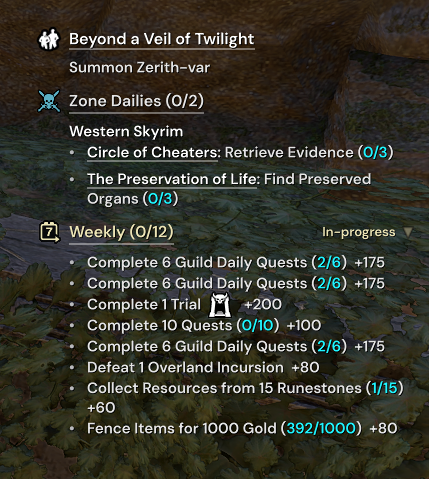
Common Works UII started compiling a personal addon that fit all my gameplay needs, and Common Works is the result.This add-on was written with AI assistance. I have reviewed the code and consider itcorrect, efficient, maintainable and free of unnecessary code, but I am disclosing theuse of AI up front so you can judge for yourself.Quest tracker (replaces the native UI)Each section is optional (mouse over tracker to uncheck sections)Add multiple quests to a special section so you can track multiple quests at once (optional)Click a quest for actions: make primary, track, show on map, share, abandon, port to its zoneHide inside instances (optional)Undaunted pledgesGuild dailiesZone dailies, grouped by zoneBattleground dailiesAlliance War repeatables (Cyrodiil / Imperial City)Tamriel Tomes, with an incomplete / in-progress / all filter; auto-claims points (optional)Queues: dungeon, battleground, Tribute and PvP campaigns, with a live timer and visual indicator when queue popsPvPContested keeps: owner, siege per alliance, cut off, Elder ScrollsOpen-field battles and recent action historyIncoming damage alert for high priority abilities (Corrosive armor, Negate, Rapid Fire, etc.)CC immunity bar (hard and soft)Combat alertsOff balance trackerLow health alerts (with sound and text options)Blastbones rhythm tones (play sounds every X seconds after BB is cast)Watched abilities: alert after the global cooldown, expire reminders, action bar glow (know when your GCD is over with difficult abilities like Stampede, be reminded when you need to recast abilities, glow action bar icon for specific abilities that have cast limitations (like Necromancer’s Siphon))Light attack weave tracker, with hit sound, and a “flash” visual helper, so you get audio and visual feedback when your weaving is on timeAll configurable and customizableQuality of lifeToggle sprint on while mounted (I don’t like toggle sprint on foot, just while mounted)Chat pop-up for group and whisper messages (optional)Integrations (each needs its host add-on)AwesomeGuildStore:Price stepper (easily add +10k, +100k, etc. with automatic rounding)Traits in place of seller namesIgnore list (ignore items sets, intricate items, wildcard searches, more. I got tired of looking at the same items when shopping)Purchase logTamriel Trade Centre: search and price history context menu additionsWritWorthy + Lazy Writ Crafter: chained master writ turn-ins (turn in one to start chain, CWUI will open the next writ(s), the player talks to Rollis, repeat)LoreBooks + CrutchAlerts: 3d Lore Book pins in the world (makes Mages Guild leveling even easier IMO)LarvalTear:Build wheel (bind a key to show a wheel with all your builds to swap on the fly)Current build and sets display (optional HUD element)Poison bar alert (reminds you when you do or don’t have a poison equipped)Dungeon Finder: “Check Fun DLC” and quest-filter buttonsCredit and thanks to the authors of WritWorthy, Dolgubon’s Lazy Writ Crafter, LoreBooks, CrutchAlerts, AwesomeGuildStore, Tamriel Trade Centre, Undaunted Pledges Utilities, LarvalTear (all of which CWUI integrates with, you must install those addons separately), LibAddonMenu-2.0, LibCustomMenu, LibMediaProvider and Solinur, whose LibCombat feeds the light attack tracker and whose SimpleCastbar is where its weave grading comes from.