

Sami’s World Timers (1.0.0)
# SamiWorldTimers
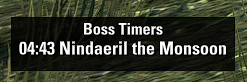
An Elder Scrolls Online addon that automatically tracks overland world boss respawn timers. When a boss dies, a countdown timer appears on your screen, helping you know exactly when to return for the next spawn.
## Features
– **Auto-tracking**: Automatically detects when world bosses die and tracks their respawn timers
– **Manual timers**: Use `/samiwt ` to manually add a timer (e.g., `/samiwt` or `/samiwt Boss Name`)
– **Customizable colors**: Change warning, alert, and default text colors
– **Background styling**: Customize background color and opacity
– **Visual alerts**: Different colors for different timer states:
– Default color: Normal timers
– Warning color: When timer is below the warning duration (default 60 seconds)
– Alert color: When timer is below the alert duration (default 15 seconds)
– **Auto-clear on zone change**: Optionally clear all timers when changing zones
– **Toggleable title**: Show or hide the “Boss Timers” title text
– **Movable UI**: Drag the timer window to reposition it
– **Smart event management**: Automatically disables death tracking in dungeons and trials
## Settings
Access settings via the ESO settings menu or type `/samiwt`:
### Timer Options
– **Timeout Duration**: How long to keep expired timers on screen (default: 8 seconds)
– **Warning Duration**: When timer falls below this, use warning color (default: 60 seconds)
– **Alert Duration**: When timer falls below this, use alert color (default: 15 seconds)
### Color Options
– **Warning Color**: Color for timers in warning state
– **Alert Color**: Color for timers in alert state
– **Default Text Color**: Color for normal timers (default: white)
### Background Options
– **Background Color**: Color of the background behind timers (default: black)
– **Background Opacity**: Transparency of the background (0 = transparent, 1 = opaque, default: 0.8)
### Display Options
– **Show Title**: Toggle the “Boss Timers” title visibility
– **Wipe Timers on Zone Change**: Clear all tracked timers when changing zones
– **Debug**: Enable debug output in chat for troubleshooting
## Commands
– `/samiwt` – Add a manual timer with an auto-generated name
– `/samiwt ` – Add a manual timer with a custom boss name
## Usage
1. Install the addon to your `live/AddOns/` folder
2. Reload the UI in-game
3. When a world boss dies, a timer will automatically appear
4. Use `/samiwt` to manually add timers as needed
5. Configure your preferences in the settings panel
## Notes
– Timers automatically disappear when they expire (after the timeout duration)
– The addon disables death tracking when you enter a dungeon or trial
– Your window position is saved automatically when you move it







