OmniAura (1.0.0)
OmniAura
Your own on-screen alerts for The Elder Scrolls Online. Track buffs, debuffs, resources, set procs and combat state, and show them as icons, bars or text exactly where you want them all from an in-game visual editor, without typing a single ability ID.
Source code: github.com/atgrau/eso-omniaura
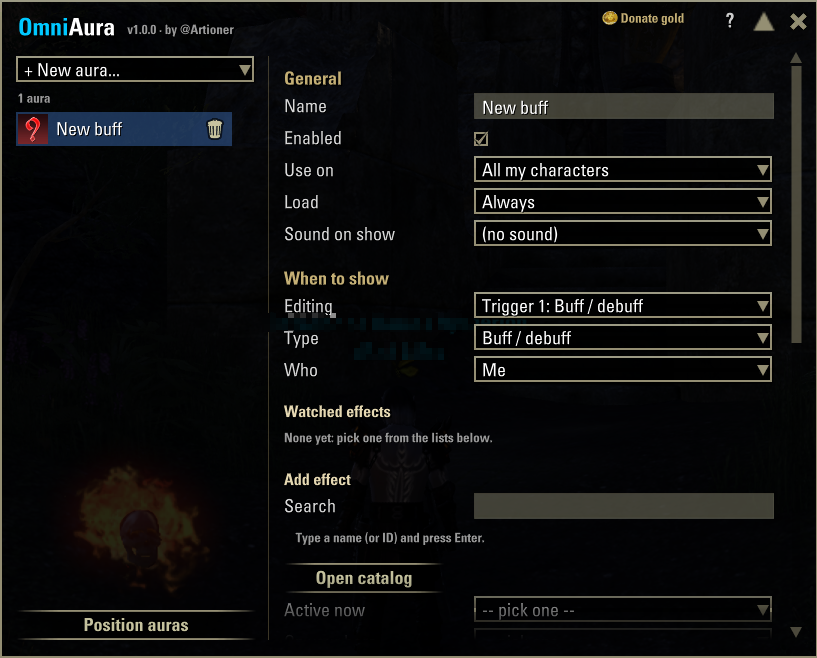
https://raw.githubusercontent.com/atgrau/eso-omniaura/main/screenshots/03-editor.png
Features
Visual editor type /omni, bind a key, or open it from Settings → Add-Ons → OmniAura. Ready-made templates to get started in seconds.
What you can track: buffs and debuffs on you, your target or a boss (active or missing, only yours, minimum stacks), health / magicka / stamina / ultimate, set procs and internal cooldowns, and combat state.
No IDs needed: search every trackable ability in the game, or browse the full catalog by category major/minor buffs, debuffs, all classes, weapons, guilds, world skills, Alliance War, Mundus stones, gear and consumables. Shortcuts for your active effects, your skill bars and recent procs.
Displays: icon (timer, stacks, duration shading, greyed out when missing), icon with text, progress bar or plain text, with custom colors, text templates and an optional sound.
Position on screen: place each aura over your normal game interface one at a time or all at once and drag the corner to resize it.
Per character or account-wide: each aura can be used on all your characters or only on one.
Clean editor: only the options that make sense for each aura are shown, plus a built-in help section.
Getting started
Type /omni to open the editor.
Pick a template in + New aura…, for example “Buff on me”.
In “Add effect”, choose the effect from the search, the catalog, “Active now”, your bars or “Recent”.
Press Position on screen, drag the aura where you want it and press Done.
Chat commands
/omni open/close the editor
/omni list list auras (numbered)
/omni show|on|off|del|copy
/omni scan current effects with their IDs
/omni log log the ability IDs you use
/omni unlock | lock position all auras on screen
/omni reset confirm delete all auras
Dependencies
None. Optional: LibAddonMenu-2.0 adds an OmniAura entry with help to Settings → Add-Ons (the editor works without it via /omni).
Languages
English, Spanish, German and French (follows your game language).
Feedback, source & license
Bug reports and ideas are welcome here in the comments or on GitHub.
OmniAura is free software licensed under the GNU GPL-3.0: you may modify and redistribute it as long as you keep the author credit and publish your changes under the same license.
Support
If you enjoy OmniAura, you can support it on Ko-fi or send some gold in-game to @Artioner (EU megaserver) there is a “Donate gold” button in the editor.