
Nirnhoned Metrics (1.0.0)
Change Log:
——————–
1.0.0 first public release
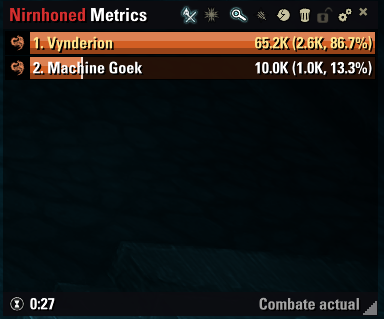
Damage and healing meter with class-colored progress bars: total, DPS/HPS and share of the group.
Group damage and healing shared through LibGroupCombatStats, plus an estimated “Rest of group” bar in boss fights.
“My abilities” view with your damage or healing per ability.
History of recent fights and fight duration in the footer.
Settings in Settings → Add-Ons; optionally hide out of combat or in PvP.
English, Spanish, German and French.
Description:
——————–
Nirnhoned Metrics
A damage and healing meter for The Elder Scrolls Online. Colored bars with every player’s total damage or healing, DPS/HPS and share of the group for each fight, plus a breakdown of your own abilities. Everything in a small window you can move, resize and configure.
Screenshots were taken with the Spanish game client. The add-on is fully translated into English, German and French and follows your game language.
Features
Damage meter with colored bars 4.43M (53.4K, 9.5%): total, DPS and percentage of the group, ranked from highest to lowest, with class icons and class colors.
Damage and healing switch between measuring damage and healing; healing shows HPS and, in the tooltip, overhealing.
Your group ESO only tells each player about their own damage, so every group member measures theirs and shares it through LibGroupCombatStats. Group members with Nirnhoned Metrics appear with their own bar; your numbers are exact, theirs are approximate.
Rest of group in boss fights, the health the bosses lose minus the damage already known gives an estimated bar for everyone who does not share theirs.
My abilities your own damage or healing per ability (and per pet), colored by damage type. Hover over a bar for hits, critical rate, average and highest hit.
Fight history the last fights are kept; open any of them from the fights icon. The footer shows how long the fight lasted.
Move and resize unlock the window with the padlock, drag it from anywhere and resize it from its edges or the bottom-right corner.
Settings bar style (progress bar or flat), sizes, text sizes, opacities, class colors, which values to show, character or @account names, only show in combat, hide in PvP, pet damage, history size and more.
Languages English,…