
AbyssUI (17/10/2026)
🌑 AbyssUI 🌑
A dark, polished all-in-one HUD for The Elder Scrolls Online
Version 1.9.25 Author: N A G A
✨ What is AbyssUI?
AbyssUI brings a full set of HUD modules into one addon and one settings menu: resource bars, target and group frames, buffs, a circular minimap, a quest tracker with fast travel, damage statistics and a lot of quality-of-life extras. Every module can be enabled or disabled on its own, and everything can be moved with ESO’s native Edit HUD.
🧩 Features
https://imgur.com/a/NaCY7EF
❤️ Character HUD
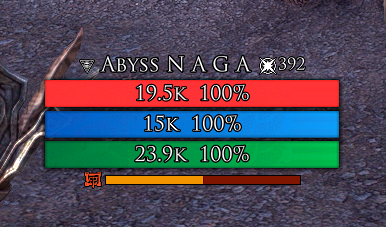
🩸 Resource bars health, magicka and stamina with custom text, shield overlay, gain/spend/low-resource effects and free positioning
⚡ Alternative bar a single XP / Champion Points bar that switches to your mount stamina while riding, with your character buffs shown below it
📈 Experience tracker animated XP gains, level-up animation and sound, Champion icon
🔢 Level visuals gradient level number with a level-up flourish
🎯 Action bar frames custom frames for skills, ultimate, quickslot and companion ultimate, cooldown text, ultimate percentage, use animation
🔮 Cast bar custom casting bar with icon, timer and tick marks
🎯 Target, Group & Companion
👁️ Target frame name, level / champion, alliance, AvA rank, boss decoration, shield, execute icon with pulse and damage feedback
👥 Group frames role, health, shield, ready check, level, death animation, right-click member menu and preview mode
🐺 Companion frame health, rapport and XP, plus a quick companion switcher
🛡️ Buffs & Synergies
✅ Player and target buffs / debuffs, passives, blacklist, custom buff panel and widgets
🌀 Synergy alert with animated border and preview
🗺️ Minimap
🧭 Circular minimap with map rotation, adjustable player arrow and camera cone
📍 Border pins by type (assisted quest, group leader, waypoint, bank, stables, wayshrine, treasure, available quests, crafting, world events, AvA/BG, keeps, skyshards) with a distance setting in meters for each pin type
🖼️ Selectable frames, “infinite” background where there is no map, and fine-tuning of map size and frame fit
🏷️ Zone name (top or bottom, custom font and size) and fixed quest-area circles
🚩 Key binding to place a waypoint at the cursor
📜 AbyssQuest quest tracker & fast travel
🚀 Fast travel menu to wayshrines, houses, friends, guildmates and group members
🎡 Editable quick-access wheel (8 slots) and lockable buttons
📌 Quest tracker, route to your objective, map panel and zoom bar
⌨️ Commands: /qtm Key bindings: toggle menu, travel to main quest, lock buttons
🏹 QuestArrow
➡️ An arrow that points to your selected quest objective and suggests wayshrines when fast travel shortens the trip, including cross-zone lookup when game data allows
⌨️ Command: /qa help
📊 Damage Statistics
⚔️ Mini meter, Group DPS, Buffs Up and a detailed analytic report (targets, abilities, uptimes, equipment, champion points) with saved reports
🎉 Alerts, sounds & extras
💥 Damage numbers with critical sounds and a DPS mini-game
💀 Kill sound on killing blows
🏴 PvP kill celebration with chains, progressive sounds and duels
📣 Group callouts for important group / leader messages
🏆 Achievement alert with a custom look
🎁 Loot history with rarity pulses, legendary sounds and sequential reveal
🎥 Adventure camera separate camera profiles for combat and exploration
✨ Immersive teleport when using recall
🧭 Compass styles plus world events on the compass with distance in meters
📋 Info panel latency, FPS, memory, clock, soul gems, mount, armor, weapons, bags and gold (/nagaip show | hide | reset)
🤖 Automations small quality-of-life helpers (mail, locked items, jump to leader, undaunted pledges, containers, books and more)
https://i.imgur.com/BYlqllo.png
https://i.imgur.com/XlRXunt.gif
https://i.imgur.com/Y41yQCZ.gif
https://i.imgur.com/9HC617f.gif
https://i.imgur.com/0luXnml.gif
https://i.imgur.com/ADUL25Y.gif
https://i.imgur.com/xCeGWpb.gif
🌍 Languages
English Portugus (BR) Deutsch Franais Espaol Русский 日本語 中文 Polski
The language follows your game client automatically.
📦 Requirements
LibAddonMenu-2.0 (required)
⚙️ Installation
Close the game.
Extract the AbyssUI folder into DocumentsElder Scrolls OnlineliveAddOns.
Make sure LibAddonMenu-2.0 is installed.
Start ESO, enable AbyssUI, and open Settings → Add-Ons → AbyssUI.
Use ESO’s Edit HUD to move any element.
💾 Saved settings
Settings are saved per server (EU / NA / PTS), and character settings are saved per character. Settings from older versions are migrated automatically.
🙏 Credits
AbyssUI is built on ideas, systems and assets from these addons:
🔹 LuiExtended XP / mount alternative bar
🔹 Bandits User Interface damage statistics and buffs system
🔹 MiniMap (FyrMM) border pins, background and wheel frames
🔹 MundusGate quest tracker and fast travel (included as AbyssQuest)
🔹 QuestArrow quest arrow
🔹 NirnSteelUI – Alerts, sounds & extras
🔹 LibAddonMenu-2.0 settings menu
🔹 If any author does not want their addon here, please contact me.
Uses ESO’s public Lua / UI APIs and client-supplied fonts. API research: ESOUI wiki and the published ESOUI client source.
🤖 AI disclosure: this addon was developed with AI assistance, including code generation.
Not affiliated with or sponsored by ZeniMax Media Inc.
💬 Found a bug or have a suggestion? Leave a comment feedback is very welcome! 🖤







