

ALT Addon Loading Times (1.0)
Addon Loading Times (ALT) is a diagnostic tool that measures how much time and Lua memory each of your addons contributes to the game’s reload/load screens.
DependsOn: LibAddonMenu-2.0, LibExtendedJournal
Features:
Load Time Profiling: Automatically tests each enabled addon by disabling them one by one and measuring the difference in ReloadUI times.
The test runs cumulatively each addon is disabled in sequence, and the time saved is calculated as the contribution of that addon. All addons are restored after the test completes.
Memory Usage Tracking: In addition to load times, the addon also measures how much Lua memory each addon consumes on init.
Progress Feedback: During the test, chat messages show which addon is being tested and the current progress (e.g., “Testing: 5/43 Disabled: AwesomeGuildStore”).
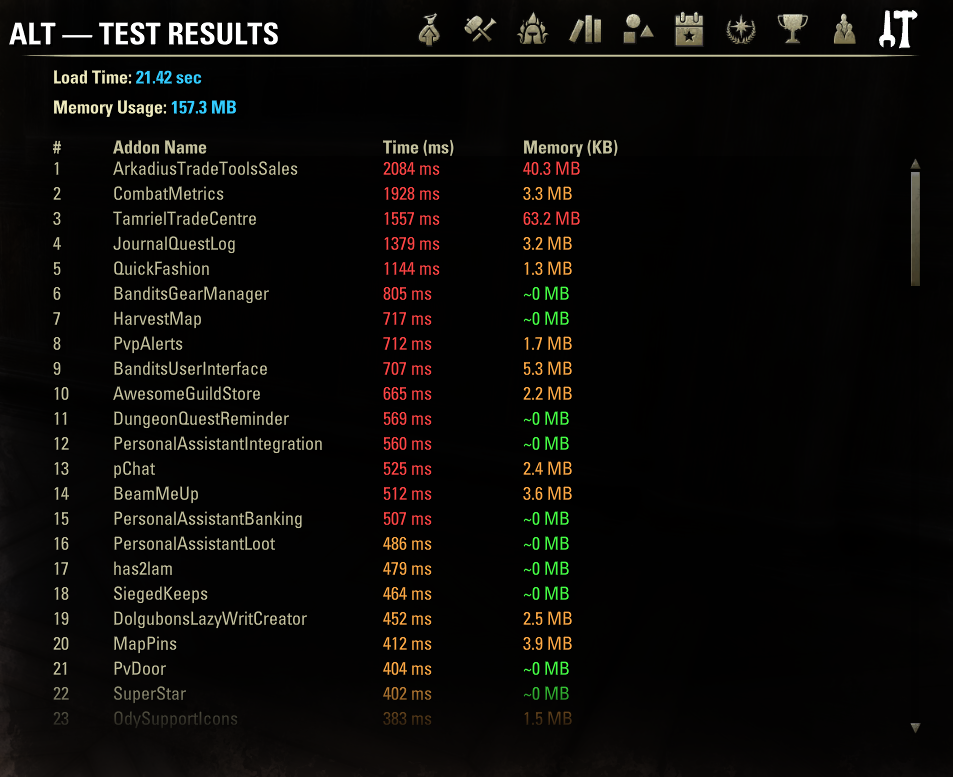
Results Panel (LibExtendedJournal): After the test completes, results can be viewed in a dedicated ExtendedJournal tab with sorted columns. Access via settings menu.
https://cdn-eso.mmoui.com/preview/pvw16196.png
Results include:
Rank addon position by performance impact.
Addon Name.
Time Contribution in milliseconds (color-coded).
Memory Usage in MB (color-coded).
A summary line at the top shows total load time and total memory usage from all tested addons.
Confirmation Dialog: Before the test starts, a dialog shows the number of addons to test and estimated time, with a warning to move to a safe location and adjust Reload Delay if needed.
https://cdn-eso.mmoui.com/preview/pvw16198.png
Adjustable Reload Delay: You can set the delay between each reload from 0 to 15 seconds. A higher delay allows you to move your character between reloads to reset the AFK kick timer during long tests.
0 seconds you will see nothing but loading screen with rotating tooltips.
2+ seconds recommended to leave some window to move character from time to time to avoid being kicked for inactivity.
Color-Coded Results:
Green: Low impact (~0 ms / <1 MB)
Orange: Medium impact (250-500 ms / 1-25 MB)
Red: High impact (>500 ms / >25 MB)
Libraries: The addon automatically excludes libraries and itself from testing in current version. A separate test for libraries will be added later.
Test Persistence: If you get disconnected or the game crashes during a test, the addon will automatically resume testing from where it left off after you log back in.
Clear Results: A button in the settings panel allows you to clear all stored test data and reset the addon when you dont need it anymore.
https://cdn-eso.mmoui.com/preview/pvw16197.png
How It Works:
Baseline measurement taken with all addons enabled
Each addon is disabled one by one (cumulatively)
After each disable, ReloadUI is called and load time measured
Contribution = Previous time – Current time
All addons are restored after test completion
Usage:
Open Settings → Addons → ALT.
Adjust Reload Delay if needed (default 3 seconds).
Click “Start Load Time Test”.
Confirm the dialog.
Wait for the test to complete.
Review results in the “ALT Test Results” tab in your ExtendedJournal.
Hints:
Move your character to a safe location (tavern room recommended) before starting to minimize hardware desync.
If you have many addons (100+), set Reload Delay to 3+ so you can move your character from time to time to reset AFK kick timer.
The estimated time in the confirmation dialog can barely be trusted, very rough numbers. My test took 50 minutes, instead of proposed 137. I will see how and if i can tweak it.
Results persist between game sessions unless manually cleared.







