

Armory Save Guard (1.1.2)
Change Log:
——————–
# Armory Save Guard Changelog
Full version history for Armory Save Guard. See README.md for current features, usage, and requirements.
—
### 1.1.2
– **Corrected the AI-assistance notice.** It wrongly said the addon had not
been tested in-game; the author has tested it. The manifest description and
README now say “reviewed and tested in-game by the author for functionality,”
matching the rest of this addon family.
– Shortened README.md. The detailed API verification list lives in the Lua
header comments.
### 1.1.1
– **Reverted the feedback change from 1.1.0.** Messages go to chat only again,
as uncolored system messages prefixed “, with the same
wording as 1.0.0. The on-screen `ZO_Alert` popups and alert sounds are
removed. They were added in 1.1.0 without being requested.
– All other 1.1.0 changes (disclosure, credits, manifest, docs) are kept.
### 1.1.0
– **Added the required AI-assistance disclosure** to the manifest description
and README, per ESOUI’s addon release rules. (This entry’s notice wrongly
said the addon was untested; corrected in 1.1.2.)
– **Standardized the author credit** to `@Kreksar5 and Claude.ai` in the
`## Author` manifest field and the README byline, matching the rest of this
addon family.
– **Added a Credits section** to the README. It credits ZeniMax Online Studios
for the vanilla dialog code this addon copies, and names two existing addons
with similar build-lock features (Armory Style Manager, RidinDirty) along
with their authors. No code or ideas were taken from those addons.
– Manifest `## APIVersion` updated from `101050` to `101050 101051`. Checked
the esoui/esoui PTS branch (API 101051): every file and function this addon
relies on is unchanged or has the same signature.
– Manifest `## Title` changed to `Armory Save Guard` (with spaces) for
readability in the in-game Add-Ons list. The folder and code name stay
`ArmorySaveGuard`, so…
Description:
——————–
Armory Save Guard
by @Kreksar5 and Claude.ai
AI-ASSISTED ADDON. Written with Claude.ai. This addon has been reviewed and tested in-game by the author for functionality.
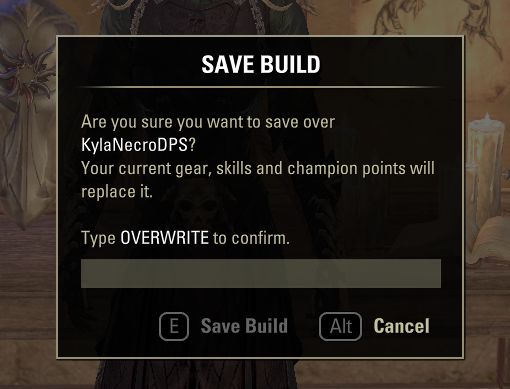
Stops you from accidentally overwriting an Armory build. Instead of a one-click Accept, you must type OVERWRITE before a build can be saved over, just like typing DESTROY to destroy a valuable item.
For the full version history, see the Change Log tab, or CHANGELOG.md included in the download.
Usage
/armorysaveguard
With no argument, toggles the typed confirmation on or off. On by default, account-wide.
The word is case-sensitive.
Requirements
No dependencies.
Keyboard mode. Gamepad mode uses the game’s normal save prompt.
How It Works
Pre-hooks ZO_ARMORY_MANAGER:ShowBuildOperationConfirmationDialog and, for save requests only, shows a typed-confirmation dialog in place of the game’s Accept prompt. On confirm, it saves the build exactly the way the game’s own prompt does, so the normal saving/success/failure popups still appear.
Verification Notes
All API usage was confirmed against the esoui/esoui source (live API 101050 and PTS API 101051) before being used.
Known Limitations
Keyboard mode only.
Prompt text and confirmation word are English only.
Addons that lock the Armory save option (see Credits) may hook the same code.
Credits
ZeniMax Online Studios the save logic and typed prompt follow the game’s own ARMORY_BUILD_SAVE_CONFIRM_DIALOG and CONFIRM_DESTROY_ITEM_PROMPT code.
Related addons no code or ideas were taken from them, but they offer a build-lock alternative: Armory…







