Enshrouded Gem of Destiny Location and Stats
The Gem of Destiny is a Weapon Gem in Enshrouded that marks an enemy and generates an orb to restore resources when the enemy is defeated.


The Gem of Destiny is a Weapon Gem in Enshrouded that marks an enemy and generates an orb to restore resources when the enemy is defeated.
High-quality, royalty-free open-source fonts (SIL OFL) for ESO.Integrates with LibMediaProvider (LMP) and includes in-game UI & chat font override settings.Required:LibAddonMenu-2.0,LibMediaProvider-1.0.
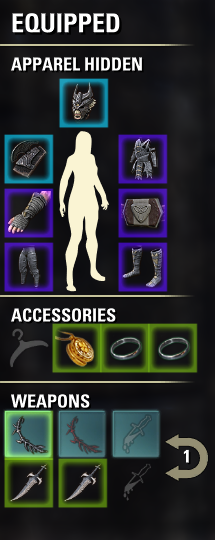
Highlights equipped sets and matching backpack items with coordinated glowing colors. Prevents accidental set breakage.Required: LibAddonMenu-2.0. Special thanks to Baertram for feedback and guidance.
There’s still time to get permanent access to Season One’s Tamriel Tome—don’t miss out!
PurgeRadar Never Miss a Cleanse AgainVersion 1.5.0 by SuperSecretTech with AI assistance and using PurgeTracker as a foundation.Slash command: /purgeradarWhen someone in your group is about to die to a purgeable DoT or an Ice Tomb heal-check, you do not have time to hunt through frames. PurgeRadar watches group effect events at the engine level, then lights up the person who needs you on screen, on their unit frame, and with a floating marker until the threat is gone.What it doesInstant, role-aware alertsThe moment a tracked effect lands on a group member, PurgeRadar fires:RoleWhat you seeHealer / / with the players nameDPS / Tank stack on the circles so healers can reach themAnyoneOptional layered alert sound (volume 15)Special callouts:Sanitys Edge Frost Bomb (183790, 185399) → |c66CCFF|r HEAL TO FULL before they freeze!Sunspire Frigid Cold (116584) → same Ice Tomb messagingOssein Cage Disease Leak → tanks are excluded; everyone else gets a hard stack callScreen text can be turned off independently of sound and icons.Floating icons that stay until it mattersWith LibFloatingIcons, a colored marker sits above the target:Heal-checks / Ice Tombs icon stays for the full effect duration (until they leave the tomb). Range does not hide it.Purgeable DoTs icon shows when they are in purge range; hides when they walk out.OneFrame / group-frame health bar colorsPurgeRadar can recolor the health bar on group and raid frames so the person who needs attention is obvious at a glance:Purge in range / out of rangeHeal-check in range / out of rangeAll five color slots are dropdown presets (green, orange, cyan, purple, blue, red, yellow, white, magenta).OneFrame integration is optional disable it if another frame addon already owns bar colors; overrides clear cleanly when effects fade or the option is turned off.Zone entry warningStep into Spindleclutch II, Cradle of Shadows, Maw of Lorkhaj, Halls of Fabrication, Asylum Sanctorium, or Blackrose Prison and get a large on-screen reminder to have Purge equipped. Heal-check-only zones are intentionally skipped.Full control in settings (/purgeradar)AudioSound on/offVolume slider (15 layered plays)Alerts & IndicatorsScreen alerts (CSA)Floating iconsOneFrame / group frame colorsZone DoT warningColorsPurge in-range (icon + frame)Purge out-of-range (frame)Heal-check in-range (frame)Heal-check out-of-range (frame)Heal-check / Ice Tomb floating iconTracked AbilitiesEvery ability is listed with a checkbox, labeled , , or .Uncheck anything you do not care about changes apply immediately (no reload required for toggles).Performance designC-level event filters on ability ID + group unit prefix the handler only runs for tracked effects on group membersUpfront locals for hot pathsRange polling only while something is active (200 ms loop), then fully unregistersAccount-wide SavedVars, server-scoped via GetWorldName()SavedVars version 2 for clean migration of new defaults
Read a letter from ESO’s Game Director, Nick Giacomini, on the future of the game on macOS.
Player feedback and a recent update have resulted in changes to the Tamriel Tomes reward system.
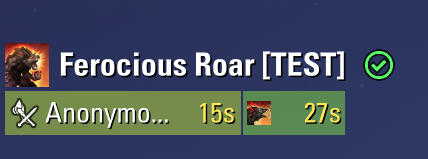
RoarTracker helps werewolf players keep track of Major Courage and Feeding Frenzy in their group. Both buffs share a compact panel, so you can see who has them, how much time is left, and who is outside your range.The panel appears while you are grouped and in werewolf form. All settings and the panel position are account-wide.Features:banana::banana::banana:- Two buff timers per player: Major Courage on the left, Feeding Frenzy on the right.- Colour-coded backgrounds: colours gradually change from green to yellow, orange and red as buffs run out. Missing buffs have a dark grey background.- 10-metre range check: players outside the radius are dimmed, while their timer text stays readable. A checkmark beside Ferocious Roar means every displayed player is in range; a cross means someone is outside it or their position is unavailable.- Group filters: show or hide yourself, or display only damage dealers. The range indicator follows these filters. DD filtering uses each players selected group role.- Adjustable layout: columns, panel width, row height, scale, background opacity and out-of-range brightness.- Adjustable refresh interval: 1500 ms, with a default of 25 ms.- Solo test mode: check your own buffs and position the panel without joining a group or transforming.Dependencies:banana::banana::banana:Install and enable both libraries:- LibCombatAlerts 0.8.2 or newer.- LibAddonMenu-2.0 r40 or newer.Group Buff Panels is not required. Other group members do not need RoarTracker installed.Getting started:banana::banana::banana:Install RoarTracker and its dependencies, restart ESO and enable them in the Add-Ons menu.Join a group and enter werewolf form, or type /roartracker test to set up the panel on your own. Unlock the panel, drag its header to the desired position, then lock it again.Settings are available under Settings → Addons → RoarTracker.Commands:banana::banana::banana:- /roartracker open settings.- /roartracker test toggle the self-only test panel.- /roartracker unlock allow dragging.- /roartracker lock lock the panel.- /roartracker reset reset its position.Tracking notes:banana::banana::banana:Major Courage is tracked regardless of its source. Feeding Frenzy tracks the active buff, rather than the synergy cooldown.Test mode shows your real buffs; it does not generate sample timers. Repeat the test command to return to normal operation.Credits:banana::banana::banana:Inspired by Group Buff Panels by @code65536. Thanks for the inspiration and for LibCombatAlerts.
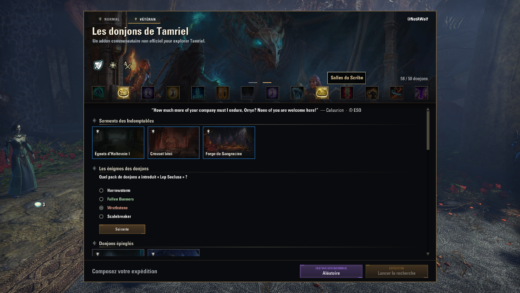
PUBLIC BETA WORK IN PROGRESSThis addon is still being improved. You may encounter bugs or changes between updates. Feedback and bug reports are welcome!This addon was developed with AI assistance for coding, translation and review, and tested in game by its author.**Required dependency: LibSets install or update it separately through Minion.****NotAWolf Dungeon Finder** offers an illustrated interface to browse ESOs four-player dungeons and choose your next adventure, in Normal or Veteran mode.Features:- Switch between Normal and Veteran dungeons.- View daily Undaunted pledges.- Pin your favorite dungeons.- Browse dungeon achievements and their tooltips.- Test your knowledge with 150 questions covering 58 group dungeons.- Select your role and queue through ESOs native Activity Finder.- Right-click the background to select all available dungeons or clear your selection.- Open the addon from the main menu icon, a keybind or `/nawdungeons`.The interface and quiz are available in French and English, selected automatically according to your game language.**Optional dependency:** LibUndauntedPledges for daily pledge data.Created by **@NotAWolf**.Credits: Baertram / LibSets, code65536 / LibUndauntedPledges, UESP contributors for dialogue transcriptions, Xynode Gaming for dungeon reference guides, and ZeniMax for ESO artwork and game assets.This is an unofficial community addon and is not affiliated with or endorsed by ZeniMax Online Studios.
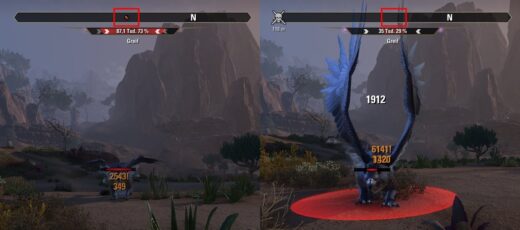
This simple addon removes the hostile enemy indicator from the ingame compass by replacing it with a blank texture.If you want to deactivate it on a running game, it will still render the indicators invisible until you restart the game.this was created for a request on the official forum Link