
Enshrouded Eternal Fireball II Spell Recipe and Stats
Eternal Fireball II is a Spell in Enshrouded that deals stronger fire damage in a medium-sized area of effect, requiring only a Mana cost.
Fireball IV is a Spell in Enshrouded that deals stronger fire damage in a medium-sized area of effect.
Eternal Fireball is a Spell in Enshrouded that deals fire damage in a large area of effect and only requires a Mana cost.
Fireball II is a Spell in Enshrouded that deals fire damage in a medium-sized area of effect.
Fire Bolt is a Spell in Enshrouded that deals fire damage to a single target.
Enjoy new ways to play and earn rewards as you begin the hunt anew this June!
Updated: Update 50 – Season 0 + 1 Type: Solo Cyrodiil & Battlegrounds Buildname: Blaze Table of Contents Cyrodiil Setup Gear Skills Class Mastery NEW Scribing Skills Champion Points Important Info (Food, Mundus, Race, Potions, Passives, Attributes) Resource Management Battlegrounds Dragonknight Subclassing Outfit Style Showcase Update Log Welcome to the ESO Magicka Dragonknight Build […]
The post ESO Magicka Dragonknight PVP Build – Mag DK appeared first on AlcastHQ.
https://i.imgur.com/r4HXQaC.pngFarming Party PlusCleaner group farming loot tracking for Elder Scrolls OnlineFarming Party Plus is an ESO addon built for organized farming groups, node runs, fishing events, and loot tracking without all the extra clutter.Instead of filling your totals with junk gear, white trash drops, or low-priority materials, Farming Party Plus gives you more control over what actually counts.What It DoesTracks loot for you and your group from one host clientSupports a material whitelist for node farmingLets you choose exactly which materials countShows tracked loot in a member scoreboard and item breakdown windowLogs loot to chat and the loot history windowSupports optional helper sync through a separate addonSupports fishing and gutting sessions, including processed fish subtraction and Fish / Perfect Roe outputsShows clear Stack Found history lines when an already-held common-fish stack gets claimed into the session totalSupports saved whitelist profiles and recipe value filteringMain Feature: Node Farming WhitelistWhitelist mode is the heart of Farming Party Plus.Instead of only tracking loot by item quality, you can tell the addon exactly what should count for the run. That makes it much better for focused farming events like:Ore runsWood runsCloth runsJewelry dust runsAlchemy material runsEnchanting rune runsProvisioning ingredient runsFurnishing material runsBait and fishing runsWhen whitelist mode is enabled, only the items you turn on will count.Category-Based FilteringThe whitelist window is split into clean categories, so building a custom farming profile is quick and easy.Categories:Ore | Logs | Cloth & Leather | Jewelry Dust | Alchemy | Enchanting | Provisioning | Common Bait | Rare Bait | Fishing | Furnishing MatsEach category supports individual item toggles, plus quick All On and All Off buttons.Saved Whitelist ProfilesWhitelist setups can be saved account-wide as reusable profiles.This is handy if you swap between different event types, such as fishing events, ore routes, furnishing material runs, or recipe-focused node routes.Profiles can be named, saved, loaded from any character, and deleted later if you no longer need them.Main addon settings are also stored account-wide now, so whitelist choices, profiles, and related settings no longer drift between characters on the same account.Recipe Value FilteringWhitelist mode also includes a Recipes rule.When recipe tracking is enabled, recipes only count if they meet your configurable minimum value. This keeps low-value recipes out of money-focused event totals while still letting valuable recipe drops count.Defaults: Recipe tracking is off by default, and the minimum recipe value starts at 3000g.Standard Tracking ModeIf whitelist mode is turned off, the addon falls back to a more traditional tracking setup:Minimum item quality | Gear filter | Motif filter | Self loot | Group lootWhile whitelist mode is enabled, Minimum Item Quality is not used and is disabled in the settings panel. This helps avoid confusion during whitelist-driven events, especially when switching characters or clients.Fishing and Gutting SessionsFarming Party Plus now has much better support for fishing sessions and gutting events.It can:Count caught fishShow when a previously held fish stack was folded into the session totalSubtract processed fish from the scoreboardCount FishCount Perfect RoeWarn when ESO Auto-Add to Craft Bag would interfere with tracked fishing outputsThis makes the addon a better fit for guild fishing events where processed items are part of the payout picture.It also supports stack-aware fishing sync recovery for other FarmingPartyPlus clients. If another client resets and later catches another fish into the same tracked stack, the receiver can rebuild the correct stack-backed total instead of only seeing the new +1.Clearer Member Scoreboard StatesThe member scoreboard now makes live event status easier to read:A green H marks the local FarmingPartyPlus host rowHelper-active members keep a *Offline grouped characters gray out instead of looking fully activeInstallationInstall the main addon folder into your ESO addons directory:Folder:FarmingPartyPlusTypical path:DocumentsElder Scrolls OnlineliveAddOnsFarmingPartyPlusRequired LibrariesLibAddonMenu-2.0 | LibAsync | LibPriceOptional Sync HelperThere is also an optional helper addon:FarmingPartyPlusSyncThis is not required for normal host tracking.Its main purpose is to improve fishing-session accuracy, especially for fish gutting and related outputs that are easier to detect on the local client than on the host.Most useful for:Processed fish subtractionFishPerfect RoeOther fishing-session inventory changes the host may not see reliably on its ownIf the helper is not installed, the main addon still works normally for standard host-visible loot tracking. Fishing and gutting events may simply be less complete than they are with the helper installed on non-host group members.If both addons are installed on the same client, the helper can still contribute local fishing and gutting sync to other FarmingPartyPlus users in the group.Optional Sync LibraryIf you want to use the optional sync path, install:LibGroupBroadcastLibGroupBroadcast is not required for normal FarmingPartyPlus use. It is only needed for FarmingPartyPlusSync and optional sync receive support in FarmingPartyPlus.CommandsCore:/fpp scoreboard | /fpp start start | /fpp stop stop | /fpp status status | /fpp reset reset dataWindows:/fpp filters whitelist window | /fpp loot loot history | /fpp log loot historyWhitelist:/fpp whitelist on enable | /fpp whitelist off disableGroup / Sync:/fpp update refresh party | /fpp sync sync receiver status | /fppsync helper sync sender statusOutput / Help:/fppc output scores to chat input | /fpphelp command helpLegacy Aliases:/fp same as /fpp | /fpc same as /fppc | /fpploot loot history windowOptional Helper IndicatorsThe members window shows whether the host has observed helper sync traffic from a party member.This helps confirm that a helper client is actually talking to the host during event testing.NotesSaved variables update on /reloadui, logout, or exitGroup loot tracking depends on what the ESO API exposes to the host clientSome actions are easier to see locally than remotely, which is why optional sync exists as a separate pathGear and motif filters still apply when whitelist mode is activeLoot history can be shown or hidden independently of chat logging through the keybind or loot-window commandsFishing outputs can be affected by ESO Auto-Add to Craft Bag, so the addon warns when that setting would interfere with tracked fishing resultsCreditsOriginally based on Farming Party, which was originally based on Group Loot by Temeez.Pricing support is intended to work with libraries and tools commonly used by ESO trading addons.
https://i.imgur.com/z9aEOVE.pngFarming Party Plus SyncOptional helper sync for Farming Party Plus fishing and gutting sessionsFarming Party Plus Sync is an optional helper addon for Farming Party Plus.It is meant for party members who are not hosting the event, but still want to help the host track loot changes that are easier to detect locally than remotely.This is especially useful during fishing and gutting sessions, where some inventory changes may be visible on your own client before the host can reliably see them.What It DoesBroadcasts helper-side fishing and gutting updates to a Farming Party Plus hostSends grouped gutting updates for processed fish subtraction, Fish, and Perfect RoeCan also sync non-guttable fishing catches, such as bait and blue trash fish, so other FarmingPartyPlus clients see the same fishing-session extrasSends touched fish-stack claim state so other FarmingPartyPlus clients can rebuild correct stack-backed fishing totals after resets or late joinsWarns the player when ESO Auto-Add to Craft Bag would interfere with tracked fishing outputsWhat It Does Not DoThis helper is intentionally small. It is not a replacement for the main addon.It does not provide the scoreboard or main loot windowsIt does not replace Farming Party PlusIt is not meant to be installed on the host instead of the main addonIf Farming Party Plus is installed on the same client, the helper can still send local fishing and gutting sync to other FarmingPartyPlus users in the group.The main addon is expected to ignore its own outbound sync locally, and same-client mesh sends are delegated safely so the helper does not collide with the main addon’s local protocol declarations.DependenciesRequired:LibGroupBroadcastNot required:LibPrice | LibAddonMenu-2.0 | LibAsyncInstallationInstall this addon folder into your ESO addons directory:Folder:FarmingPartyPlusSyncTypical path:DocumentsElder Scrolls OnlineliveAddOnsFarmingPartyPlusSyncAlso install:LibGroupBroadcastThis setup is mainly useful for fishing and gutting events where the host may not see every local inventory change directly through the ESO API.CommandHelper Status:/fppsync show helper sync sender statusNotesThe helper batches gutting-related sync updates before sending them to the hostThe helper also syncs touched fish-stack claim state so receivers can recover stack-backed fishing totals after a resetThe helper warns if ESO Auto-Add to Craft Bag is on because that can bypass tracked fishing outputsNormal event hosting, whitelist filtering, and scoreboard display all live in FarmingPartyPlus, not in this helper addonQuick SummaryUse Farming Party Plus Sync when you want non-host party members to help report fishing and gutting changes back to the group.Use Farming Party Plus when you want the actual event tools: scoreboard, loot windows, whitelist filtering, chat output, and host-side tracking.
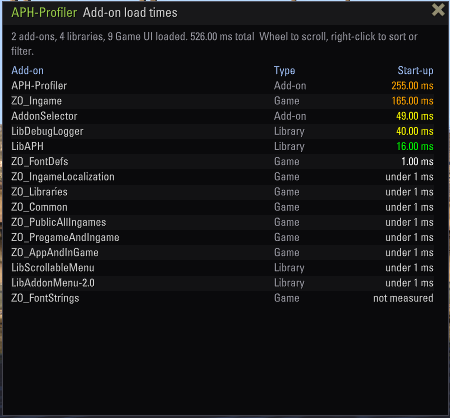
Addon Loading Times (ALT) is a diagnostic tool that measures how much time and Lua memory each of your addons contributes to the game’s reload/load screens.DependsOn: LibAddonMenu-2.0, LibExtendedJournalFeatures:Load Time Profiling: Automatically tests each enabled addon by disabling them one by one and measuring the difference in ReloadUI times.The test runs cumulatively each addon is disabled in sequence, and the time saved is calculated as the contribution of that addon. All addons are restored after the test completes.Memory Usage Tracking: In addition to load times, the addon also measures how much Lua memory each addon consumes on init.Progress Feedback: During the test, chat messages show which addon is being tested and the current progress (e.g., “Testing: 5/43 Disabled: AwesomeGuildStore”).Results Panel (LibExtendedJournal): After the test completes, results can be viewed in a dedicated ExtendedJournal tab with sorted columns. Access via settings menu.https://cdn-eso.mmoui.com/preview/pvw16196.pngResults include:Rank addon position by performance impact.Addon Name.Time Contribution in milliseconds (color-coded).Memory Usage in MB (color-coded).A summary line at the top shows total load time and total memory usage from all tested addons.Confirmation Dialog: Before the test starts, a dialog shows the number of addons to test and estimated time, with a warning to move to a safe location and adjust Reload Delay if needed.https://cdn-eso.mmoui.com/preview/pvw16198.pngAdjustable Reload Delay: You can set the delay between each reload from 0 to 15 seconds. A higher delay allows you to move your character between reloads to reset the AFK kick timer during long tests.0 seconds you will see nothing but loading screen with rotating tooltips.2+ seconds recommended to leave some window to move character from time to time to avoid being kicked for inactivity.Color-Coded Results:Green: Low impact (~0 ms / <1 MB)Orange: Medium impact (250-500 ms / 1-25 MB)Red: High impact (>500 ms / >25 MB)Libraries: The addon automatically excludes libraries and itself from testing in current version. A separate test for libraries will be added later.Test Persistence: If you get disconnected or the game crashes during a test, the addon will automatically resume testing from where it left off after you log back in.Clear Results: A button in the settings panel allows you to clear all stored test data and reset the addon when you dont need it anymore.https://cdn-eso.mmoui.com/preview/pvw16197.pngHow It Works:Baseline measurement taken with all addons enabledEach addon is disabled one by one (cumulatively)After each disable, ReloadUI is called and load time measuredContribution = Previous time – Current timeAll addons are restored after test completionUsage:Open Settings → Addons → ALT.Adjust Reload Delay if needed (default 3 seconds).Click “Start Load Time Test”.Confirm the dialog.Wait for the test to complete.Review results in the “ALT Test Results” tab in your ExtendedJournal.Hints:Move your character to a safe location (tavern room recommended) before starting to minimize hardware desync.If you have many addons (100+), set Reload Delay to 3+ so you can move your character from time to time to reset AFK kick timer.The estimated time in the confirmation dialog can barely be trusted, very rough numbers. My test took 50 minutes, instead of proposed 137. I will see how and if i can tweak it.Results persist between game sessions unless manually cleared.