

BTV Tools Roster Importer (0.2.0)
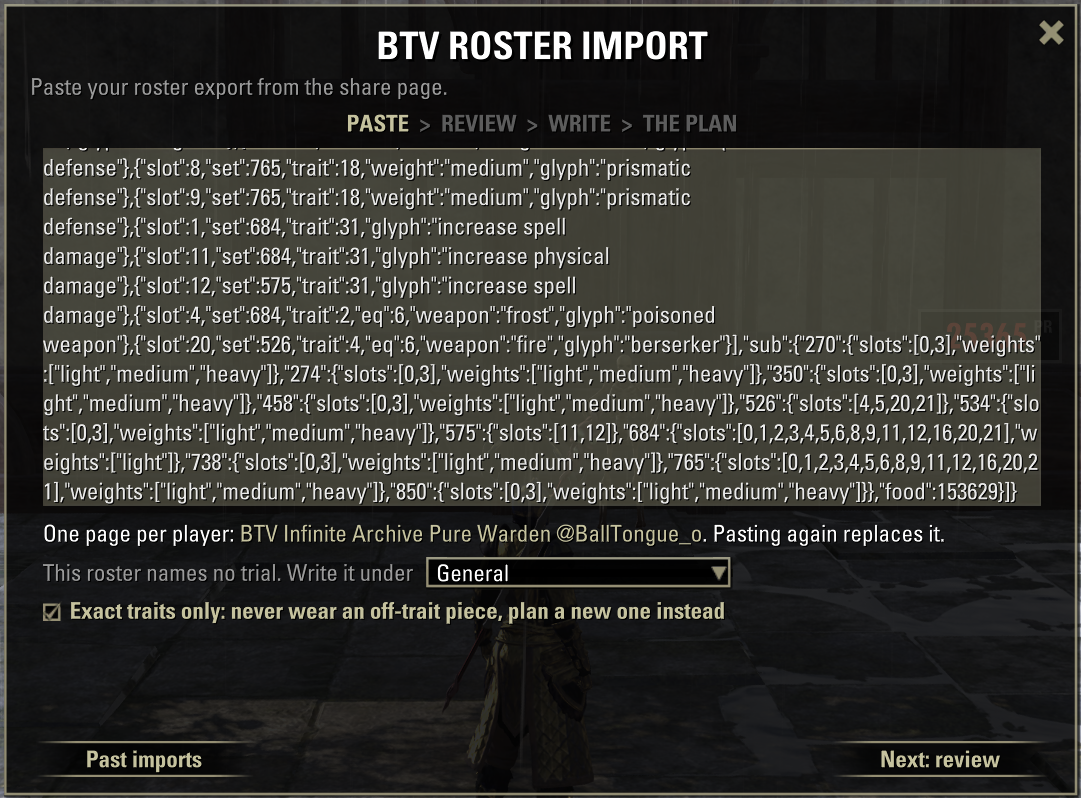
BTV Tools Roster Importer
Takes a roster built on btvtools.com and turns it into finished Wizard’s Wardrobe setups.
What it does
Imports a full roster into Wizard’s Wardrobe with one paste.
Fits the build to the gear you own. Your raid lead doesn’t know what gear pieces you own, so the addon finds the best way to make the build work with what you got.
Pulls the gear you need out of your bank and storage coffers, and deposits it from your other characters.
Crafts and reconstructs missing pieces for you when you open a station (experimental).
Gives you a self updating checklist of everything left to do before the build is complete.
Lets you pick how to get each missing piece: craft, reconstruct, buy or farm.
Calculates the amount of transmute crystals your picks cost and shows the total cost.
Lets you pick skills for the flex slots your raid lead left open.
Tells you if a piece has the wrong glyph or trait on it compared to what the roster says.
Chat commands
/btv – Opens the window. You get the checklist if an import is running, the paste box if not.
/btvpaste – The fast way. Paste, get one chat line, done. Uses the default for every choice.
/btv missing – Opens the checklist, or tells you there’s no import in progress.
/btv settings – Opens the settings.
/btv debug – Records what the addon saw on your next import, so you can send it in with a bug report.
/btv test – Runs the addon’s self check.
/btv passives – Prints what the addon thinks each of your characters can craft.
The features
Roster import
You or your raid lead builds a roster in the BTV Roster Builder. You open the link, copy your player WW snippet and paste it into the addon. It looks through your bags, your bank and your other characters for the right gear, then writes every setup into Wizard’s Wardrobe on one page called “BTV “. Pasting again replaces that page, and the addon never touches pages you made yourself. The addon supports the native WW auto swap for different bosses/trash as long as the roster is made with the correct template and has the bosses the same as WW.
Your raid lead doesn’t know which pieces you own, so the addon does its best to work that part out. The roster might put a set on the chest while you only have it as legs. The addon moves sets between slots to fit the gear you’ve got, keeps the number of pieces per set the same, and keeps your heavy, medium and light count the same. If you own a piece twice, the better quality one wins, even if it’s sitting on another character.
Review
Before anything is written you see every setup and where each piece is: on this character, in the bank, or somewhere else on your account. Anything it couldn’t place is listed with the reason, like “you own it but only as the wrong weapon type”.
Ways to get missing gear
For every piece you don’t own anywhere, the addon picks a way to get it: craft, reconstruct, buy or farm. You can change any pick. It works out the fewest pieces that cover the whole roster, so you don’t make two when one will do. Farm rows name where the piece drops, and craft rows say if your traits are researched and which station you need.
Transmute crystals
Every reconstruct row shows its crystal cost. The total for all your picks sits next to your crystal balance, so you know if you can afford it before you commit.
Flex slots
If you or your raid lead left a skill slot open with a few options, you pick one here. One pick fills every setup that has that slot. Skills that are unavailable are greyed out.
The checklist
After the import you get a list of what’s left, grouped by where you have to go: reconstruct, craft, buy, farm, deposit, fetch, withdraw. Boxes tick themselves when a piece shows up in your bags. When everything is ticked, the import is done. It’s saved for your whole account, so it’s still there tomorrow and on every character.
Bank, coffers and other characters
Open your bank or a storage coffer while an import is running and the window pops up with one button. Fetch pulls out every piece the build needs. On another character that’s holding a piece, the button says Deposit instead. Turn on “Auto deposit/withdraw” and it moves the gear the moment you open the container.
Auto crafting (experimental)
Click the craft and reconstruct lines you want on the checklist, then walk up to the right station. The addon makes them one at a time at CP160, in the trait and quality you picked. If it can’t make one yet (missing research or materials) it says so and waits for your next visit. Crafting needs LibLazyCrafting. Reconstructing works without it.
Warning: auto crafting is experimental, and it spends real materials and transmute crystals. It makes exactly what the roster on the site says, so double check that the right item is set on the roster before you queue anything. You use it at your own risk. We take no responsibility for wrong items, lost materials, lost crystals or anything else that goes wrong. With that said I’ve used it multiple times without any issues.
Empty slots fill themselves
A piece you don’t own yet is written as an empty slot. When that piece lands in your backpack, the addon puts it into every setup that was waiting for it.
Glyphs
A piece with the wrong glyph still gets used. It shows up on the checklist under “Put the right glyph on” and ticks once you’ve fixed it. Click the row to skip it if you don’t care.
Past imports
Finished imports go into a history (the last 10 by default). Open one to make it active again.
The website
The addon is a part of btvtools.com, a free site with tools for ESO players. This is where you can build your own rosters or builds to import to WW for free.
Roster builder
The roster builder is where the roster is put together: who plays what, with which sets and skills, for each boss. When it’s done you share one link, and every player copies their own part from that page into the addon. New to it? The quick start gets you going and the guide covers the rest.
Help and bug reports
Need help, or found a bug? The best place is the BTV Discord: discord.gg/5aVRJgZ5SN. If it’s a bug, type /btv debug before your next import and send the file it tells you about. That shows us what the addon saw.
Supporting the project
The site and the addon are free and will stay free. If you want to help out with in game items like gold, mats or crowns, mail them to @balltongue_o on PC EU. It’s highly appreciated. There’s also a Patreon and a Discord, both on the support page.
What you need
Wizard’s Wardrobe, Inventory Insight, LibAddonMenu-2.0 and LibSets are required. LibLazyCrafting is optional and only matters for auto crafting.







