Category: News

0

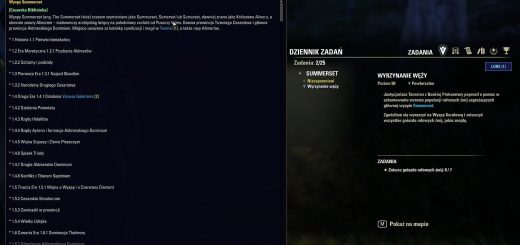
LoreTooltips (1.0.0)

Lore Tooltips Your Pocket Encyclopedia of TamrielThis addon is primarily designed for the Polish Elder Scrolls community. If you are an English-speaking player, you probably do not need to install it at this stage. However, I am fully open to cooperation and future expansion.Requires: LibLoreLibraryCesarska Make sure the library is installed and enabled, otherwise the addon will not display any lore data.—Lore Tooltips Twoja podreczna encyklopedia TamrielPrzestan przerywac gre, by szukac informacji w Internecie! Lore Tooltips to immersyjny dodatek, ktory pozwala blyskawicznie sprawdzic kim jest dana postac, bog, czy gdzie lezy wspomniane w rozmowie miasto wszystko to bezposrednio w oknie gry, bez “Alt-Tabowania” do przegladarki.Dedykowane Polskiej SpolecznosciObecna wersja dodatku zostala stworzona z mysla o polskich graczach. Baza wiedzy jest w pelni zintegrowana z Cesarska Biblioteka, co zapewnia dostep do tysiecy hasel w jezyku polskim.Mozliwosc techniczna (UESP)W przyszlosci istnieje techniczna mozliwosc integracji z baza danych UESP (Unofficial Elder Scrolls Pages). Pozwoliloby to na pelna funkcjonalnosc dodatku rowniez dla graczy anglojezycznych.—Jak to dziala?Addon automatycznie analizuje teksty, ktore czytasz w grze. Gdy w dialogu z NPC, tresci ksiazki lub opisie zadania pojawi sie znane pojecie (np. “Molag Bal”, “Wielka Smocza Straz”, “Daggerfall”), zostanie ono subtelnie podswietlone.Glowne funkcje Kontekstowa Wiedza: Kliknij podswietlone haslo, aby otworzyc panel z opisem, historia i ciekawostkami. Inteligentne Kolory: System dobiera kolor podswietlenia tak, by byl czytelny w kazdym oknie. Renomowane Zrodla: Informacje pochodza bezposrednio z projektow spolecznosci (Cesarska Biblioteka).—Biblioteka Lore (Lore Library)Chcesz poczytac o swiecie gry w wolnej chwili, a nie tylko podczas rozmowy? Addon zawiera wbudowana Biblioteke Lore pelny katalog wszystkich dostepnych hasel, dostepny z poziomu menu glownego gry.—Dla graczy na Padzie i KonsolachDodatek zostal zaprojektowany z mysla o pelnej obsludze kontrolera (Gamepad Mode). Nie jest to zwykly port z PC! Natywny wyglad: Panel Lore wyglada jak integralna czesc interfejsu gry. Inteligentne Skalowanie: Okno wiedzy dopasowuje swoj rozmiar i pozycje, nie zaslaniajac tekstu. Wygodna Nawigacja: Uzywaj bumperow (L1/R1 lub LB/RB), aby szybko przelaczac sie miedzy wieloma haslami.Premiera wersji konsolowej nastapi w pozniejszym terminie.—Dla graczy PC (Klawiatura i Mysz)Wersja klasyczna oferuje pelna swobode zarzadzania oknami. Zewnetrzne Zrodla: Przycisk “Link” generuje gotowy adres URL do pelnego artykulu na Wiki. Elastycznosc: Mozesz dowolnie przesuwac i skalowac okno Lore.Zanurz sie w historie Elder Scrolls glebiej niz kiedykolwiek wczesniej.

0

SRS Guild Hall Icon (1.0)

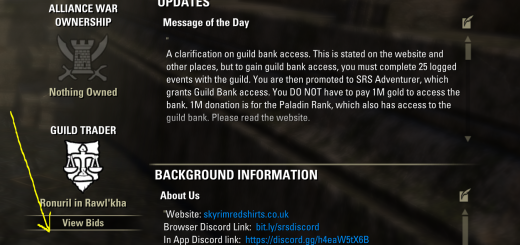
A simple addon for Skyrim Red Shirts Guild. This addon adds an image of our logo to the Guild Page in the game. Clicking on the image will take you to the Guild Village (Guild Hall). Other guilds feel free to use this code.No dependencies

0

SRS Events (1.0)

This is a simple addon to list the current day’s events for the Skyrim Red Shirts Guild. Other guilds may use this code and adapt it for their own eventsThe next time you want to know what’s happening today in the guild and how long before it starts, just go to your chat box and write/srsYou will then see a response like the one above showing that day’s events. It also compensates for alternate events, like Dungeon Racing and Duelling on Thursdays.​There is another function, try typing/srsguildThis time, you will see a little text box appearing in the centre of your screen. You can copy this with Ctrl+C and then paste it into your chat box to tell others in the guild when the next event starts. Press enter to close the box.No dependencies

0

BananaParser (1.0)

Have you ever wanted to top parse but failed. have you ever wanted to score push but failed. do you wanna die everyday. join the banana parse discord to be good at something! you might have the most bananas in the game! you can hold a world record without you even knowing. Stop crying and apply to the banana parse discord: https://discord.gg/3xWdGHAKZ5 This addon is the official banana parse addon :)command: /bananas

0

Alternate Death Recap (3.0.3)

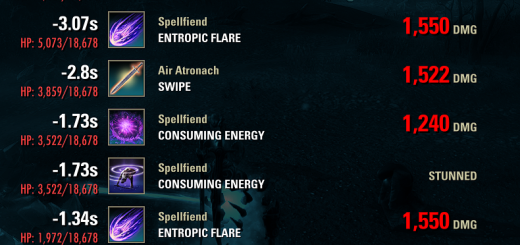
As requested, this is a PC upload of the Alternate Death Recap add-on, which was originally made for console. Big thanks to @M0R for contributing and making this add-on PC compatible.Features:Each row in the death recap screen now only involves one tick of damage instead of potentially including multiple ticks.The death recap now displays a timeline of how many seconds before the killing blow each attack was.The death recap now displays how much current/max health you had when each attack hit you.Skills that cost health will now be displayed in the death recap as damage.All heals (excluding overflow) will now be displayed in the death recap.Miscellaneous crowd control effects, such as snares, stuns, and break-frees can now appear in the death recap. (toggleable setting for each)Adds the command “/togglerecap”, which allows you to view your death recap even after reviving.Compact modeAdjustable scroll sensitivity.Adjust the maximum number of attacks recorded.Adjust the maximum allowed age of tracked attacks.

0

Gamepad Inventory Tweaks (PC/XBOX/Playstation) (0.2.0)

Small quality-of-life tweaks for ESO’s gamepad inventory: active category bar, Mundus visibility control, search field toggles, and smarter navigation.The addon is also available on mods.bethesda.net for Xbox/PS4/PS5.https://cdn-eso.mmoui.com/preview/pvw15500.pngDependencies🔸LibGamepad >= 1.0.4DescriptionGamepad Inventory Tweaks is an addon for Elder Scrolls Online that improves the gamepad inventory experience through a collection of small, focused tweaks. Each feature can be toggled independently from the in-game options menu (accessible via the Gamepad settings panel provided by LibGamepad).Active Category BarDisplays a visual filter bar above inventory item lists as my take on a gamepad-style filter bar. The bar shows shoulder button icons, navigation pips, and the name of the active category.Non-active categories in the item list are dimmed to keep the focus on the currently selected one, while the full list remains visible and native navigation stays unchanged.Supported pages:🔸All backpack inventory item pages🔸Craft Bag🔸Bank Withdraw / Deposit pages (sorted by category)https://cdn-eso.mmoui.com/preview/pvw15501.jpgMundus VisibilityHides the Mundus section from the main inventory category menu. The Mundus entry is unrelated to item management and this option lets you remove it from the list entirely.Search Field VisibilityControls whether the search input field is shown on inventory pages:🔸Inventory pages toggle search visibility across all standard inventory item pages.🔸Craft Bag page separate toggle for the Craft Bag search field.Navigation Improvements🔸Entering an inventory item page always starts from the top of the list.🔸Pressing B to return to the category list restores the previously selected position.🔸Navigation behavior is consistent with standard console UX conventions.OptionsAll settings are accessible in-game through the Gamepad menu → Settings → Inventory Tweaks, powered by LibGamepad.https://cdn-eso.mmoui.com/preview/pvw15503.jpg

0

DLC Yes No (1.0)

📜 DlcYesNo – Votre Assistant de Collection de DLCDlcYesNo est un addon lger et puissant pour The Elder Scrolls Online, conu pour rpondre une question simple : “Est-ce que je possde dj ce DLC ?”. Fini les hsitations dans la Boutique Couronnes, vous saurez en un clin d’il ce qu’il vous manque !✨ Fonctionnalits- Vrification Instantane : Affiche une liste claire et organise de tous les Chapitres, Zones et Donjons du jeu.Code Couleur Intuitif :🟢 Vert (avec ) : Vous possdez ce contenu.🔴 Rouge (avec ) : Ce contenu vous manque.- Lien Intelligent vers la Boutique : Un simple clic sur un DLC manquant tente de vous rediriger directement vers sa page d’achat dans la Boutique Couronnes.Interface Hautement Personnalisable :- Fentre redimensionnable volont.- Opacit rglable via des boutons et .- Mode Rduit : Transformez la fentre en une simple bande affichant le titre et le compteur, idale pour garder l’info sous les yeux sans encombrer l’cran.- Toutes les positions et dimensions sont sauvegardes.Accs Rapide et Pratique :- Une icne flottante est disponible pour un accs permanent.Clic Gauche : Ouvre/Ferme la fentre principale.Shift + Clic Gauche : Permet de dplacer l’icne o vous le souhaitez.Au premier lancement, l’icne apparat au centre de l’cran !🌍 Entirement Multilingue :Changez la langue de l’interface la vole (sans recharger le jeu) via un menu ddi.Supporte : 🇫🇷 Franais, 🇬🇧 Anglais, 🇩🇪 Allemand, 🇪🇸 Espagnol, 🇷🇺 Russe. Trad Google.🛡️ Gestion du Combat :Activez l’option pour que la fentre se ferme automatiquement lorsque vous entrez en combat.Elle se rouvrira toute seule la fin du combat, si elle tait ouverte au dpart.🚀 Commandes/dlcyesno : Affiche ou cache la fentre principale.📦 Installation & DpendancesCet addon est conu pour tre autonome.Il ne ncessite aucune bibliothque externe pour fonctionner.(Optionnel) : LibStub est list dans le manifeste pour compatibilit, mais n’est pas requis pour l’utilisation de l’addon.Pour l’installer, dcompressez simplement l’archive dans votre dossier d’addons : Documents/Elder Scrolls Online/live/AddOns/

0

SimplePlayTime (1)

SimplePlayTimeSimplePlayTimeis a lightweight, “set-it-and-forget-it” utility for players who want to track their total time investment in The Elder Scrolls Online. It automatically records your playtime for every character across all megaservers and presents it in a clean, draggable in-game window.Why use SimplePlayTime?Most playtime addons are either discontinued or part of massive suites. SimplePlayTimeis a minimal alternative. It captures the data from the /playedcommand and stores it in an easy-to-read formatboth in-game and in your local fileswithout the bloat.Features:Automatic Tracking:Updates your time every time you log in or reload your UI.Server Separation:Automatically organizes data into NAand EUcategories.Account Totals:Displays a sum of all character playtimes for each server.In-Game UI:A draggable window to view all characters’ times at a glance.Keybind Support:Set a custom toggle key in Settings > Controls.Raw Data Access:View your playtime in your SavedVariables/SimplePlayTime.luafile.Commands:/playtime- Toggles the summary window.Development Disclosure & Permissions:This addon was generated by Gemini (Google’s AI) at the request of a player.While the idea and logic were directed by a human, the Lua and XML code were written by an AI to provide a clean, functional solution for the community.This project is entirely open-source.Since it was AI-generated, there are no copyright restrictions. You are encouraged to tweak the code, add features, or update it for future API versions. If you are a developer and see a way to optimize the code further, please feel free to do so!Installation:Place the SimplePlayTimefolder into your Documents/Elder Scrolls Online/live/AddOns/directory.Log into each character once to populate the data.Open the menu using /playtimeor your assigned keybind.

0

Combat Coordinates – 3D Ground Effects & Group Sync (e.g. Standard of Might) (20260314-0001)

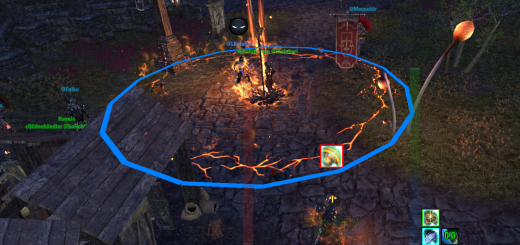
Change Log:——————–20260314-0001- Initial commit: Added files.Description:——————–Required Dependencies:LibAddonMenu-2.0 >= 41LibGroupBroadcastDonations: Please send Columbine, Bugloss, Mountain Flower or Essence of Health Potion (Tri-Pot). I am completely broke. ^_^ Thx! @Duesentrieb Combat Coordinates – 3D Visualizer & Group SyncVisualizes ground-based combat effects in 3D world space and synchronizes them with your group in real-time.REAL-TIME GROUP SYNCHRONIZATIONUsing LibGroupBroadcast, this addon shares the exact 3D coordinates of placed skills with your group members. No more guessing where the Dragonknight Standard is actually located see it as a clear 3D marker on the ground.GROWING SKILL LIBRARYThis addon is designed as a framework. While it starts with the Standard of Might, many more skills (Heals, Buffs, and other AoEs) will follow in future updates to provide a comprehensive 3D combat overview.HIGHLY CONFIGURABLE 3D RENDERINGAdjust the look and feel of every skill individually via LibAddonMenu. From resolution (sides) to colors and line thickness you have full control over the visual impact.Core Features:3D World Markers: Draws clean, high-performance 3D circles directly in the game world.Skill-Specific Styling: Each supported skill has its own sub-menu for independent radius, color, and thickness settings.Self vs. Group Distinction: Easily differentiate between your own casts and those of your group members through customizable color schemes.Terrain Compensation: Includes a manual Height Offset slider to adjust markers for uneven terrain or floating placements.Performance Optimized: Uses an advanced line-pooling system to ensure minimal impact on your frame rate, even…

0

Kwibus Random Things (1.2.2)

A random collection of addons i’ve made over last short while that i decided to combine to have a unified place for all the random things i might come up with. As of now consists of following addons that can be turned off individually:Requiers following libraries:- LibAddonMenu-2.0- LibSkillBlockerKromitor Moment – shows you are reminder to proc archdruid if you are the one wering it and there is no vuln on the target. Also has a skill blocker Kwibus in Combat – shows you an on-screen popup when you enter and leave combatKwibus Reset – shows you an on-screen popup when trial instance is resetKwibus Colorless Pool – reminds you to proc colorless pool if target doesn’t have vuln debuff (if you have the skill slotted)Kwibus Confirm – auto fills “confirm” in decon dialoguesKwibus Auto Lead Pass – a small addon (usefull for groups doing spaulder reinvite) that automatically passes lead back and forth from the actual lead to the player that is doing the reinviting and back)ISIIbus Equipped – shows equipped sets on you (like currently equipped but improved) – thanks to my favorite raidlead Isiimode for letting me borrow the codeKwibus Spaulder – does the spaulder kicking and reinvitingKwibus Auto Log – automatically starts/stops logs in selected typed of contentGroup User ID – shows player IDS in group window instead of character nameshttps://ibb.co/1fcmGRFh