

Chorus – Minimal Combat Text (0.2.4)
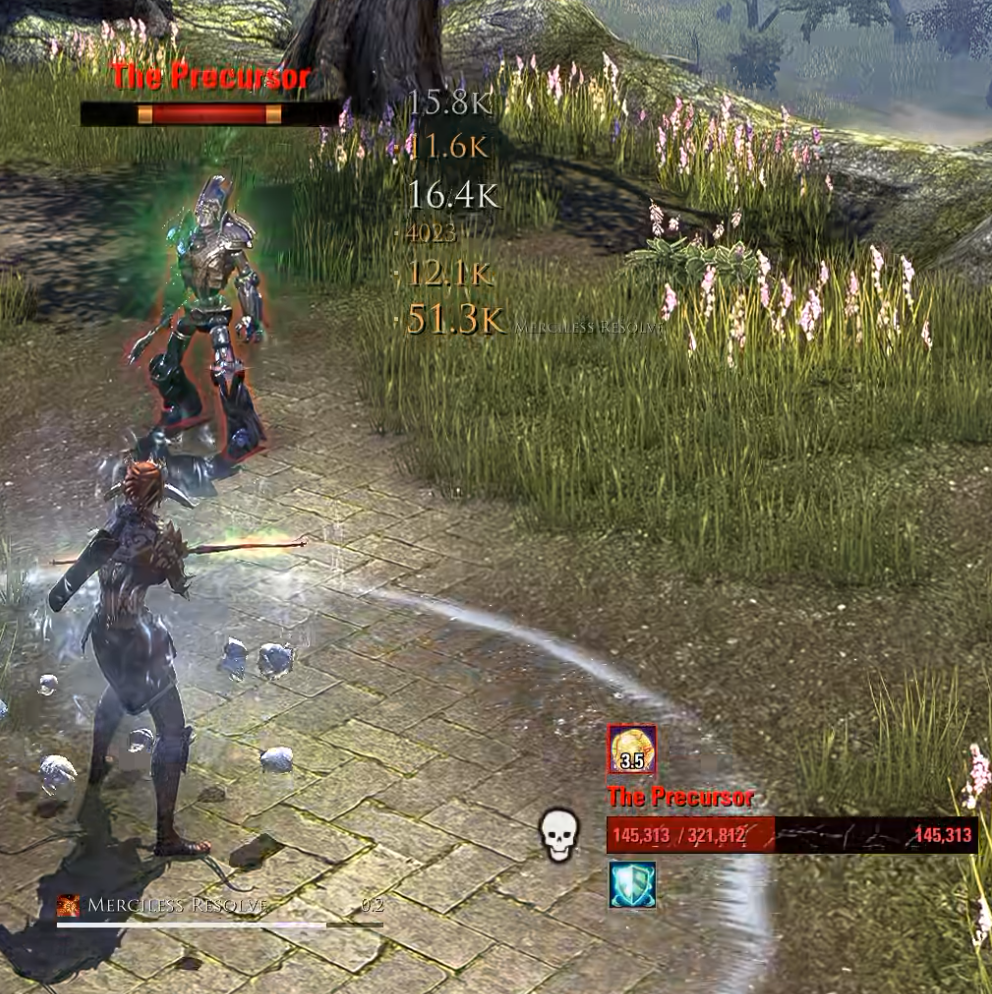
This is a minimal, floating Combat Text Addon.
I dislike big, flashy numbers or tons of hybrid animations, so I just wanted something nice, minimal and compact but with enough settings so that I don’t get bored after a while either.
I use this in combination with Lui Extended, but it should generally work with any and all UI Addons, just turn off their Combat Text Modules as well as the Default Ingame Option.
General Info:
– Displays outgoing damage in a column to the right of the crosshair. Newest hits appear at the bottom, with older hits moving upward.
– Scales damage numbers relative to your damage dealt during the previous 20 seconds.
– Combines multiple hits from the same ability, such as AoE attacks and channels, into a single entry with an n hit count.
– Displays each damage-over-time ability as a single entry that updates with each tick instead of creating a new entry.
– Marks critical hits with a distinct color and a small indicator.
– Displays the ability name for hits in the top 10% of your recent damage values.
– Displays a short fight summary after combat lasting at least five seconds, including fight duration, DPS, and your highest-damaging ability. The summary fades after a few seconds. (Can be turned off).
– Optional pet damage tracking, enabled by default.
– Optional healing display in a mirrored column to the left of the crosshair, disabled by default.
Settings:
Chorus provides an optional LibAddonMenu settings panel with the following options:
– Move the damage column using a drag button with a static preview.
– Configure the number of visible entries, minimum and maximum font size, and display duration.
– Select from the game’s built-in fonts: Univers, Trajan, Handwritten, Stone Tablet, and Futura.
Support for additional fonts registered through LibMediaProvider.
– Toggle pet damage, healing, ability names, critical hit indicators, and fight summaries.
– Configure damage text and critical hit colors.
If LibAddonMenu is not installed, all functionality remains accessible through slash commands:
/chorus unlock
/chorus lock
/chorus test
/chorus summary
/chorus fonts
/chorus font
Notes:
– Disable other combat text sources to avoid duplicate damage numbers. This includes LuiExtended Combat Text and the game’s built-in combat text under Settings > Combat.
Chorus displays a reminder once per login if LuiExtended Combat Text is still enabled.
– Incoming damage is not tracked or displayed.
– Only the player’s own damage is tracked. Damage dealt by group members is excluded.
No dependencies required, but optionally recommended are:
– LibAddonMenu-2.0 for the settings panel,
– LibMediaProvider-1.0 for extra fonts.







