

Craft Search (0.1)
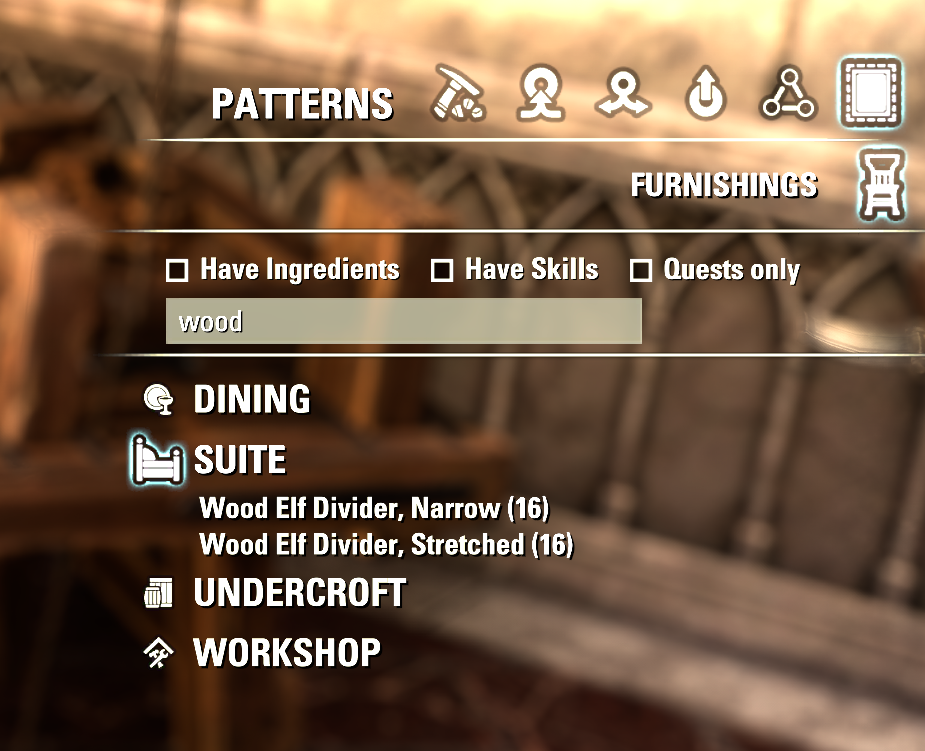
Craft Search
Find furnishing recipes by name. Craft Search adds a search box to the furnishing recipe list at every crafting station, so you can type part of a name instead of scrolling through every category of blueprints, patterns, diagrams, praxis, formulae and designs.
Features
Search box on the Recipes tab at blacksmithing, clothing, woodworking, jewelry, enchanting and alchemy stations
The same box on the Furnishings tab at the provisioning station
Filters as you type, ignores upper/lower case and finds the text anywhere in the name
Works together with the game’s Has Ingredients / Has Skills / Quests Only filters
Lightweight: no settings, no saved variables, no libraries required
How to use
Open the Recipes tab (or the Furnishings tab at a provisioning station), click the search box under the filter checkboxes and start typing. Press Enter to close the box, and clear the text to see the full list again.
If a recipe you know is missing, untick Has Ingredients or Has Skills.
Installation
Install with Minion, or extract the zip into DocumentsElder Scrolls OnlineliveAddOns so that you end up with AddOnsCraftSearchCraftSearch.txt. Then enable Craft Search in the Add-Ons menu on the character select screen.
Limitations
Keyboard and mouse interface only; gamepad mode is not supported
Searches recipe names only, not ingredients
Feedback
Found a bug, or does the box overlap something at your UI scale? Leave a comment with a screenshot.







