Crown Crate Codex (0.12.2)
AI disclosure: Crown Crate Codex was developed with AI-assisted code generation using OpenAI Codex. It has been tested through automated checks and in-game use. Please report issues through the addon comments.
CROWN CRATE CODEX
Your Crown Crate history, rewards, and personal drop rates in one place.
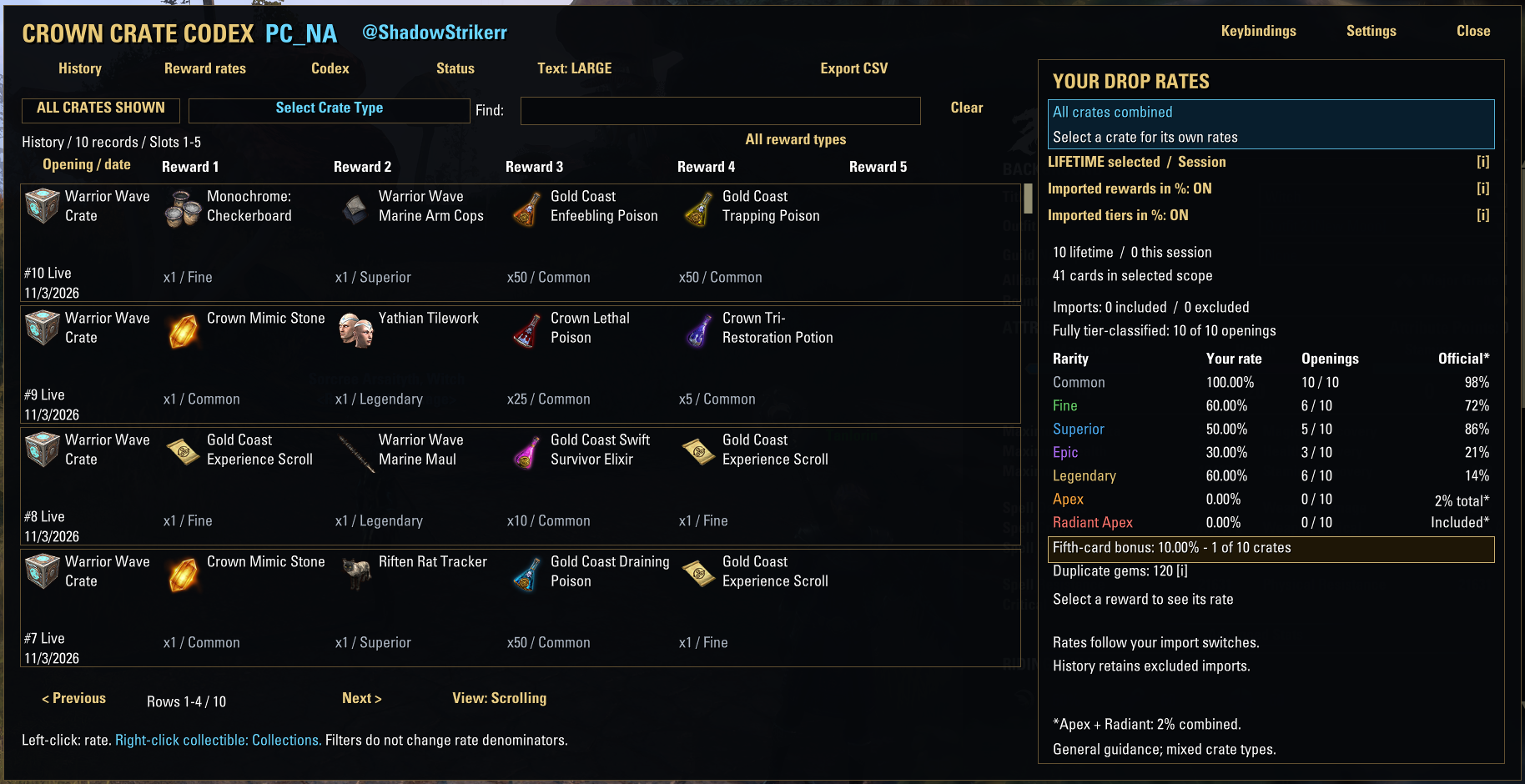
Crown Crate Codex automatically records new crate openings and presents them in a searchable history with item names, icons, quantities, rarity information, and personal statistics. It works independently of Crown Crate Tracker and does not require the former crowncrates.com service.
Seven interface languages are included, with an Automatic option that follows ESO. PC controller navigation is also included.
QUICK START
1. Download and extract the ZIP.
2. Place the CrownCrateCodex folder in Documents/Elder Scrolls Online/live/AddOns.
3. Confirm the manifest is directly at AddOns/CrownCrateCodex/CrownCrateCodex.txt, without an extra nested folder.
4. Enable Crown Crate Codex in ESO and reload the UI. Restart ESO if it does not detect the new folder.
5. Type /ccc to open it, or assign a key in Controls > Keybindings > Crown Crate Codex.
RECOMMENDED LIBRARY
LibAddonMenu-2.0 provides the Settings > AddOns panel, including manual language selection and display preferences. Core tracking, reward images, statistics, and automatic interface translation work without it. Install this library separately; it is not bundled.
PERSONAL HISTORY AND STATISTICS
Records new crate openings automatically through ESO’s API.
Separates history and statistics by ESO @UserID and server: PC_NA and PC_EU.
Shares history between characters on the same account and server.
Shares addon preferences between NA/EU within the same account.
Shows the current server and account in the header. The account name can be hidden for screenshots.
Keeps lifetime history while offering a separate current-session statistics view.
Records fifth-card bonus frequency and gems reported by ESO from duplicate collectible conversions.
A MORE READABLE HISTORY
Reward icons, full names, quantities, verified rarities, and bonus-card markers.
Alphabetical crate selection, search, and reward-category filters.
A clear Show All Crates action to return to the combined view.
Choose pages or scrolling, with configurable mouse-wheel movement.
Compact, Large, and Extra Large text/icon sizes, plus window scaling.
Adjustable background opacity, topmost behavior, tooltip width, and action-hint color.
Left-click a history reward to inspect its observed rate.
Right-click a collectible to open its entry in ESO Collections.
UNDERSTAND YOUR RESULTS
The sidebar shows your observed rates for all included crates or one selected crate type. Numerators and denominators are displayed so you can see the sample behind each percentage.
Common, Fine, Superior, Epic, Legendary, Apex, and Radiant Apex are shown separately when the tier is verified. Rarity percentages use fully classified openings; unknown tiers do not silently count as misses. An opening with unresolved tiers remains visible in history and can still contribute to item and bonus-card statistics.
Individual reward rates measure openings containing that reward, rather than treating every unit in a stack as a separate drop. Card counts and unit counts are shown separately. Search and reward-type filters change the visible results, not the statistics denominator.
An optional Official reference column shows Bethesda’s general purchased-crate guidelines alongside your results. The published Apex figure includes Radiants; the addon does not invent a separate official Radiant percentage. Special and promotional crates may have different reward pools. Small personal samples can differ substantially from published guidelines and do not predict the next opening.
GEM EXTRACTION INFORMATION
Purple item-tooltip hints show extraction values when verified. ESO’s live value for a matching backpack item takes priority; otherwise a bundled item-and-stack reference is used. Catalog values are labelled and include their source. The Resplendent Sweetroll’s 400-gem exception is included.
These are potential values, not gems already earned. Codex does not extract items for you. Items obtained outside Crown Crates may have the same name but different extraction eligibility. Unverified values stay clearly marked.
CODEX, WISHLISTS, AND EXPORT
The Codex tab is your reward catalog. It lists rewards recorded in your crate history and shows whether you already own a collectible. Click an entry in this tab to mark or unmark it on your wishlist; marked entries show . It may not list rewards you have never received.
CSV export opens copyable text in-game. Copy all numbered parts in order into a text file; only the first part contains the header. ESO addons cannot directly save an arbitrary CSV file. The Status tab provides recording and import diagnostics.
OPTIONAL IMPORT FROM CROWN CRATE TRACKER
Crown Crate Tracker is a separate addon created by Faunter. It is not created or maintained by the author of Crown Crate Codex; no affiliation or endorsement is implied. It is optional and is not required for new recordings. Both addons can remain enabled.
IMPORTANT: Old Crown Crate Tracker records have no account or server labels. Import only if you know ALL records belong to the current ESO account and selected server. If you played multiple accounts or both servers, mixed records cannot be reliably separated.
Settings > AddOns > Crown Crate Codex > Import Crown Crate Tracker History opens a preview. It shows the readable/unreadable record counts, requires a server choice and an unchecked ownership confirmation, and keeps Import disabled until confirmed. You must be logged into the selected server. Cancel imports nothing. Existing matching records are skipped, and records already stored on another server are not copied across. Your original Tracker saved file is not modified.
Imported rewards and verified imported tiers can each be included in or excluded from percentages through separate switches. The history itself remains visible.
CONTROLS AND COMMANDS
/ccc or /crowncratecodex – Open or close Codex.
/ccc settings – Open addon settings.
/ccc keys – Open keybindings.
/ccc import – Open the legacy-history confirmation dialog.
/ccc scan – Refresh owned/on-sale crate discovery.
/ccc status – Show recording/import diagnostics.
Codex uses its own configurable keybinding. It does not assign or override R automatically. A clickable Codex history action is also available in the Crown Crates scene.
UPDATING AND SAVED DATA
Exit ESO, replace only live/AddOns/CrownCrateCodex with the new addon folder, then launch ESO again. Preserve live/SavedVariables.
History and settings are stored in live/SavedVariables/CrownCrateCodex.lua. Updates preserve existing data; automatic reset code has been removed. There is no Clear History button. The Clear button beside Find clears the search only.
The addon does not automatically prune lifetime history. ESO writes SavedVariables during a clean logout or /reloadui; a crash before saving can lose new results. Keep separate backups. Reinstalling the addon folder normally retains SavedVariables. Addon downloads do not include your personal saved history.
NEW CRATES AND KNOWN LIMITATIONS
Owned/on-sale/opened crates are discovered through ESO’s API; you do not need to enter new crate names manually.
Complete unseen reward pools are not available through discovery. Historical reference catalogs are bundled with addon updates; Codex does not download website data in-game.
Some new high-tier rewards may need a catalog update to reliably distinguish Apex from Radiant Apex. Unresolved tiers remain unknown rather than being guessed.
Seven interface languages are included. ESO supplies reward/crate names in the client language. Historical tier lookup uses verified catalog identities or unambiguous numeric product/quantity facts; unresolved matches stay unknown.
Tested in-game on Windows PC. Mac remains unverified; this is not a console release. PC controller navigation has been tested in-game by the author; other controllers, bindings, and layouts may still need adjustments.
API changes may require future compatibility updates.
SUPPORT
This is a personal project maintained as time allows. Feedback and bug reports are welcome, but a fix or response time cannot be guaranteed. Please include the addon version, PC_NA or PC_EU, the action that caused the issue, and any Lua error text. Screenshots help; hide your account name through Settings if desired. Do not post your full SavedVariables publicly because it contains account names and personal history.
Support: Please use the Comments tab on this ESOUI addon page.
CREDITS AND SOURCES
Inspired by Crown Crate Tracker by Faunter:
https://www.esoui.com/downloads/info1741-CrownCrateTracker.html
Adapted reward and extraction reference data: UESP contributors, Creative Commons Attribution-ShareAlike 2.5. Source revision links and attribution are included in the download. No UESP images are redistributed; the addon resolves icons and names inside ESO.
https://en.uesp.net/wiki/Online:Crown_Crates
https://creativecommons.org/licenses/by-sa/2.5/
General purchased-crate reward guidelines: Bethesda Support.
https://help.bethesda.net/#en/answer/49828
ZeniMax’s required non-affiliation and trademark disclosure is included in README.txt inside the addon ZIP.
LANGUAGES AND TRANSLATION HELP
Interface languages: Automatic (follow ESO), English, Simplified Chinese, French, German, Japanese, Russian, and Spanish. Choose Language in Settings > AddOns > Crown Crate Codex, then /reloadui. ESO supplies reward/crate names in the game client language. Translations are AI-drafted, structurally checked, and welcome native-speaker review; localized fonts and layouts need in-game verification. Native speakers are welcome to suggest corrections through Comments. Files are included under CrownCrateCodex/lang/: en.lua (English), de.lua (German), fr.lua (French), es.lua (Spanish), ru.lua (Russian), zh.lua (Simplified Chinese), and ja.lua (Japanese). Please include the current wording, suggested wording, and a screenshot where possible. Preserve formatting placeholders in proposed file edits.
PC CONTROLLER NAVIGATION
Set ESO Gamepad Mode to Automatic or On. D-pad moves focus; standard UI bindings select, go back, show details, and open Collections or controller options. Shoulders change tabs and triggers change pages. Controller settings reuse the existing options. No existing opening keybind is overwritten. Automated checks and initial in-game controller testing have passed. In Extra Large mode, footer hints may be clipped; Large mode shows the complete hints in the supplied screenshot. CSV copying still uses the PC clipboard workflow.
Some gallery graphics are AI-assisted composites of in-game captures. Refer to standalone screenshots for exact layout and text sizing.