
Grave Sight (0.4.1)
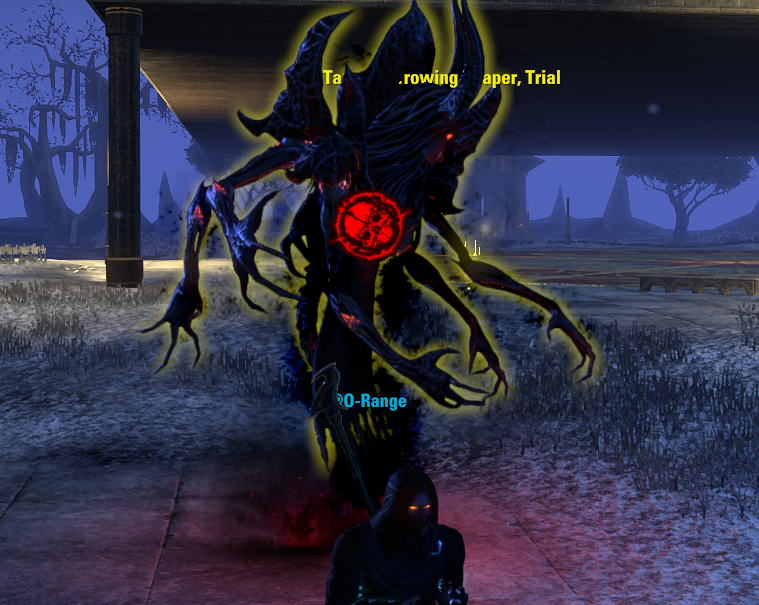
# GraveSight
**Author:** O-Range
**Version:** 0.4.1
## About
GraveSight replaces the default Elder Scrolls Online reticle with a custom Necromancer-themed emblem inspired by the forbidden arts of Tamriel.
The addon is intentionally lightweight, focused, and unobtrusive. Rather than adding new gameplay systems, GraveSight enhances the visual presentation of combat, stealth, and targeting while preserving ESO’s normal functionality.
## Features
### Custom Reticle
GraveSight replaces the standard ESO reticle with a custom DDS texture.
### Automatic UI Handling
The custom reticle automatically hides while menus and interface screens are open and restores the game’s native reticle behavior when appropriate.
Supported UI scenes include:
– Inventory
– Skills
– Character Sheet
– Mail
– Bank
– Store
– Guild Roster
– Other standard UI modes
### Hostile Target Detection
When aiming at an attackable enemy:
– The reticle turns red.
– Opacity increases to full visibility.
– Optional lock rotation activates.
This behavior is designed to provide immediate visual feedback during combat.
### Rotation Effect
GraveSight can rotate the reticle toward a fixed hostile-target position, creating a distinct combat stance appearance.
When the target is lost, the rotation smoothly returns to center.
### Stealth Detection
GraveSight detects ESO stealth states using the game’s native stealth system.
Supported states include:
– Stealth
– Hidden
– Stealth (Almost Detected)
– Hidden (Almost Detected)
### Stealth Color Themes
When stealthed, the reticle changes to a user-selected purple style.
Available themes:
#### Arcane Purple
A subtle magical purple suitable for everyday use.
#### Necromancer Purple
A darker violet inspired by classic Necromancer visuals.
#### Glowing Purple
A brighter, more vibrant purple for high visibility.
### Vanilla Reticle Suppression
GraveSight suppresses:
– Default ESO reticle graphics
– Non-interact reticle elements
– Stealth eye UI elements
This ensures the custom reticle remains visually clean and uncluttered.
## Settings
GraveSight includes options through LibAddonMenu.
### Enable GraveSight
Turns the addon on or off.
### Reticle Size
Adjusts the overall size of the custom reticle.
### Idle Opacity
Sets transparency while no hostile target is selected.
### Enemy Coloring
Enables or disables hostile-target red coloring.
### Lock Rotation
Enables or disables hostile-target rotation.
### Stealth Color Style
Select between:
– Arcane Purple
– Necromancer Purple
– Glowing Purple
## Visual Priority System
GraveSight uses the following priority order:
### Hostile Target
– Red
– Full opacity
– Rotation enabled
### Stealthed
– Purple
– User-selected opacity
### Idle
– White
– User-selected opacity
Hostile targets always override stealth coloration.
## Design Goals
GraveSight follows the same philosophy used in other O-Range addons:
– Lightweight
– Focused
– Single-purpose
– Minimal configuration
– No unnecessary systems
– No feature bloat
The goal is to provide a distinctive Necromancer-themed reticle while remaining stable, responsive, and unobtrusive.
## Requirements
– Elder Scrolls Online
– LibAddonMenu-2.0
## Credits
Created by O-Range.
Built for players who believe forbidden magic should come with better UI.