

Groupbound All-in-One Group Finder (1.0.0)
https://i.postimg.cc/7ZbfCCZM/groupbound-logo-2x.png
Groupbound
Every group you could join, in one place.
Group Finder + zone chat + guild chat | Sorted for your role | Alerts | Post and lead a group
Optional: LibAddonMenu-2.0 (for the settings page)
It was made with the help of AI but most of it is done by myself, I test every feature in-game myself and keep it updated.
Why it’s better than the game’s Group Finder?
It only shows Group Finder listings. Many groups are still posted in zone chat and guild chat. Groupbound puts all three in one list, so you see every group, not just some of them
It shows one category and difficulty at a time. Groupbound searches trials, dungeons, arenas and the other categories in turns, normal and veteran, and keeps them all on one board
Its extra filters can hide groups without you noticing. Groupbound searches without them, so no group stays hidden, then puts your filters back for the game’s own Group Finder
It doesn’t tell you what fits you. Groupbound checks every group for room for your role, your CP and the DLC it needs, and sorts the best ones first. “For me” shows only the groups you can actually join
It doesn’t tell you when a group shows up. Groupbound can alert you (message and sound) when a new group for your trial or dungeon appears, even with the board closed
It doesn’t warn you about dead listings. Groupbound marks listings where nobody joined or left for a long time, and greys out groups you just failed to join
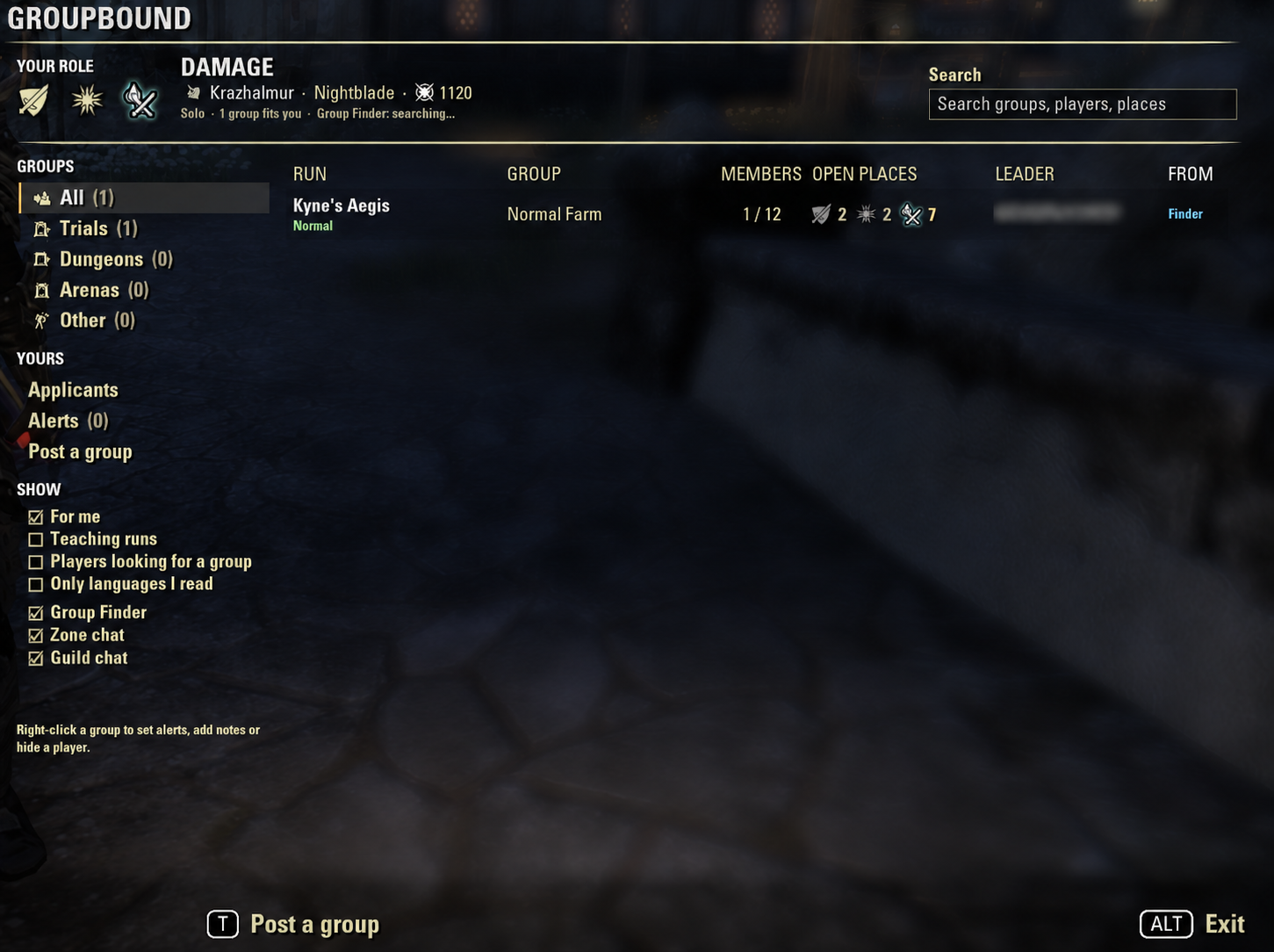
Its titles are hard to read. Groupbound turns “vKA_HM_prog” into Kyne’s Aegis with the difficulty in color under it (Normal green, Veteran gold, HM red-orange)
Posting is Group Finder only. Groupbound posts your group to the Group Finder, zone chat or guild chat from one form, remembers your setup per run, and can list your last group again with one click
Who it’s for
Anyone who joins or leads groups for trials, dungeons, arenas or the Infinite Archive. If you join, you see every group that fits you at a glance. If you lead, posting, picking applicants and listing again take a few clicks.
The board
One list from the Group Finder, zone chat (plus say and yell) and your guild chats. Tick the sources you want on the left
Reads every post: the trial or dungeon (short names like vSS, nFG1, vDSR or full names), normal, veteran or hard mode, the open roles, the CP needed, when it starts (“8pm EST”, “in 15 min”), and tags like progression, farm or teaching. English, German and French posts
Open places at a glance: each role always in the same spot, your role glowing with a gold number. A “Members” column shows “6 / 12” for Group Finder groups
Sorted for you: groups with room for your role come first. Click a column to sort by it
Click a group to open it: the leader’s full text, size, CP, start, source and language, with Join / Apply, Whisper and Alert me buttons. Double-click to join or apply right away
Apply with a message when the leader checks each player. Your role and CP are filled in for you
Categories: Trials, Dungeons, Arenas and Other, with how many groups are in each
Filters: For me, Teaching runs, Players looking for a group (handy when you lead), Only languages I read, and a search box for groups, players and places
Hides the noise: selling posts and guild ads are recognised and hidden (you can show them), and you can hide groups with words you pick
New mark: groups that weren’t there the last time you closed the board get the game’s “new” icon
Notes on players: a private note, a “good run” mark, or hide a player’s groups completely. Right-click any group for these
Achievements: when a group asks for one, you see its icon and whether you have it
Alerts and on screen
Alert me on any group (or from the empty board) to get a small message at the top right, with a sound, whenever a new group for that trial or dungeon shows up. Or get alerts for every new group that fits you
The Groupbound button shows how many groups fit you right now. Click it to open the board, right-click for a quick menu, mouse wheel to resize it
An optional small board keeps the five groups that fit you best on screen
Quiet in dungeons: inside a dungeon, trial or arena, the button, small board and alerts step out of the way
The Group Finder can keep being checked in the background, so alerts and the button’s number stay up to date
Post a group
Type what you’re running (“vss hm”, “Rockgrove”, “fg1”) and set who you need. The run, difficulty and roles are read for you
Min. CP, start time, note and auto-accept right on the page. Everything else (achievement, description, the Group Finder’s own options like category, size, playstyle, title, voice chat, enforce roles and invite code) sits in two folding sections, each with a summary line
Remembers your setup per run: type “vss” again next week and your roles, CP and note come back
Ask for an achievement: pick one of the run’s achievements from a list with icons and filters. Chat posts get its link
One click to list it in the Group Finder, or to post it in zone chat or a guild chat (the chat box opens with your post filled in, you press Enter)
Update your listing while it’s up, remove it, or list it again later (the roles that joined since count as filled)
Leading: your applicants
A message tells you when someone applies. The Applicants page shows their role, name, CP, message and time left
Accept, decline or whisper with one key, double-click or the right-click menu. Your notes and good-run marks show next to them
Role switch warning: while you lead, Groupbound tells you when a member changes role after joining (for example from tank to damage dealer)
How to open it
Click the Groupbound button, or type /gb (or /groupbound). Set keybinds under Controls > Groupbound: open the board, post a group, open the newest alert, show the small board and list your last group again. /gb post opens the post page, /gb relist lists your last group again, /gb settings opens the settings and /gb reset puts the window, small board and button back in their places.
Good to know
Addons only hear the zone chat of the zone you’re in. Groupbound keeps chat posts for a while (15 minutes by default), so posts from zones you pass through add up.
Addons can’t send chat by themselves. The Whisper, Zone chat and Guild chat buttons open the chat box with the text filled in, and you press Enter.
Only you see your notes, marks and hidden players. An addon can’t check other players’ achievements.
Made for the keyboard UI. Gamepad mode isn’t supported yet.
Your settings, alerts and notes are shared by all your characters on the same server (NA, EU and PTS each keep their own).
Available in English, German and French. Want it in your language? Copy lang/en.lua to your language code (for example lang/es.lua), translate the texts in quotes and send it to me, no coding needed.
Requirements
LibAddonMenu-2.0 (optional) for the settings page
Installation
Minion (easiest): search for Groupbound, click Install, done. Minion keeps it up to date too.
Manual: open the .zip and drag the Groupbound folder into DocumentsElder Scrolls OnlineliveAddOns. Then start the game and make sure Groupbound is ticked under Add-Ons.
Credits
The dungeon list (which zone belongs to which dungeon) comes from LibUndauntedPledges by code65536. Groupbound carries a copy of that data, so you don’t need the library installed. GroupFinder+ by atharti showed how much better the Group Finder can feel, and some of Groupbound’s ideas, like listing your last group again and hiding sale listings, came from it and from its players’ comments. Thanks to both of you. The settings page is built with LibAddonMenu by sirinsidiator.
Donators
@haze068, creator of Animated Action Bar. Thank you for your support! 💗
Found a bug, or a post it reads wrong? Leave a comment with the post’s text (and the lines /gb errors prints, if any) and I’ll take a look. The addon keeps improving with each patch.
2026 brianmit. Free for personal use. Please don’t re-upload or share modified versions without asking me first.







