

Haze Charswap (1.0)
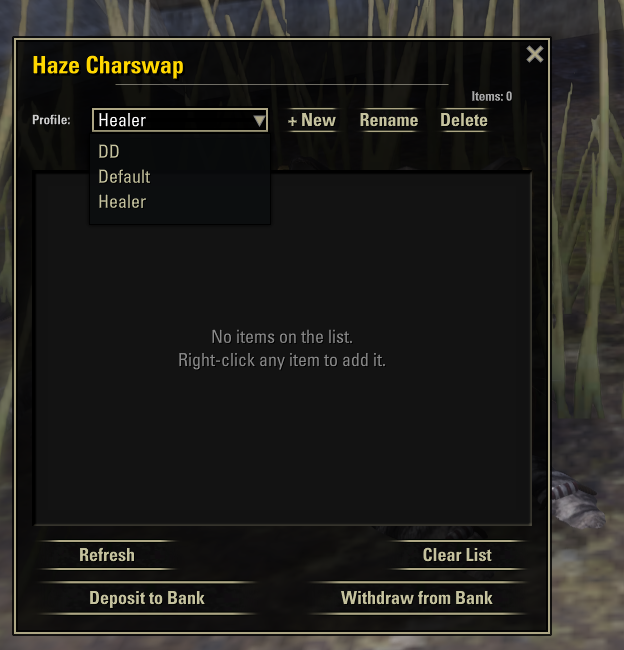
Haze Charswap
Lightweight item transfer assistant for character swaps since ppl dont have 4 copys of sets
Mark items via right-click, then move the whole list to or from the bank with a single click.
There are already excellent full-featured bank assistant addons out there that include this kind of functionality as part of a larger suite. Haze Charswap was built as a focused, standalone addon just the swap workflow, nothing else. After several requests from people who wanted exactly that without the rest, I decided to make it public.
★ Features
Right-click any item in your bag or bank to add it to the Charswap list (or remove it).
Deposit to Bank / Withdraw from Bank buttons move every item on the list at once when you’re at a banker.
Profiles keep separate lists for each role or use case (e.g. Tank, DD, Healer, Crafting). Profile names are fully customizable. Create, rename, delete, and switch profiles directly from the window.
Keybinds bind a hotkey to toggle the window, and optional hotkeys to cycle to the next/previous profile. Configure under Settings → Controls → Haze Charswap.
Live overview UI shows every item on the active profile and where it currently is: Bag, Bank, or Elsewhere (on another character). Items on other characters stay visible on the list so you don’t lose track of them.
ESO Plus aware uses both the regular bank and the subscriber bank automatically.
Stolen item handling stolen items are skipped by default (they can’t be banked); a setting allows marking them anyway.
Account-wide the list and profiles are shared across all your characters, which is the whole point.
► How to use
Right-click an item in your inventory → Charswap: Add to list.
Repeat for every item you want to swap between characters.
Visit a banker the Charswap window opens automatically (can be disabled).
Click Deposit to Bank to move everything to the bank, then log in with your other character and click Withdraw from Bank.
For different roles or characters, create separate profiles via the + New button so each setup has its own list.
⚙ Settings
Available under Settings → Addons → Haze Charswap:
Auto open window at bank
Show chat messages
Allow stolen items on list
Show item icons in list
Reset current profile
⚡ Dependencies
LibAddonMenu-2.0 (for the settings panel)
✉ Feedback and bug reports
If you run into any bugs or have suggestions for improvements, please either:
Leave a comment on ESOUI, or
Reach out on Discord: haze.3169
Both are checked regularly.







