
KelaPadUI Enhanced (2.8.0)
KelaPadUI Enhanced
KelaPadUI Enhanced is a maintained successor to the original KelaPadUI add-on.
It enhances the Elder Scrolls Online gamepad interface with extra item information, trading data, daily-progress tracking, and quick access to the screens you use most. It is designed for the gamepad UI and keeps the core controller layout intact.
Original add-on by @rkirgizov. Current maintenance by @slice_o’life.
Requirements
The Elder Scrolls Online gamepad UI (controller mode). LibSets (required). API version 101051.
Optional integrations are detected at runtime. Missing libraries only disable the features that use them.
Optional integrations
Tamriel Trade Centre (TTC): TTC price data in tooltips and trading screens. Arkadius Trade Tools (ATT): ATT sales data, guild statistics, and guild colors. LibCustomMenu: Player context-menu actions in chat and social lists. LibItemLink: Other-quality price comparison rows in trading tooltips. USPF: The Skill Points row on the dashboard. LibDebugLogger: Optional diagnostic logging. PersonalAssistant: Permanent-junk marking actions in the gamepad inventory.
The trading features need at least one of TTC or ATT. Either provider works alone, and both are used together when installed.
Installation
Close The Elder Scrolls Online. Delete the old KelaPadUI, KelaPadUIBuyingData, and KelaPadUIListingData folders from Documents/Elder Scrolls Online/live/AddOns/ if they exist. KelaPadUI Enhanced refuses to start while the original is installed, because both use the same settings file. Copy the KelaPadUIEnhanced folder into Documents/Elder Scrolls Online/live/AddOns/. Install LibSets and any optional add-ons you want to use. Start the game and enable the add-on from the Add-Ons menu. Use /reloadui after changing reload-gated settings.
Minion and ESOUI installations use the same folder layout.
Upgrading from the original KelaPadUI
Settings and trading history are preserved: the saved-variables file is still kpuiSavedVariables.
The add-on deliberately does not declare the removed kpuiSavedVariablesBuyingData and kpuiSavedVariablesListingData files, so buying and listing history recorded by the old companion add-ons is not imported.
Export anything you need from them before deleting those folders.
Features
Gamepad item and trading tooltips
Adds TTC price data and ATT sales data to gamepad tooltips. Works in the guild store, bank, vendors, and crafting stations. Shows deal ratings, price comparisons, quality rows, production rows, and crafting-component rows. Keeps TTC and ATT independent: each provider fills only the rows it supports, and unavailable data is shown as N/A. Adds a known-item filter and price-effect filter to guild-store searches while keeping the normal paginated results. Tracks buying, listing, and removal history, with retention cleanup on load. Adds ATT guild statistics and guild colors to trading tooltips.
Sets browser
Adds a dedicated gamepad sets browser to the main menu. Browses set bonuses and set pieces using LibSets data. Can be hidden from the main menu with its own setting.
Item set search
Search set names in gamepad Item Set Collections and the transmute station’s reconstruction screen. Search filters the existing categories and respects the game’s item filters. Use the Search Sets keybind to enter or clear a search and change the game’s locked-item and equipment filters. Changes apply immediately. The search is cleared when leaving the screen. The Additional gamepad filters setting enables these and future additional menu filters; changing it requires a reload.
Recipe filters
Use the Recipe Filters keybind at gamepad crafting stations to search recipe names and select color-coded qualities. Provisioning also supports CP 150-160, Unique Dishes (Delicacies), and other levels. Furnishing plans have separate filters. Multiple selections within a group match any selected option; leaving a group unchecked shows all. Ingredient, skill, and quest choices are also available in this menu. Filters set in the game’s separate Options menu still apply.
Achievement filters
Search achievement names and descriptions from the gamepad achievement category list or an individual category. Filter by earned/unearned, progress, or tracked achievement. Achievement selections last for the current UI session, including zone changes, but are not saved across logout or /reloadui. These filters use the same Additional gamepad filters setting and shortcut as the set and recipe filters.
Antiquities
Adds name, difficulty, lead, recovery, codex, and game progress filters to the gamepad antiquity journal under the Additional gamepad filters setting. Shows missing lead details, including where each lead can be found. Keeps the journal readable with the existing gamepad navigation.
Companion information
Shows companion level, rapport, and active-companion details when talking to a companion. Adds rapport stages and sources to the companion tooltip. Adds the passive perk and its description, level and XP, rapport progress and tier, and equipped gear with weight and trait to the gamepad Collections > Allies > Companions tooltip, so off-duty companions can be inspected. Slotted skills and the ultimate are recorded with the build but are not displayed for now. Companion builds are recorded while the companion is summoned and shared by all characters; rapport is recorded per character. Missing data is never invented, and cached rows are labeled as recorded while summoned.
Dungeon finder and pledges
Adds role, activity, and pledge details to the dungeon finder. Tracks Undaunted pledges for the current character and reset day. /pledges (or /pledge) prints the current pledge status in chat.
Chat tools
Adds Send Mail and Jump to Player actions to the player context menu when LibCustomMenu is installed. /keyboardmap opens the world map. /achievementsearch text opens Achievements with the search box filled. /linkachievement trial links your highest completed achievement for a trial. /linkachiev and /link are aliases.
Map rally point
Adds a gamepad keybind to the world map for setting or removing the group rally point at the map cursor. The keybind stays available while the map options are open.
Main-menu quick access
Adds a Quick Access submenu to the gamepad main menu, opened with the Options (tertiary) button. Uses the menu’s built-in Select and Back keybinds and adds no main-menu row. Shortcuts to the group finder, Rumours, Mail, antiquities, the Sticker Book, the Companions collection page, and your primary house. The Events section provides Tome Challenges, PVP Veterancy, and Golden Pursuit; unavailable seasonal activities are disabled.
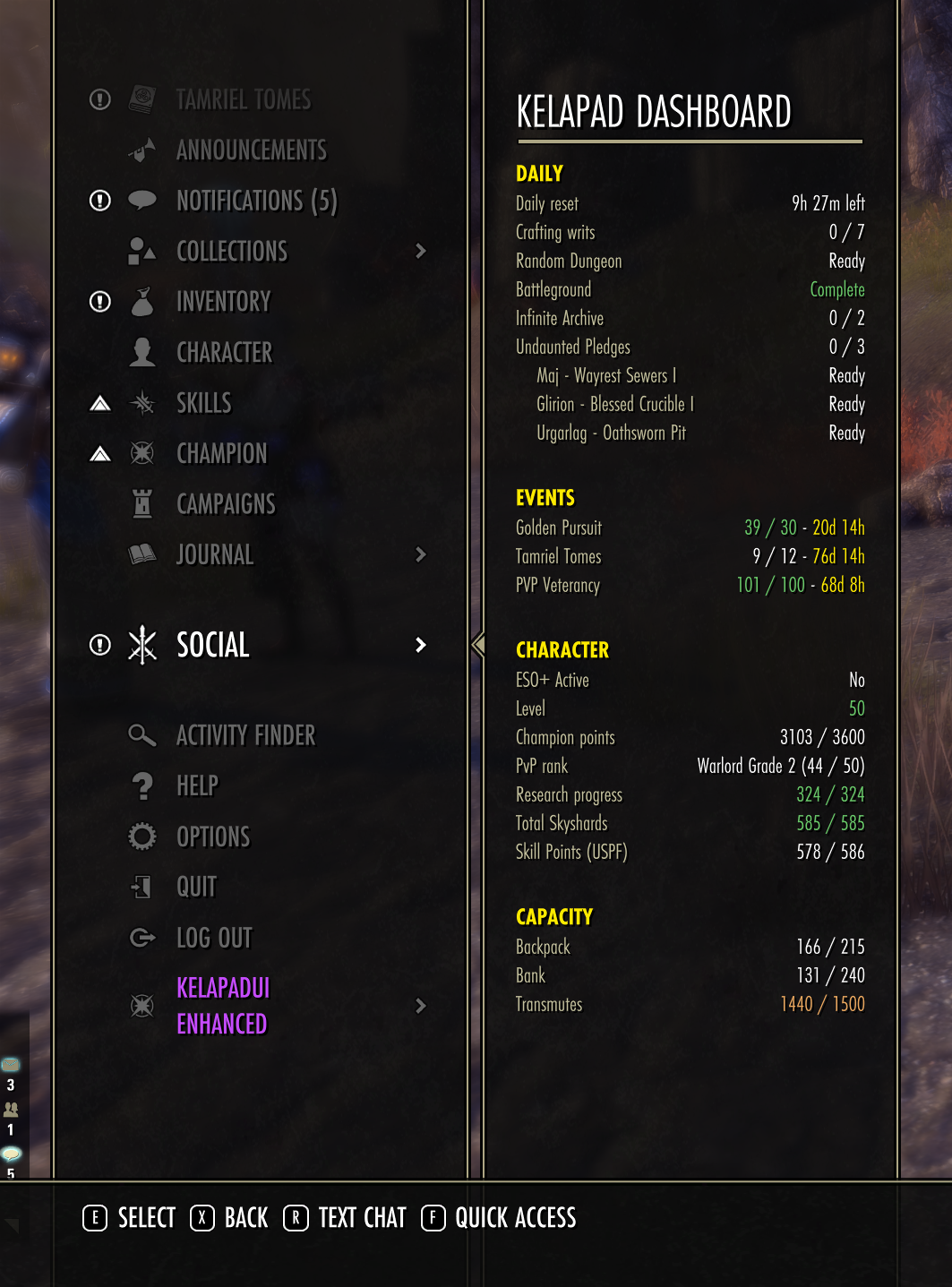
KELAPAD dashboard
A passive dashboard shown beside the gamepad main menu.
It is filled when the menu opens, so nothing is polled while it is hidden, and it scrolls with the right stick when the rows are taller than the panel. Countdowns keep ticking about once a minute while the panel stays open.
Daily
Daily reset countdown. Crafting writs. Random Dungeon and Battleground rewards. Infinite Archive progress. Undaunted pledges with per-pledge status.
Events
Golden Pursuit, Tamriel Tomes, and PVP Veterancy progress. Time left in each event or season. Additional active promotional campaigns published by the client.
Character
ESO Plus status. Level, Champion Points, and PvP rank. Research progress with the time to the next research completion. Skill points and skyshards.
Capacity
Backpack, bank, and transmute-crystal usage with warning colors.
Daily progress is tracked per character and survives /reloadui. The writ, archive, and pledge rows share one journal scan and clear after the daily reset.
The research row counts the same traits as the Trait Research browser, so both show the same researched / total figure.
Trait Research browser
Shows every crafting research trait against every research line, on one page, for any character on the server you are playing.
Left pane
The characters on the server you are playing, logged-in character first, with the research summary on two lines under each name. Any other character’s knowledge comes from LibCharacterKnowledge when it is installed; without it only the current character is listed.
Right pane
The whole matrix at once, split into weapon, armor, and jewelry sections because the game uses a separate trait set for each. The weapon and jewelry sections share the first row (jewelry against the right edge) and armor takes the second. Each section is named, and every group has a single-line heading with its researched / total count, such as Heavy Armor 24/63. All sections share one column width, so the weapon and armor columns line up vertically. Neighbouring groups are separated by a small gap.
Cell states
Green check: Researched. Yellow timer: Research in progress. Orange plus: An unlocked item for that trait exists. Red cross: There is no available item.
Item availability
Covers the backpack and bank for the current character, and the bank for the other characters on the server.
Active research
Appears below the matrix in four station columns, with each research line, trait, and countdown.
Use the right stick to scroll the right pane when its contents do not fit on screen.
PersonalAssistant junk integration
Adds Mark as Permanent Junk and Unmark as Permanent Junk to the gamepad inventory actions prompt when PersonalAssistant is installed. Enabled by default when PersonalAssistant is present.
PS5 button map
Replaces Xbox controller button icons with PlayStation 5 icons. Off by default; the setting applies without a reload.
Settings
All settings live in the KelaPadUI section of the gamepad settings menu. They are stored account-wide in kpuiSavedVariables.
Feature toggles for companion info, dungeon finder, chat tools, map rally, additional gamepad filters, antiquity lead details, main-menu quick access, the dashboard, PersonalAssistant junk marking, and the PS5 button map. Sets interface toggle. Trading master toggle, ATT analysis period, and per-surface tooltip toggles for the guild store, bank, vendors, and crafting stations. Guild statistics, ATT price information, listing rows, quality rows, production rows, and crafting-component rows.
Some settings require a reload to take effect; the settings screen shows a prompt when that is the case.
See docs/SETTINGS.md for the full setting list and IDs.
Commands
/pledges, /pledge – Show current Undaunted pledge status. /keyboardmap – Open the world map. /achievementsearch text – Open Achievements with a search. /linkachievement trial – Link the highest completed trial achievement. /linkachiev, /link – Aliases for /linkachievement.
Compatibility
Built for API 101051 and the gamepad UI. TTC-only, ATT-only, both, and neither are supported; trading features stay off without a provider. Optional libraries are guarded, so missing add-ons do not break loading. No automation, botting, or gameplay automation is included. All features are read-only information or UI shortcuts.
Documentation
docs/SETTINGS.md – Settings model, IDs, and how to add or retire a setting. docs/TRADING_HOUSE.md – Trading modules, history storage, and test checklist. docs/MAINTENANCE.md – Structure, load order, and update workflow. docs/DEVELOPMENT_NOTES.md – Conventions, invariants, and common pitfalls. docs/RELEASING.md – Packaging, GitHub Actions, and ESOUI upload. TODO.md – Deferred work and rated candidate enhancements. changelog.txt – Release history.
Credits
Original add-on: @rkirgizov. Current maintenance: @slice_o’life. LibSets and the optional libraries listed above are maintained by their respective authors. The Elder Scrolls Online is a trademark of ZeniMax Media Inc. This add-on is not created by, affiliated with, or sponsored by ZeniMax Media Inc.