
Lethal PvP Insights (1.9.71)
Lethal PVP Insights
Track kill statistics and top PvP builds, and choose who to share your data with
Lethal PVP Insights (LPI) is a PvP companion for Cyrodiil, Imperial City and Battlegrounds. It counts your killing blows and assists, displays kill feed leaderboards per faction, and records the skills, procs and sets that friendly and enemy players use. It also keeps a history of players you follow and of your group members, including their full gear and skill bars.
Optional: share your collected data with your faction, guild or friends list.
Check out esopvp.com for server-wide leaderboards, class statistics and top PvP builds.
Requirements
LibAddonMenu-2.0 – optional, for the settings panel (every setting also has a /pvpdi command)
LibChatMessage – optional
In-game Settings > Social > PvP Kill Feed turned on (the kill feed is the main source for kills and assists)
Windows OS, for the optional LPI Companion (gear & skill bar import, esopvp.com). Nothing to install: it uses Python 3 if installed, otherwise the PowerShell built into Windows
Installation
Unzip the LethalPVPInsights folder into DocumentsElder Scrolls OnlineliveAddOns (or use Minion).
Enable it in the AddOns menu and turn on the PvP kill feed (Settings > Social).
Open the window with /pvpdi or a key under Controls > Keybindings > Lethal PVP Insights.
Optional: double-click LPI COMPANION.bat in the addon folder once to start the Companion (it adds a shortcut with the LPI icon).
Features
Kills & Kill Feed
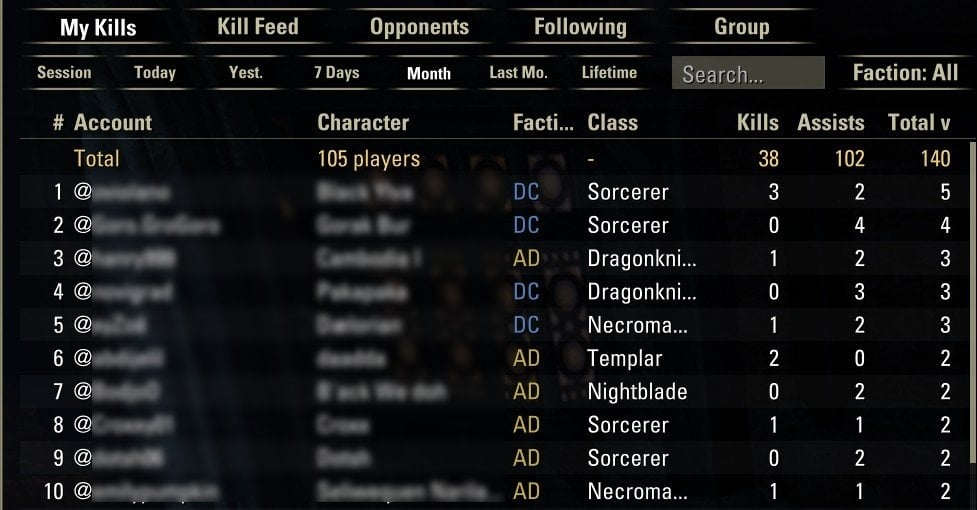
My Kills: your killing blows and assists per enemy @account and class, with a total row
Kill Feed: a leaderboard of every kill in the kill feed, filterable by faction (AD / EP / DC)
Periods: Session, Today, Yesterday, 7 Days, This Month, Last Month, Lifetime (days follow the game’s daily reset)
Opponents – what enemies hit you with
Every enemy player who recently attacked you, including faction, class, race, max health and mundus
Everything they hit you with, sorted by type: Weapon, Skill, Passive, Ultimate, Synergy, Proc Set, Monster Set, Mythic, Weapon Glyph, Poison, CP, Damage Effect
Per-day view, because builds change from one day to the next
Group history & full builds
The last 200 accounts you grouped with (PvP, PvE or both): class, race, CP, role, faction, health, mundus, buffs
Full gear and both skill bars for group members, imported from the game’s encounter log – the addon turns the log on only while needed and off again as soon as everyone is captured
Multiple setups per player (“Build 1/N”)
Following
Press Follow on any friendly player or opponent to keep a daily snapshot of their build until you unfollow them
Followed players never expire and don’t count toward the stored data limits
Share builds in chat
Select a player and press Link: a link goes into chat
Anyone with LPI can click it to see that build (class, race, CP, mundus, skill bars, gear)
Account name changes
When a character shows up under a new @account, the details show the player’s former name (“formerly @OldName”)
Real Death Recap (off by default, PvP areas only)
Pops up when you die: the top 5 damage sources of the fight
The last 10 hits before death with timing
LPI Companion (optional, Windows)
Imports gear and skill bars from Encounter.log – automatically or with one click on Upload in game
Turns the encounter log on only briefly to capture the data it needs, and deletes the log after each import
Optional upload to esopvp.com (see below) and download of data shared by other players (displayed in the addon with a blue +)
esopvp.com (optional)
Nothing leaves your PC unless you tick Upload my LPI data to esopvp.com in the Companion. When you do, you get:
Server-wide leaderboards, alliance and class statistics, and curated Top Builds
Your own data in the browser (register with the Identifier shown in the Companion)
Builds other players saw of your opponents and group members, merged into your addon
You decide who can see your group builds, followed players and friendly players (All, Your Faction, Guild Members, Friends or None) in Settings > Data sharing. You can stop uploading or delete your uploaded data at any time
Slash commands
/pvpdi – open / close the window
/pvpdi settings – settings panel
/pvpdi status – what is being recorded right now
/pvpdi recap – show the last Real Death Recap
/pvpdi link – put the selected build into chat
/pvpdi pvponly on|off – track only in PvP areas
/pvpdi notify on|off – chat message on kills and assists
/pvpdi groupscope pvp|pve|both – where group history is recorded
/pvpdi capture – turn the encounter log on manually
/pvpdi autolog auto|ask|never – automatic encounter log while grouped
/pvpdi import, /pvpdi deletelog, /pvpdi logpath – encounter log tools
/pvpdi killdays <1-60>, /pvpdi buffhours <1-168> – how long data is kept
/pvpdi skillreset – undo your right-click type choices
/pvpdi reset (session), /pvpdi cleargroup confirm, /pvpdi wipe confirm – clear data
FAQ
Why are my kills counted as assists?
Turn on the PvP kill feed (Settings > Social). Only kills the kill feed credits to you count as killing blows.
Why don’t I see a group member’s gear?
Addons can’t read other players’ gear directly; the game only writes it to the encounter log. Start the Companion, fight once while grouped, then click Upload in the import window and /reloadui.
Why do some skills have a * next to them?
They were seen as a buff on that player and may have come from another player (group heals, banners, Contingency…). Skills on the captured skill bars never have a *.
Does it work in PvE?
Kills, opponents and the Death Recap are PvP only. Group history can be recorded in PvE too (Settings > Group history).
This Add-on is not created by, affiliated with or sponsored by ZeniMax Media Inc. or its affiliates. The Elder Scrolls and related logos are registered trademarks or trademarks of ZeniMax Media Inc. in the United States and/or other countries. All rights reserved.