

Lights Out (1.00)
]LightsOut
LightsOut is a lightweight housing mini-game add-on that lets you turn your ESO home into a competitive battleground using interactive furnishings.
Players or teams compete by controlling the state of objects (on/off or multi-state), racing to achieve and maintain their assigned winning condition while others try to disrupt them.
Core Idea
Assign each team an interactable furnishing and define a winning state (for example, ON or OFF).
Teams then battle by toggling objects in the house to reach their win condition.
Other players can interfere at any time, making this a fast-paced, competitive experience.
Game Modes
Target
Select a number of items that count toward victory.
Only a random subset of each teams items are tracked the rest act as decoys.
First team to get all their tracked items into the correct state wins.
Threshold
All items count, but you only need a set number in the correct state to win.
Other teams can undo your progress at any time.
War
All teams compete over the same object, each claiming a different state.
The number of teams is limited by the number of states the item supports.
State changes only count after 5 seconds, preventing accidental wins while cycling states.
Timers & Overtime
Games can optionally include a timer:
When time expires, the team with the highest completion percentage wins
If tied, the game enters sudden death
First team to pull ahead wins
Without a timer, the game continues until a normal win condition is reached.
Creating Teams
Place an interactable item in your house
Set it to the desired winning state
Open the housing editor (default: F5)
Select the item
Run a command:
/lo add
/lo war add
Note: Items must be placed in a house because the add-on tracks placed furnishing IDs, not just item types.
Commands
/lo add – Add team (Target/Threshold)
/lo war add – Add team (War mode)
/lo start threshold X – Start threshold game
/lo start target X – Start target game
/lo start war – Start war game
/lo reset – Stop game and reset items
/lo window – Toggle status window
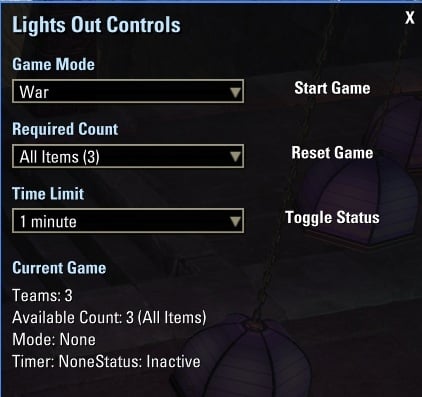
/lo controls – Open control panel
Features
Supports solo play, teams, or large group games
Works with any interactable furnishing
Dynamic item tracking and randomization
Control panel UI for managing games
Live status window showing progress
Visual winner effects and feedback
Notes
Leaving the house will end the active game with no winner
War mode supports only as many teams as the item has states
Other players can always interfere with your progress
Turn your house into a puzzle, a race, or total chaos your rules, your game.







