

Outfit Styles Favorites (1.0.0)
Outfit Styles Favorites
An Elder Scrolls Online addon that extends the Outfit Styles panel with a favorites system, letting you mark and filter styles you care about most.
Features
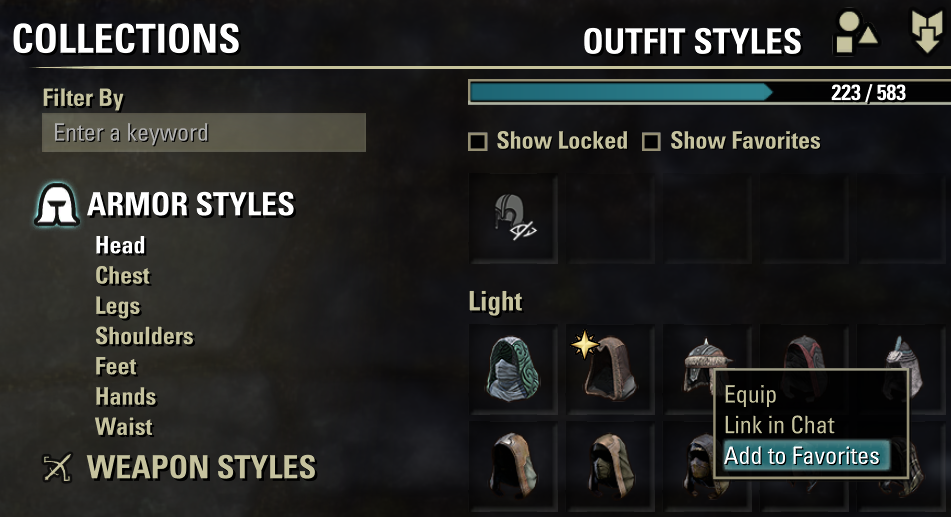
– Show Favorites checkbox placed on the same header row as “Show Locked”; filters the grid to favorited styles only
– Context menu right-click any style cell to add or remove it from favorites
– Gold-star badge favorited entries are marked with a star icon when the filter is off, so favorites are always visible at a glance
– Account-wide persistence favorites are stored per account (not per character), matching how outfit style unlocks work in ESO
Installation
1. Download the addon folder (`OutfitStylesFavorites`)
2. Place it in your ESO AddOns directory:
– Windows: DocumentsElder Scrolls OnlineliveAddOns
3. Launch ESO and enable the addon in the AddOns menu (character select or in-game)
Usage
1. Open the Outfit panel (default: “U” → Outfit tab or the Outfit Styles panel)
2. A Show Favorites checkbox appears on the header row next to “Show Locked”
3. Right-click any style cell and choose Add to Favorites or Remove from Favorites
4. Check Show Favorites to filter the grid to your favorited styles only
5. Uncheck it to return to the full list favorited styles will have a gold star badge
Localization
The addon ships with:
– English
– Russian
Github
https://github.com/timere-nemo/OutfitStylesFavorites







