

QuestArrow (0.2.1)
Created with AI assistance.
QuestArrow
A movable quest navigation arrow for The Elder Scrolls Online on PC. Follow your selected quest objective and get wayshrine suggestions when fast travel can shorten your journey, including travel to another zone when the necessary game data is available.
Features
Navigation button in the standard keyboard-mode quest journal.
Movable compass-style pointer with adjustable size and opacity.
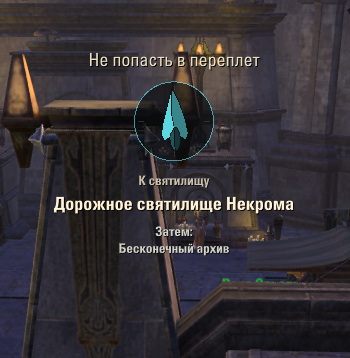
Gold pointer for quest objectives; turquoise pointer for departure wayshrines, with the suggested destination shown below.
Suggestions based on unlocked, usable travel nodes and available quest location data.
Settings saved separately for each character.
No external libraries required.
How to use
Open the quest journal, select a quest, and click Показывать путь (Show route). Close the journal to see the pointer. Click the same button again to stop navigation, or use /qa stop.
The add-on interface is currently in Russian. The included README has English and Russian instructions. In gamepad mode, focus a quest using the game’s quest tracking and enter /qa; the journal button is available in keyboard mode only.
Useful commands
/qa toggle navigation for the selected or focused quest.
/qa unlock and /qa lock move the pointer, then lock its position.
/qa scale 1.5 adjust pointer size.
/qa alpha 0.7 adjust opacity.
/qa next switch between available objectives within the quest.
/qa travel on or /qa travel off enable or disable wayshrine suggestions.
/qa reset restore default position, size and opacity.
/qa help show command help.
Please keep in mind
The arrow shows a straight-line direction; it does not calculate a path around obstacles or between floors. Quest locations depend on information supplied by the game: a marker may represent a search area or an intermediate passage. Cross-zone suggestions require destination data and usable, unlocked travel nodes. Regular wayshrine suggestions are disabled in PvP areas and dungeons. Displayed distance is a percentage of map height, not metres.
Movement, interaction and teleportation remain manual.
Installation
Close ESO and extract the QuestArrow folder into DocumentsElder Scrolls OnlineliveAddOns. The resulting manifest path should be AddOnsQuestArrowQuestArrow.txt. Enable the add-on in the game’s Add-Ons menu.
Author and feedback
Author: alabuzya
Questions, suggestions and bug reports: aabuziarov@gmail.com
For bug reports, please include the add-on version, quest name, zone, current quest step, /qa debug output and any Lua error message.
Русский
QuestArrow добавляет перемещаемую стрелку к выбранному заданию и предлагает дорожные святилища, если перенос может сократить путь. Поддерживается поиск назначения в другой зоне, когда игра предоставляет необходимые данные.
Выберите задание в стандартном журнале и нажмите Показывать путь, затем закройте журнал. Золотая стрелка ведёт к маркеру задания, бирюзовая к святилищу отправления;
подпись показывает, куда переместиться.
Перемещение и телепортацию игрок выполняет самостоятельно.
Команды
/qa unlock позволяет перетащить указатель,
/qa lock закрепляет его.
/qa stop выключает навигацию,
/qa help показывает команды.
В режиме геймпада используйте /qa для отслеживаемого задания.
Стрелка показывает направление по прямой и не строит маршрут в обход препятствий. Точность зависит от данных игры: целью может быть область поиска или промежуточный переход. Расстояние указано в процентах высоты карты, а не в метрах. Обычные рекомендации святилищ отключены в PvP и подземельях.
Интерфейс аддона на русском языке, README на русском и английском. Сторонние библиотеки не нужны. Аддон создан при помощи ИИ.
Автор: alabuzya. Вопросы и пожелания: aabuziarov@gmail.com. Для сообщения об ошибке приложите версию аддона, название задания, зону, текущий этап и вывод /qa debug.







