
Questbound – Quest Tracker & GPS (1.0.1)
https://i.postimg.cc/C5ThwPT2/questbound-banner-seal-2x.png
Questbound
Track it. Follow it. Finish it.
Quest tracker | Direction arrow | GPS on the surface | Travel, queue and PvP shortcuts
Optional: LibAddonMenu-2.0 (for the settings page)
Works with: AUI – Advanced UI (shows your route on its minimap)
I got tired of opening the map every few steps to see where a quest wanted me to go, following a marker to a door, and then being lost again on the other side. So I made Questbound. It’s a quest tracker that doesn’t just list your quests, it takes you there: an arrow at the top of your screen, GPS tracker on the surface that follow the streets, and one click away from the nearest wayshrine, the dungeon queue or your PvP campaign.
Who it’s for
Anyone who quests: new players who don’t know their way around yet, story players working through a zone, and people like me who have 20 quests open and just want to know “where do I go next?”. Pledges and dailies are covered too.
The quest tracker
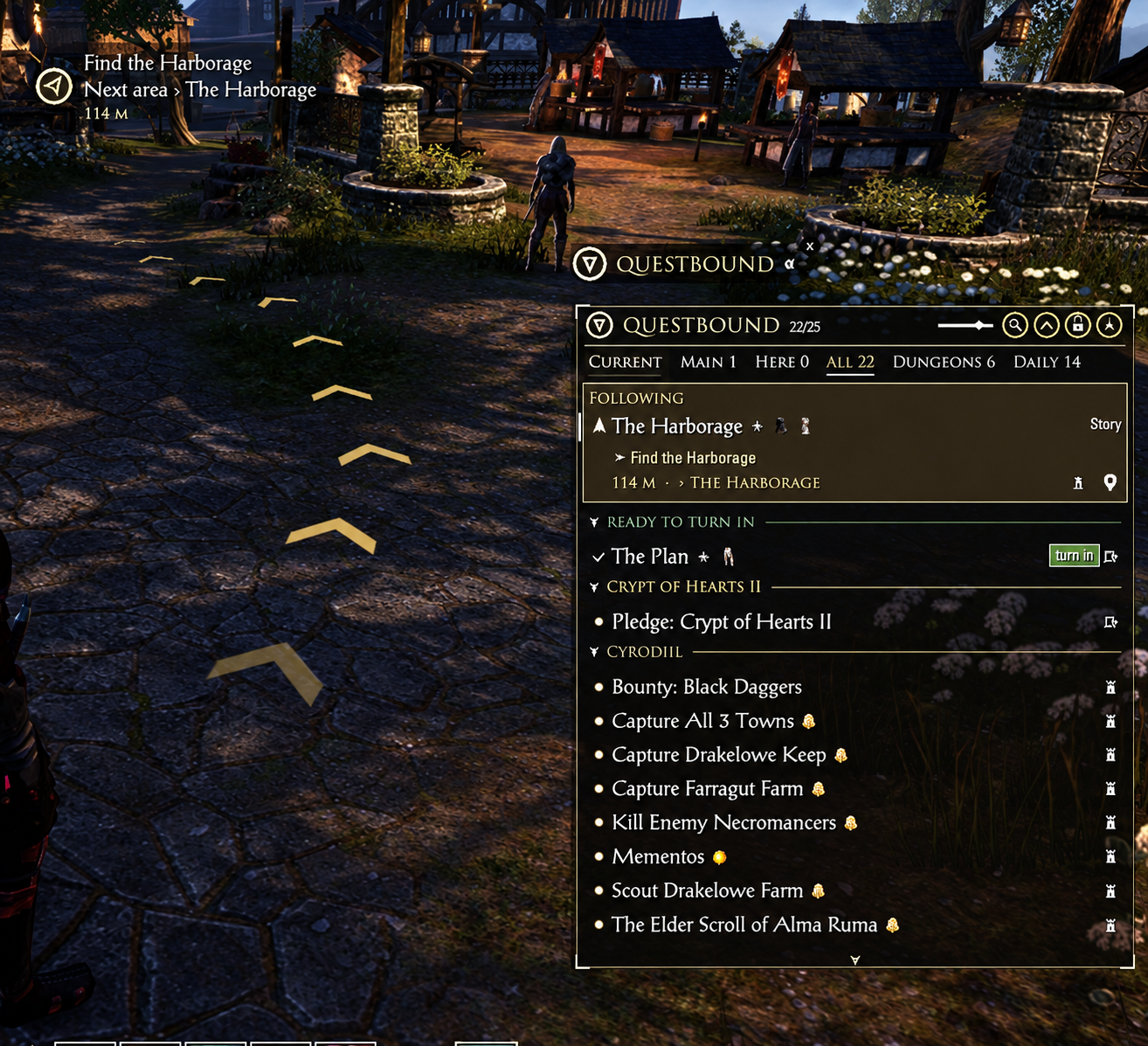
Tabs: Current, Main story, Here (this zone, nearest first), All, Dungeons and Daily
The quest you follow sits on top with its objectives, progress, distance and where the next area leads
Ready to turn in: finished quests get their own group, so you never forget to hand one in
Pin and hide: pin the quests you care about to the top, hide the ones you don’t (right-click)
Rewards at a glance: a small icon for quests that give a skill point or a good item, and a tooltip with all rewards
Search: type a few letters to find any quest or zone
One-click icons: travel to the wayshrine nearest the quest, queue for its dungeon, or join your Cyrodiil campaign
Right-click: follow, map marker, show on map, open in journal, share with group, abandon
Resize it from any edge, lock it, set the background opacity, pick a frame and text size
The navigator
A small golden arrow in a small hud at the top of your screen, with the objective and the distance
A turn signal on its rim when the objective is behind you, a soft glow when you’re heading the right way, and a green check when you arrive
Next area Orsinium: says where a door or road actually leads
Faster travel: when a wayshrine you know is much closer to the objective, it tells you. Click the text to travel, queue for the dungeon, or join your campaign
GPS
GPS tracker on the surface that lead you to the objective, clearest a few steps ahead of you
Learns the streets while you walk, so the next time it follows the roads, goes around walls, up the right stairs and through doors
Comes with some routes already learned, so it helps from the start
Rings on the spot when you get close, and green rings when you arrive
Markers in the world: a quest marker above the person you have to talk to, a red hunting area for monsters to kill, and a badge with the count next to your crosshair on quest monsters
With AUI, the route shows on its minimap too
Smart navigation
A quest you accept is followed right away (you can turn this off)
Your own map marker first, then the quest
Also finds steps the game only marks on the map, like many hand-ins
A short banner in the middle of the screen when an objective is done, with what’s next
Works with other addons
AUI – Advanced UI: the route shows on its minimap. AUI also has its own quest tracker under the minimap: Questbound hides it while its own tracker is shown (a chat message tells you once), and AUI’s minimap stays. Want AUI’s tracker back? Untick “Hide Advanced UI’s quest tracker” in Questbound’s settings. AUI’s own settings are never changed
Other quest trackers (CQuestTracker, Ravalox’ Quest Tracker…): they run fine next to it, you’ll just see two trackers. Hide one of them, or hide Questbound’s with its button
QuestArrow: works too, but you’ll have two arrows. Hide one of them (/qb text hides Questbound’s)
Map pin addons like Quest Map and Destinations: no conflicts
Questbound hides the game’s own quest tracker (you can turn that off in the settings)
How to open it
Click the Questbound button (right above the tracker) to show or hide the tracker, or type /qb (or /questbound). The little arrow on the button shrinks it to just the logo, and it hides itself during combat. Click the logo in the tracker’s header for the settings. /qb help lists all commands, and there are keybinds in Controls. /qb reset puts everything back in its place.
Good to know
The game tells addons nothing about roads or walls, so Questbound learns them as you walk. Where you haven’t been yet, the GPS points straight at the objective.
In the open world the game doesn’t give addons the exact spot of an NPC, so the marker can sit a meter or two beside them. Once you’ve had them under your crosshair it snaps onto them.
Made for the keyboard UI. Gamepad mode isn’t supported yet.
Learned streets and your settings are shared by all your characters, on NA and EU.
Available in English, German and French.
Requirements
LibAddonMenu-2.0 (optional) for the settings page
AUI – Advanced UI (optional) for the route on the minimap
Installation
Minion (easiest): search for Questbound, click Install, done. Minion keeps it up to date too.
Manual: open the .zip and drag the Questbound folder into DocumentsElder Scrolls OnlineliveAddOns. Then start the game and make sure Questbound is ticked under Add-Ons.
Credits
The look of the quest tracker was inspired by Ravalox’ Quest Tracker by Ravalox Darkshire (now kept alive by calia1120, Calamath, Demiknight and Lakashi), a classic that showed how good a quest tracker can be.
The idea of a quest arrow came from QuestArrow by alabuzya, thanks for the inspiration.
The route on the minimap is drawn on AUI by Sensi, and the way the GPS arrows lie flat on the surface I learned from LibCombatAlerts by code65536.
One of my biggest creations, made with the help of AI most of it is done by myself, I test every feature in-game and keep the addon updated myself.
There is a big chance you may experience bugs since its first release, so your feedback is important so I can keep improving this addon, found a bug, or a quest the navigation doesn’t find? Leave a comment (the lines /qb debug and /qb obj print help me a lot) and I’ll take a look. The addon keeps improving with each patch.
2026 brianmit. Free for personal use. Please don’t re-upload or share modified versions without asking me first.







