Quickslot Profiles (1.3.0)
Change Log:
——————–
1.3.0
first release on ESOUI
Description:
——————–
AI disclosure: Quickslot Profiles is developed with the help of AI (Claude by Anthropic). Every change is tested in game before release.
Requires: LibAddonMenu-2.0
Quickslot Profiles
Profiles for the quickslot wheel that load by themselves in the zone types you choose. Keep siege and repair kits on the wheel in Cyrodiil, potions and food in trials, and mementos in houses, without rebuilding the wheel every time.
Profiles and zone types
Each profile is a name, the 8 wheel slots and the zone types it loads in. A loading screen puts the profile of the zone type you’re in on the wheel:
Battlegrounds
Imperial City (and its sewers)
Cyrodiil (including its delves)
Infinite Archive
Arenas (Maelstrom, Dragonstar, Blackrose Prison, Vateshran Hollows)
Trials
Group dungeons
Houses
Delves and public dungeons (outside Cyrodiil)
Everything else (overland, and every zone type that no profile has)
A zone type belongs to one profile only. If no profile has “Everything else”, zone types without a profile leave the wheel as it is. A profile stores items, collectibles (assistants, companions, mementos…), emotes, quick chat and quest items.
Editing a profile
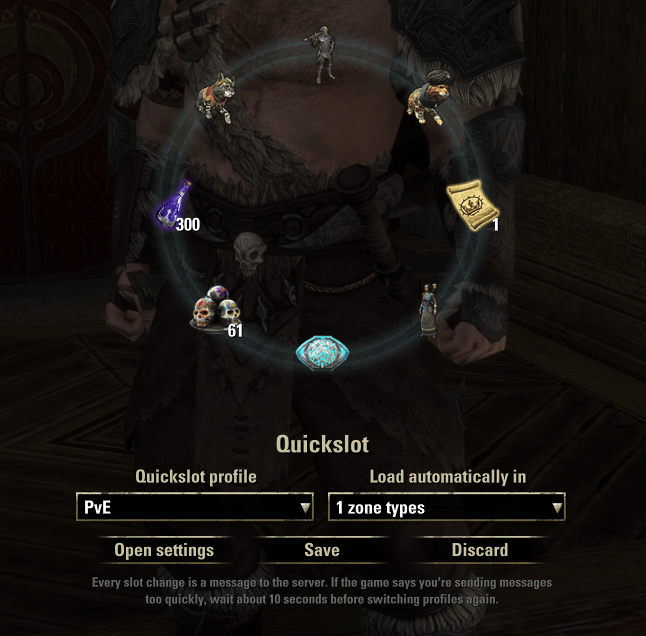
Profiles are edited in the game’s own quickslot menu, the inventory’s Quickslots tab, with the usual drag and drop. Under the wheel:
Quickslot profile: pick a profile and it goes on the wheel, exactly as saved.
Load automatically in: the zone types this profile loads in.
Open settings, Save and Discard. Save and Discard light up when the wheel differs from the profile.
Picking another profile or leaving the tab drops unsaved changes (the chat says so), or saves them if Save changes when leaving the quickslot menu is on. Then the profile of the…