

Skillbound – Skills & Build Presets (1.0.0)
https://i.postimg.cc/7Z1kgDpg/skillbound-logo-clear-2x.png
Skillbound
Save it. Wear it. Switch in one click.
Build presets | Gear, skills, food and more | Auto switching | Gear check
Optional: LibAddonMenu-2.0 (for the settings page)
I play a lot of different content on the same character, and every switch meant the same routine: swap the gear piece by piece, drag the skills onto both bars, fix my champion stars, eat the right food, and then find out in the first pull that I forgot a ring. So I made Skillbound. You save what you’re wearing as a build, and later you put the whole thing back on with one click. It finds the pieces in your bag, tells you when one is in the bank or on another character, and can even switch builds for you when you enter a trial or face a certain boss.
Who it’s for
Anyone with more than one setup: a trial build and an overland build, a PvP build, a tank set for when the group needs one. New players get a simple start (just “Save build” and “Wear”), and if you like to fine-tune, everything else is one right-click or one tab away.
Builds
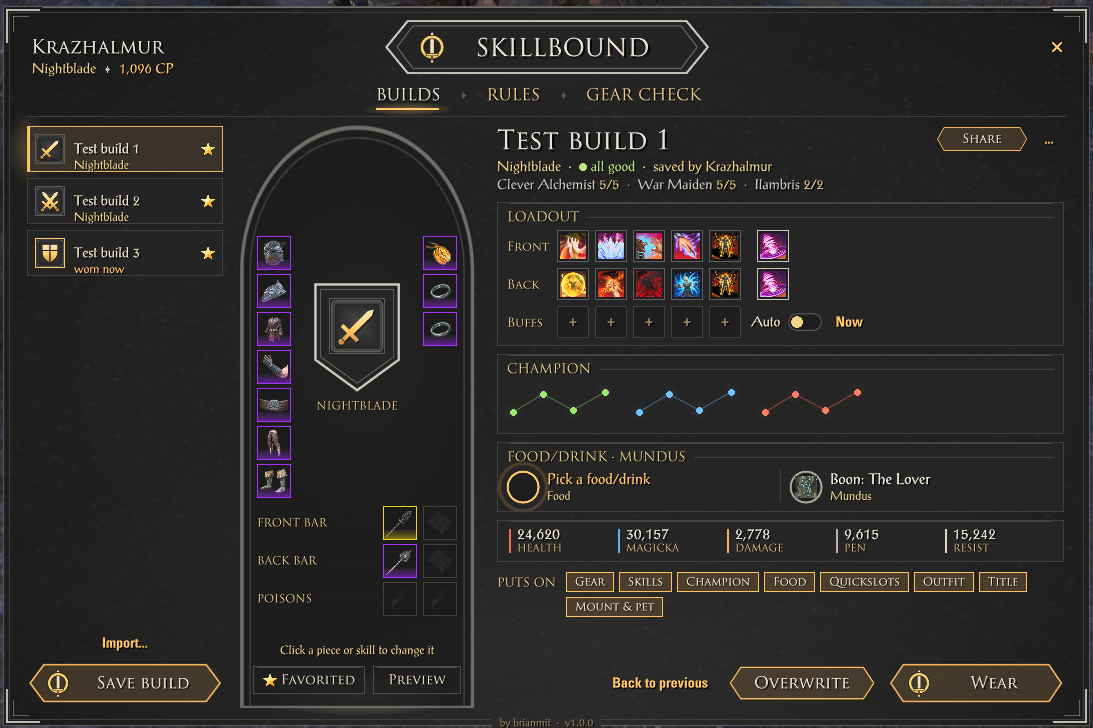
Save build: saves what you’re wearing right now. Give it a name, a picture, a note, and pick what it holds: gear, skills on both bars, champion stars, food or drink, quickslots, outfit, title, mount and pet, and your companion
Wear: puts it all on with one click. It asks first (you can turn that off), and an optional “what will change” list shows every change before anything happens
Waits for the right moment: if you’re in combat, it finishes when the fight is over
Finds your gear: the exact piece first, otherwise a copy of the same set and kind. It tells you when a piece is in the bank or on another character
Back to previous: changed your mind? One click puts back what you wore before
Edit it in the window: click a gear slot or a skill to pick another one, click the name to rename it
Preview on your character: see the build’s look on your character and spin it around
Compare two builds side by side (sets, bars, stats), and learn a build’s skills: it buys the skills and morphs you’re missing (it asks first and lists the points)
Layers: a build that only changes a few things, like just your champion stars or one bar
The Skillbound button
A small button with up to 10 favorite builds. Click one to wear it. Hover a favorite to see its notes
Fold it to 5 slots with the arrow at its end
Quick wheel: hold a key and pick a build with your mouse
Keybinds for each favorite, the window, the wheel, back to previous and more (Controls > Skillbound)
Rules: switch builds by themselves
“When I enter a trial, wear my trial build”. Also for group dungeons, Cyrodiil and Imperial City, battlegrounds, one zone, back out in the world, or a certain boss by name
Plan a trial or dungeon: one build for the trash and one for each boss. Bosses are added by themselves the first time you meet them there
Ask first per rule, and a “Rules on” switch to pause them all
The most specific rule wins: a boss before a zone, a zone before the rest of the world
Gear check
Shows the condition of your gear, your weapon charge, repair kits and soul gems at a glance
Repair and Recharge buttons, or let it happen on its own below a level you choose
For every build: ready, in the bank, on another character, or missing
At the bank: a Skillbound panel next to the bank takes a build’s gear out for you, and puts spare pieces away
A small mark on build gear in your bag and bank, so you don’t sell or deconstruct it by accident
Food, buffs and dungeons
Food and drinks per build: pick one, and it eats it for you in trials and dungeons when the buff runs out. It never eats over another food buff that’s still running
Ready check: a small card when you enter a dungeon or trial shows your food, potions, poisons, repair, charge and mundus at a glance
Prebuff: puts your buff skills on the bar for a moment so you can cast them, then puts your bar back
Share your builds
Link in chat: post a build in chat, and anyone with Skillbound can click it to import it
Share code: a short code to copy and paste, for Discord or a guide
Import from the Armory: turn your game Armory builds into Skillbound builds
How to open it
Click the logo on the Skillbound button, or type /sb (or /skillbound). Right-click the button for more options. Click the title plate at the top of the window for the settings. A short welcome tour shows you around the first time (/sb tour shows it again). /sb help lists all commands, and /sb reset puts every window back in its place.
Good to know
Addons can’t cast skills for you. Prebuff only puts the skills on your bar, you still press them.
Nothing changes during combat. A build you pick in a fight goes on as soon as it’s over.
“On another character” is known for characters you logged in with since installing Skillbound.
After installing or updating, restart the game once: new images only load on a full start, /reloadui isn’t enough.
Made for the keyboard UI. Gamepad mode isn’t supported yet.
Your builds and settings are shared by all your characters.
Available in English, German and French.
Requirements
LibAddonMenu-2.0 (optional) for the settings page
Installation
Minion (easiest): search for Skillbound, click Install, done. Minion keeps it up to date too.
Manual: open the .zip and drag the Skillbound folder into DocumentsElder Scrolls OnlineliveAddOns. Then start the game and make sure Skillbound is ticked under Add-Ons.
Credits
A lot of the inspiration came from the build addons I used for years. Wizard’s Wardrobe by ownedbynico, ghostbane, JN Slevin and STUDLETON gave me the idea of trial plans with a build per boss, and AlphaGear 2 by mesota (and the original AlphaGear by AlphaLemming) showed how handy a build bar with one-click buttons is. Thanks to all of you. The settings page is built with LibAddonMenu by sirinsidiator.
This was my personal addon, but I decided to share it too, made with the help of AI most of it is done by myself, I test every feature in game and keep the addon updated myself.
Found a bug, or a piece of gear it doesn’t find? Leave a comment (the line /sb errors prints helps me a lot) and I’ll take a look. The addon keeps improving with each patch.
2026 brianmit. Free for personal use. Please don’t re-upload or share modified versions without asking me first.







