

Stylich (1.0.0)
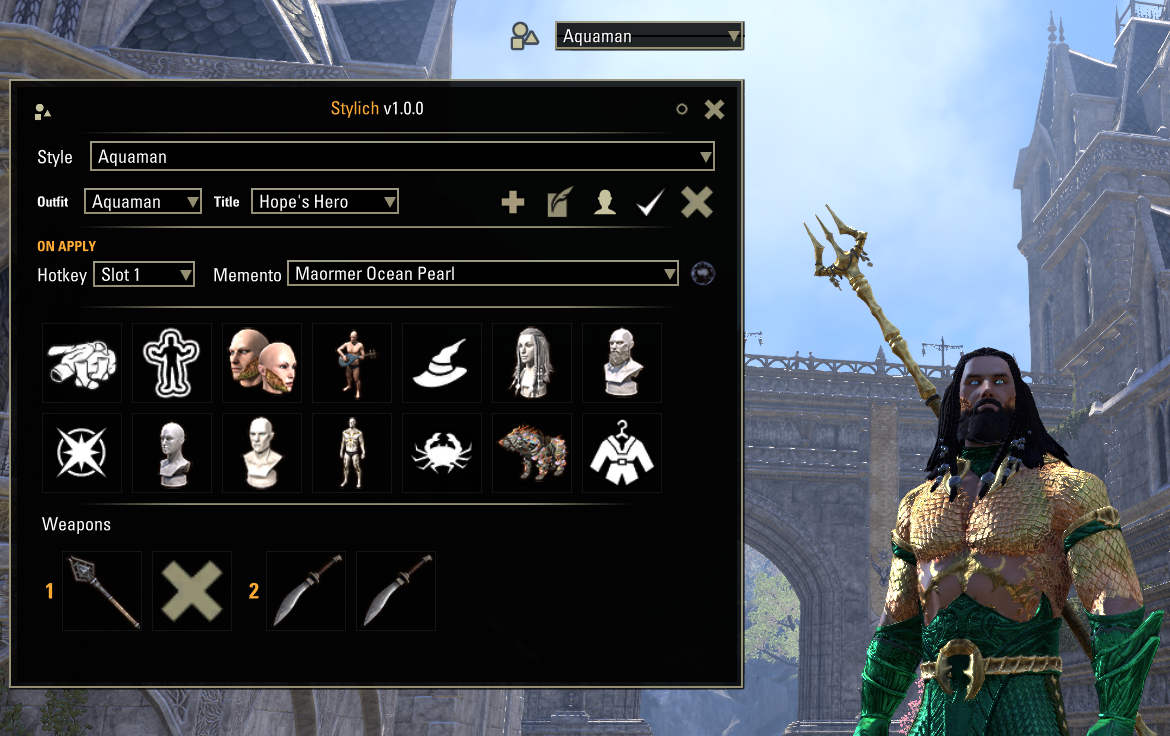
Stylich lets you save complete looks – appearance, weapons, title and outfit – and swap between them instantly, with a signature entrance memento that masks the transformation for a dramatic reveal.
AI disclosure: Stylich was built by the author with AI assistance for the coding. The concept, design and direction are the author’s, and every feature was tested and validated in-game.
Why Stylich?
I used to run AlphaStyle together with AlphaGear just to switch my look and my weapons at the same time – and on top of that, I would manually trigger a memento every time to create a little transition effect when I changed appearance.
Over time I kept noticing small adjustments I wished were there. So I sat down with the help of AI to improve all of it and finally get exactly what I wanted: one clean tool that swaps your whole look and your weapons, and plays the entrance memento for you automatically.
Then I figured – why not share it? So I made it multilingual (6 languages) so as many people as possible can enjoy it, and fully standalone (zero dependencies) to keep it light and smooth.
Features
Save & instantly apply complete styles: appearance, weapons (both bars), outfit and title
Drag weapons straight from your inventory onto a slot; right-click a slot to leave it empty (unequips)
Entrance memento played automatically on apply – the new look is revealed at the end of the animation
15 assignable hotkey slots + an open/close keybind
Movable floating widget (button + quick-switch dropdown) with a memento cooldown indicator
Options panel with confirmation dialogs
Localized in English, French, German, Spanish, Italian and Russian
How to use
Type /stylich (or click the floating widget) to open the window.
Set up your look in-game – costume, skin, hair, personality, etc.
Click New style, give it a name, then Update to capture your current appearance.
Weapons: drag a weapon from your inventory onto a weapon slot. Right-click a slot to leave it empty (that slot is unequipped when the style is applied).
Pick an Outfit, a Title and an Entrance memento from the dropdowns.
Assign a hotkey if you want to switch to this style with a single keypress (Controls > Keybindings).
Hit Apply – the memento plays, and your new look is revealed as it ends.
Tip: if the memento is still on cooldown, the style is held back so the reveal always lands.
Weapons & combat
Weapons are real items from your bags, so weapon changes only happen out of combat – applying a style mid-fight keeps your current weapons and notifies you. Each weapon can only be assigned to one slot at a time (a physical item can’t be equipped twice). Appearance, outfit and title still apply normally.
Options (cog wheel)
Open the options from the cog button. Available toggles:
Show floating button – the quick-access icon on screen.
Show quick-switch dropdown – the fast style selector next to the button.
Lock button position – prevents the floating widget from being dragged by accident.
Play entrance memento on apply – turn the reveal effect on or off globally.
The panel also includes a short built-in help section explaining how to create a style and how the entrance memento works.
Good to know
Styles are saved per character (they reference that character’s weapons, unlocked outfit and earned titles). Widget position and toggles are account-wide.
Dependencies
None. Stylich is fully standalone.
Credits
A modernized, largely rewritten continuation of the abandoned add-on AlphaStyle by mesota – full credit to the original author.
Memento activation pattern inspired by LovelyEmotes.
Floating movable button approach inspired by AlphaGear.







